Is Terraria Bad on Console? An Analytical Review
A rigorous, balanced assessment of Terraria on console, covering performance, UI, updates, crossplay, and who benefits most. Pixel Survival guides you through platform-specific pros, cons, and practical tips for optimizing your console experience.


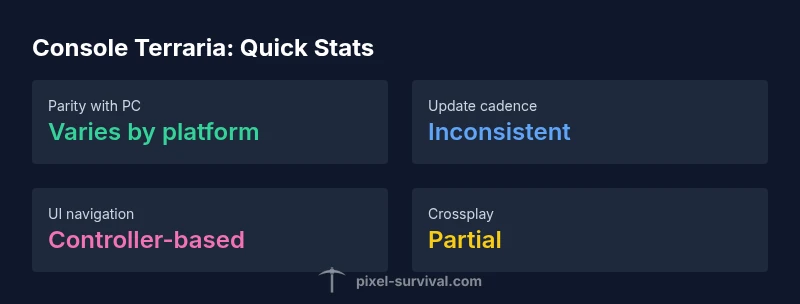
Is Terraria bad on console? Not inherently, but the console version carries platform-specific caveats. The core gameplay remains intact, and progression is familiar, yet performance variances, patch timing, and UI differences can affect the experience. According to Pixel Survival, how you feel about Terraria on console often depends on your console generation, your tolerance for input delays, and your expectations for parity with PC. In short, the game is solid on console, but it isn’t exactly the same experience as PC.
Is Terraria bad on console? A balanced framing
Is Terraria bad on console? The short answer is nuanced: the core adventure remains faithful to the PC version, but platform-specific realities shape the player experience. According to Pixel Survival, the console edition preserves the essential progression, biomes, and boss encounters, yet it carries trade-offs that PC players might not notice. For players evaluating where to invest time, this framing matters: you can expect the same world-building thrill, but with a few console-oriented quirks that influence pacing and accessibility. This article dives into those differences, with practical tips to make the most of Terraria on console regardless of whether you’re on Switch or Xbox. By understanding the strengths and limitations, you’ll approach progression with clear expectations and fewer frustrations.
Performance and frame rate realities on consoles
Performance is a frequent topic when discussing Terraria on console. While the game is designed to run smoothly, the reality is that different console generations and hardware configurations can cause variation in how frames render and how quickly chunks load. Pixel Survival’s analysis highlights that newer hardware tends to offer steadier performance, while older devices may exhibit occasional stutter during large builds or intense boss encounters. The takeaway is simple: expect a solid baseline experience, but don’t be surprised if you encounter brief hiccups during peak moments. This reality doesn’t erase the game’s charm; it just colors the moment-to-moment feel.
UI and controls: navigating a console-native experience
The user interface and control schemes on console differ from PC, influencing how players interact with inventories, menus, and wiring systems. Console players rely on controllers, which can slow item management compared with mouse-and-keyboard precision. Pixel Survival notes that while major UI components are present, some quality-of-life improvements from PC are either simplified or delayed on consoles. With practice, the layout becomes intuitive, and the reduced reliance on hotkeys can feel accessible to newcomers. The important part is to give yourself time to adapt—build muscle memory for menus, and you’ll accelerate through crafting and exploration.
Content parity and the cadence of updates across platforms
Update cadence often varies between PC and console versions, a reality that can affect content parity. Terraria’s core content—biomes, enemies, and tools—remains consistent, but the timing of new features and bug fixes can diverge. Pixel Survival’s observation emphasizes that console players still receive meaningful updates, but PC-specific enhancements may appear first. This discrepancy is not a betrayal; it’s a reflection of platform certification processes, certification windows, and the practicalities of testing on multiple hardware configurations. Players who value the latest PC features should plan for a short-term gap, while console players can still enjoy a rich, evolving game world.
World seeds, progression, and item availability on console
Seedable worlds and progression paths form the backbone of Terraria, and console versions maintain these core elements. The console edition often presents the same seed logic, item drops, and dungeon layouts, but there can be minor differences in loot tables or vendor stock timing due to platform-specific balance adjustments. Pixel Survival’s guidance suggests focusing on personal goals—whether you’re after certain biomes, contraptions, or boss strategies—and using seed seeds that maximize your preferred playstyle. This pragmatic approach helps you enjoy the game’s creativity without getting tripped up by platform quirks.
Console-specific issues and practical workarounds
Every platform has its own bumps in the road. On consoles, you might encounter longer loading times, occasional input latency, or menu navigation that isn’t as snappy as PC. The remedy is typically straightforward: ensure you’re on the latest official patch, keep your console firmware up to date, and consider in-game settings that optimize performance (for example, adjusting visual effects or draw distance where available). A calm, methodical approach to troubleshooting—checking network settings, clearing cache, and restarting the game—often resolves many common issues. Pixel Survival’s pragmatic tips favor reproducible steps over speculative fixes.
Multiplayer, crossplay, and social play on console
Terraria’s multiplayer layer shines on console when players connect with friends, whether locally or online. Crossplay is a reality for many console players, but certain features may scale differently across platforms. Pixel Survival highlights that networking stability and matchmaking quality can influence your group’s experience more than the single-player campaign. If you value consistent multiplayer sessions, prioritize stable internet, verify your friends’ platform compatibility, and choose servers or worlds with clear hosting guidelines. The social dimension remains a strong selling point for console Terraria, even amid platform-specific quirks.
Optimizing your console Terraria experience: a practical guide
A practical approach to optimizing your experience starts with planning your play sessions around the game’s strengths. Build in stages, set realistic goals, and use community seeds to explore interesting biomes without overwhelming the console’s processing capacity. Turn down nonessential visual features if you notice any hiccups during large builds, and allocate time for testing new updates in a safe, controlled environment. The core adventure remains deeply rewarding, and a thoughtful setup can maximize your enjoyment even when platform constraints appear. Pixel Survival’s framework for optimization emphasizes consistency, intentional play, and learning the rhythms of your specific hardware.
How to decide which console generation or edition suits you best
Choosing between console generations or editions hinges on your priorities: do you crave the latest features, or is a stable, familiar experience enough for your playthroughs? Evaluate the hardware you own, your willingness to wait for updates, and how important parity with PC is to your enjoyment. For many players, the best choice balances comfort, price, and access to friends playing on the same platform. Pixel Survival’s guidance cautions readers to consider the crossplay ecosystem, community resources, and personal comfort with console quirks when deciding between Switch, Xbox, or other console ecosystems. A structured decision process helps you avoid buyer’s remorse and aligns your purchase with your Terraria goals.
The Good
- Core Terraria experience preserved on console
- Wide console player base and couch-coop potential
- Active community and world-sharing culture
- Accessible for players new to PC controls
Negatives
- Performance variability across console generations
- UI/UX lags compared to PC mouse-and-keyboard
- Patch cadence can lag PC releases
- Some PC-only features and tweaks are delayed or absent
Solid core experience with platform caveats; best for couch co-op and players prioritizing the console ecosystem.
Terraria on console delivers the familiar adventure and progression, with patch cadence and UI differences that can affect the user experience. If you value social play and a sturdy, portable setup, it’s a strong pick; otherwise, PC remains the more parity-focused option.
Got Questions?
Is Terraria still updated on console at the same pace as PC?
Console updates still occur, but the cadence can differ from PC. Major features are typically released, though PC often leads with new content. Expect occasional delays.
Console updates happen, but PC gets new features first.
Can I play Terraria on console with players on PC?
Crossplay is available in many cases, enabling multiplayer across platforms. Always verify server settings and platform compatibility before launching.
Crossplay is possible, but check compatibility first.
Are there console-specific seeds or world options that differ from PC?
Seed logic generally carries over, but some seed-based features or loot rotation may differ slightly due to platform balance decisions.
Seeds work similarly, with some platform tweaks.
Does Terraria on console support mods the way PC does?
Console versions have more limited mod support compared to PC. Official modding remains platform-dependent and is typically less extensive.
Mods are more limited on console than PC.
Which console is best for Terraria, Switch or Xbox?
Both offer solid Terraria experiences, but Switch may appeal for portability, while Xbox provides broader online features and more powerful hardware. Consider your play style and friends’ platforms.
Switch is portable; Xbox has stronger online features.
What tips help optimize performance on console?
Keep the game and system updated, close background apps if possible, and adjust in-game settings to balance visuals and performance.
Update everything and tweak settings to suit your hardware.
Key Points
- Assess your console generation before buying
- Expect platform-specific UI differences
- Plan around update cadence and crossplay availability
- Leverage couch co-op for the best console experience
- Stay flexible with seeds and progression paths to maximize fun