Terraria World Difficulty: Can You Change It? A Practical Guide
Discover whether Terraria lets you change world difficulty, when to switch, and how it impacts enemies, loot, and progression. A comprehensive, step-by-step guide from Pixel Survival.


Terraria does not let you flip world difficulty on an existing world. To play at a different difficulty like Normal, Expert, or Master, you must start a new world and choose the target mode at creation. For experimentation, consider Journey Mode or a separate test world to compare progression. This approach keeps your original world intact while you explore new setups.
What 'terraria can you change world difficulty' means in Terraria
If you search for the phrase "terraria can you change world difficulty", you’ll typically find that the standard game design does not allow flipping the difficulty of an already created world. In Terraria, difficulty is baked into the world at creation time and is reflected in enemy health, loot, and boss behavior. The Pixel Survival team recognizes that players often want to experiment with tougher challenges without losing their current progress. The core idea behind this question is whether you can retrofit a world to a harder or easier setting after it’s been built. In practice, the safe answer is: plan ahead. If your goal is to compare experiences, use a fresh world or a dedicated testing environment. For players who crave trial-and-error learning, Journey Mode offers a sandbox-like avenue to adjust some rules for experimentation while preserving your primary save. In short, terraria can you change world difficulty is best managed by starting anew or using supported modes designed for learning and experimentation. The goal here at Pixel Survival is to provide clear, actionable steps so you can choose the path that fits your playstyle while preserving your existing adventures.
When you can actually change difficulty and how it affects your play
In Terraria, difficulty levels such as Normal, Expert, and Master are tied to the world at the moment you create it. You cannot toggle these settings mid-game in a single world on most platforms. If you want a tougher experience, you typically start a new world and select the desired difficulty during creation. Journey Mode, introduced in 1.4, provides another route to adjust certain gameplay rules on the fly for experimentation, without permanently altering your main world. This distinction matters because it means progression, loot tables, enemy stats, and spawn rates can feel dramatically different from one world to another. Pixel Survival’s experience shows that players who compare a Normal world with an Expert world often notice steeper boss fights and rarer loot in the higher difficulty, which can fundamentally change pacing and resource management.
Prerequisites and safety: backups and planning
Before you embark on any change in world difficulty, establish a plan and protect your existing progress. Create a reliable backup of your current save and store it in a separate location or cloud save if your platform supports it. Decide your objective: is this a learning exercise, a request from friends to try a harder mode, or a test of your build planning? Having a clear objective helps you evaluate whether starting a new world is worth the effort. The process is less about a single trick and more about deliberate planning, especially when you want to compare how your strategies adapt to different enemy setups, loot scarcity, and boss phases. In summary, guard your current world, outline your goals, and prepare to document the differences you observe between this new world and your baseline.
How difficulty affects gameplay: enemies, loot, and progression
Normal, Expert, and Master modes alter several gameplay dimensions. Enemies scale in health and damage, drops may be adjusted, and the overall risk-reward balance shifts. Boss behavior and phase timing can also feel noticeably different at higher difficulties. Loot tables can be more or less forgiving, influencing early gear choices and resource planning. The upshot is that progressing in Expert or Master mode often requires more careful exploration, better gear, and smarter routing through biomes and events. For players focused on progression pacing, this can mean longer sessions early on but faster growth later as you adapt to tougher encounters. Pixel Survival notes that understanding these shifts helps players set realistic milestones and avoid frustration when entering a higher-difficulty world.
Step-by-step options to switch difficulty: how to approach this safely
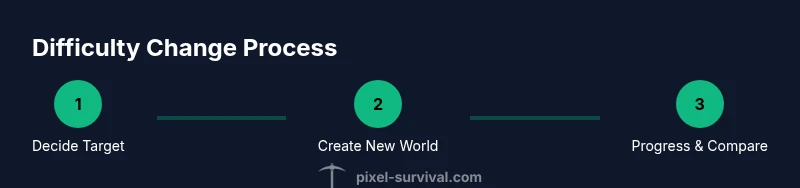
There are two primary paths you can take when you want to experience Terraria at a different difficulty: (1) create a brand-new world with the desired difficulty, or (2) use Journey Mode to adjust certain rules for experimentation. If you decide to start fresh, launch Terraria, select Create New World, choose Normal, Expert, or Master, and tailor world size and seed as desired. If you want a sandbox approach, enable Journey Mode and experiment with item availability, enemy spawns, and other settings to simulate tougher conditions without permanently changing an existing world. In either path, track your progress and note how resource drops, enemy behavior, and boss phases differ from your baseline. This structured approach yields meaningful comparisons and helps you build robust strategies across difficulties.
Journey Mode and other experimentation options: what to know
Journey Mode is designed for testing and learning. It allows you to adjust many gameplay parameters without altering the core rules of your primary world. This makes it an ideal environment to practice combat, test build strategies, and understand how changes in difficulty affect progression. While Journey Mode does not replace the challenge of an Expert or Master world, it provides a controlled way to observe the impact of different settings on loot, enemy spawns, and resource economy. For players who want to practice or learn without risking their main adventure, Journey Mode can be a valuable teaching tool and a bridge to understanding how difficulty shapes your Terraria journey.
Pixel Survival insights and community tips for changing difficulty
According to Pixel Survival, the optimal path for most players is to treat difficulty as a separate experiment rather than a direct alteration to an existing world. This keeps your original campaigns intact while you learn the mechanics of stronger enemies, tighter loot cycles, and longer boss fights in higher modes. The team also recommends documenting your observations and building a separate strategy for each world. In our experience, this approach preserves your long-term goals while enabling you to explore how different settings influence pacing and resource management. By embracing the idea that multiple worlds with distinct difficulties can coexist, you’ll gain a broader understanding of progression in Terraria and reduce the risk of losing progress when testing new setups.
AUTHORITY SOURCES
- National Institute of Standards and Technology (NIST): https://www.nist.gov
- Massachusetts Institute of Technology (MIT) OCW: https://ocw.mit.edu
- The New York Times: https://www.nytimes.com
Final thoughts and next steps for players exploring world difficulty
Understanding whether you can change world difficulty in Terraria starts with a clear plan and a willingness to experiment in a controlled way. You’ll typically create a new world for each difficulty mode, while Journey Mode offers a flexible testing ground for adjustments that mirror higher difficulty without committing your main save. Pixel Survival’s guidance emphasizes deliberate planning, backups, and a curiosity-driven approach to progression. As you experiment, keep a log of what changes in enemy behavior, loot cadence, and boss patterns, and use those notes to refine builds, routes, and farming strategies across different worlds.
Tools & Materials
- Terraria game installed(Platform-appropriate version (PC, console, or mobile). Ensure latest update.)
- Backup copy of existing world save(Store in a separate folder or cloud storage before testing.)
- Secondary world seed (optional)(Helpful for side-by-side testing of identical setups in different difficulties.)
- Stable internet connection (optional)(Useful for cloud saves and online guides.)
Steps
Estimated time: 30-60 minutes
- 1
Decide target difficulty and plan
Choose which difficulty you want to test (Normal, Expert, or Master) and define clear goals for the run (e.g., reach defeat of a specific boss, reach hardmode, or test loot drops). This upfront planning minimizes confusion later.
Tip: Write a one-sentence goal to revisit during play. - 2
Create a new world with the chosen difficulty
In the world creation screen, select the desired difficulty and set world size if your platform offers that option. Give the world a descriptive name to avoid mixing it with your main save.
Tip: Name clearly and separate from your main world to prevent cross-save confusion. - 3
Launch and begin fresh progression
Start the new world with basic gear and a plan for early progression. Focus on essential resources, safe zones, and NPC housing to establish a solid start.
Tip: Document early encounters and resource gaps to compare with your main world later. - 4
Document differences and track progress
As you play, take notes on enemy difficulty, loot quality, and boss behavior. Compare these notes with your original world to identify what changes the new difficulty brings.
Tip: Keep a small table of differences for quick reference. - 5
Decide on next steps and preserve results
If you enjoyed the new setup, continue with the new world. If not, revert to your original world and adjust your strategy in smaller experiments or revisit Journey Mode settings.
Tip: Back up both worlds again if you plan further experimentation.
Got Questions?
Can you change difficulty in an existing Terraria world?
No. To play at a different difficulty, you must start a new world and select the desired mode at creation.
You can't switch difficulty in an existing world; you need a new world to do that.
What are Normal, Expert, and Master modes used for?
Normal is standard, Expert increases enemy health and damage with better loot scale, and Master raises difficulty even further for seasoned players.
Normal is standard, Expert means tougher enemies and better loot, Master is the hardest option.
What is Journey Mode and how does it relate to difficulty?
Journey Mode lets you adjust certain gameplay rules and spawns for experimentation without changing your core world difficulty.
Journey Mode lets you tweak rules for testing new setups.
Can I transfer progress between worlds when changing difficulty?
Progress transfer between worlds is not standard; treat each world as separate and manage items and saves individually.
Items don’t automatically move between worlds; keep them separate.
How should I decide whether to switch worlds?
Consider whether the new difficulty aligns with your goals and whether you’re ready for tougher enemies and rarer loot.
Ask yourself if you’re ready for a tougher challenge.
Watch Video
Key Points
- Plan your target difficulty before creating a new world
- You cannot switch difficulty in an existing world
- Use Journey Mode to safely experiment with rules
- Back up saves before changing worlds
- Start a new world to experience different progression