Terraria for 3DS: A Practical Starter Guide
Learn to start Terraria for 3DS with practical, step-by-step guidance. This beginner’s guide covers controls, progression, crafting, and handheld optimization for a confident start on the Nintendo 3DS.


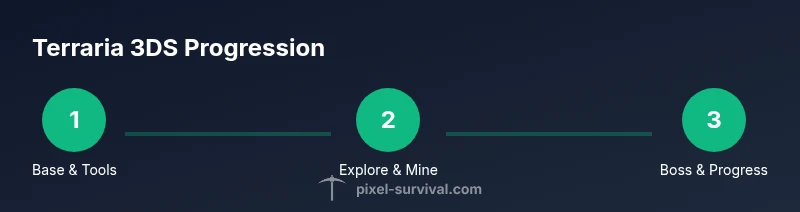
Terraria for 3DS starts with creating a new world, choosing a seed, and building a safe shelter. Gather wood, stone, and torches, then craft basic tools and weapons to survive rocky caverns. This guide shows setup, progression, and practical tips for handheld play, so you can advance through the early game confidently.
Terraria on 3DS: Platform realities
Terraria for 3DS is a portable adaptation of the sandbox game designed to fit the handheld format. You'll notice the two screens, with inventory and map glimpses on the bottom touchscreen, making quick management easier during exploration. The 3DS version keeps the same core progression as PC and console editions, but includes control schemes and UI tweaks that suit button navigation and a smaller screen. When you begin, your first goal is to establish a safe base, gather basic resources, and unlock crafting tables. The limitation of the tiny screen means you’ll rely on quick hotkeys and the resume-save behavior to avoid losing progress. The map is smaller, but the world still offers biomes, caverns, and treasure chests to discover. Several quality-of-life improvements for portable play include simplified item stacking, a compact toolbar, and touch-friendly interactions on the bottom screen. Pixel Survival's analysis notes that players who adapt to the handheld workflow tend to progress more consistently, because you can pause exploration to manage resources without losing momentum. The key is pacing your exploration with short play sessions that fit a bus ride or waiting room. In short, terraria for 3ds offers a faithful core experience with handheld refinements.
Controls and User Interface on the 3DS
On the 3DS, you’ll rely on a mix of the Circle Pad or D-pad for movement, the face buttons for actions, and the touch screen for quick inventory management and map checks. The bottom screen becomes your quick-access bar, which helps you switch weapons and tools without pausing your exploration. Familiar crafting menus translate to button-driven navigation, with hotkeys mapped to reduce clutter. You’ll learn to toggle lights, open chests, and place blocks using a combination of taps and button presses. Clear on-screen prompts reduce confusion when switching between mining, crafting, and combat. For players transitioning from PC or console, expect some UI rearrangements that favor rapid access rather than full mouse precision. Pixel Survival’s guidance emphasizes practicing basic controls in a safe zone before delving into caves, so your fingers adapt to the rhythm of handheld play. With time, you’ll build muscle memory for fast weapon swaps, quick torches placement, and efficient inventory management—all essential for longer sessions on the road.
World structure and progression limits on 3DS
The 3DS version maintains the core Terraria world structure: a procedurally generated world with biomes, caverns, and a day-night cycle. Seed selection still matters for terrain, loot spawns, and mineral distribution, but the handheld platform can influence how you approach exploration due to screen size and quick-swap mechanics. Progression follows the same general path—acquire wood and stone, craft basic tools, build a shelter, enter caves, and prepare for early bosses like the Eye of Cthulhu in pre-hardmode. Because the screen is smaller, you’ll often optimize routes: choose nearby caves, mark landmarks with torches, and keep a compact base that’s easy to defend. The key is balancing exploration with safe retreats to craft gear and stock supplies. Pixel Survival analysis indicates that players who map their routes and set small, repeatable goals per session tend to advance faster on portable devices, even when world generation remains consistent with other editions.
Crafting, inventory, and storage on the go
Crafting in Terraria for 3DS mirrors the core system but adapts to handheld input. Gather woods, ores, and bars, then craft tools at the appropriate workbenches. Your inventory is organized for quick swaps, with a focus on stacking and compact storage. When you find chests, prioritize labeling and arranging items by utility—building blocks, torches, tools, and weapons—so you don’t waste time searching during tense moments. Since the 3DS version emphasizes mobility, you’ll often carry a small, essential toolkit: a wooden sword for early combat, basic armor, a few torches, and a pickaxe for mining. A reliable strategy is to create a starter base with a small storage room, which saves time while you stockpile resources. Pixel Survival recommends keeping a running tally of resources across play sessions to minimize backtracking and wasted trips.
Early game: shelter, resource gathering, and safety
Your first hours in terraria for 3ds should focus on securing a safe shelter and gathering essential resources. Start by collecting wood from trees, then harvest stone and clay to craft stronger tools and a basic furnace. Build a small, secure house with walls and a door to deter enemies at night, and place torches to illuminate the area. As you mine, keep an eye out for surface caves that lead to mineral veins; copper and tin ores are common early finds, enabling you to craft better tools and armor. Craft a few basic weapons to defend against roaming foes, and establish a dedicated storage system for your growing inventory. The 3DS version rewards methodical exploration, so set short-term goals—e.g., “clear the nearby cave” or “collect ten torches”—to maintain momentum in tight play sessions. This approach minimizes risk when you’re multitasking on a handheld device and helps you transition into more ambitious ventures later in pre-hardmode.
Resource farming and base building strategies
Efficient farming in terraria for 3ds means targeting resource-rich zones while staying close to your base. Create a small tree farm to guarantee a steady supply of wood, and establish dedicated ore mining corridors near the surface to minimize long spelunking trips. Expand your base with simple apartments that offer safe storage and quick access to crafting benches. Consider lighting, door placement, and defensive walls to deter night invasions. Farming also includes steady cultivation of herbs and plants for basic potions and sustainability. Pixel Survival highlights the importance of organization: keep a dedicated chest for raw materials, another for refined resources, and a separate one for crafted items and gear. With a stable resource loop, you’ll progress more reliably, upgrade your equipment, and farm essential materials without feeling overwhelmed by a sprawling world.
Boss progression and recommended routes on 3DS
Eye of Cthulhu is typically the first major boss encounter for many Terraria players, including those on the 3DS edition. Before attempting a boss, ensure you have a modest armor set, at least a copper or tin weapon, and a decent stockpile of healing items and torches. Clear nearby caves to gather resources and craft stronger gear that improves your odds in the fight. After defeating the first boss, you’ll enter hardmode transitions and unlock additional resources and challenges. On the 3DS, you’ll refine your routes to fit portable play: pre-plan battles around daylight windows, locate safe arenas, and use supportive terrain to minimize risk. Pixel Survival’s guidance emphasizes preparation and pacing—don’t rush boss encounters; instead, grow your arsenal gradually and learn each foe’s attack patterns for a more reliable progression curve on 3DS.
Performance tips and 3DS optimization
To maximize performance on terraria for 3ds, drop unnecessary on-screen effects during exploration, reduce brightness slightly to extend battery life, and close other running applications if supported by your hardware. Maintain a lightweight inventory, favor stacking, and avoid clutter that can slow input response. When exploring, save frequently and use a consistent map-marking system to avoid losing your bearings in a compact screen environment. If the game feels laggy in busy biomes, focus on smaller, more manageable areas with less visual clutter and fewer enemies on screen. Pixel Survival notes that disciplined session planning—quarter-hour exploration blocks with scheduled crafting slack—helps players stay efficient and engaged when playing on a handheld console.
Common mistakes and how to fix them
New players on the 3DS often overextend into dangerous caverns without basic gear, mismanage inventory, or neglect shelter security. A frequent fix is to establish a quick base first, with a door and torches, before deeper exploration. Always carry a ready supply of torches, a basic weapon, and healing items to prevent sudden setbacks. If you find yourself running low on resources, retreat to the base to organize and restock rather than pushing forward with a weak loadout. Also, don’t underestimate the value of keeping your map open and marking significant landmarks; this keeps you oriented in a compact 3DS play space. By adopting a cautious, planned approach, you’ll steadily improve your survival odds and progress further into the game.
Tools & Materials
- Nintendo 3DS system(Original hardware or compatible family; ensure firmware is up to date.)
- Terraria for 3DS game(Digital or cartridge version; ensure the cartridge is clean and functioning.)
- microSD card with space(At least 4–8 GB for saves and patches; back up saves regularly.)
- Charger and power supply(Keep the system charged during long play sessions.)
- Stylus or finger for touchscreen(Helpful for precise touch interactions on the bottom screen.)
Steps
Estimated time: 2-3 hours
- 1
Create a new world and character
Launch Terraria for 3DS and start a new world. Choose a seed if available and name your world. Create your character with the basic skin options and ready yourself for exploration.
Tip: Set a simple save routine and place a quick beacon near your starting spot to guide you back from early caves. - 2
Gather basic resources
Punch trees to collect wood, then mine stone and clay. Gather torches for lighting and soft armor materials if available. Use the basic tools you craft to speed resource collection.
Tip: Keep a small stockpile of wood and stone; you’ll reuse these for shelters and basic gear frequently. - 3
Build a starter shelter
Construct a small, secure shelter with a door, walls, and a few torches. This protects you from night enemies and gives you a safe place to store early loot and craft benches.
Tip: Place torches on the ceiling to maximize visibility without crowding the floor space. - 4
Craft essential tools
Upgrade from wood to metal tools as soon as you can craft them. Craft a pickaxe, a sword, and basic armor if resources permit. This improves your mining efficiency and combat readiness.
Tip: Prioritize tools that unlock new resource tiers (like metal ore) to accelerate progression. - 5
Explore caves responsibly
Delve into nearby caves with a stack of torches and healing items. Map your route with torches to avoid getting lost and return to base safely when your inventory fills.
Tip: Don’t overextend; retreat to base to craft better gear before venturing deeper. - 6
Prepare for the first boss
Upgrade armor and weapons, stock healing items, and craft a simple arena for the first boss encounter. Ensure you have a safe retreat path and a plan for quick healing.
Tip: Practice avoiding boss attacks in a small space to increase survivability. - 7
Defeat the first boss
Face the Eye of Cthulhu or equivalent early boss, depending on world settings. Learn its patterns, exploit terrain, and retreat when needed to regroup.
Tip: Always have a quick escape route and a backup healing item ready. - 8
Expand your base and gear
Increase your shelter’s size to accommodate storage and crafting benches. Craft better weapons and armor as ore becomes available and expand your mining operations.
Tip: Organize loot by category to minimize time spent searching during play.
Got Questions?
Is Terraria for 3DS different from PC or console versions?
The core gameplay is the same, but the 3DS version uses handheld-optimized controls and a touchscreen UI. Some quality-of-life features are tailored for portability. Progression and biomes remain similar, with platform-specific tweaks for input.
The 3DS version keeps the core game, but with handheld-friendly controls and screen layouts. It’s the same progression at heart, just adapted for portable play.
Can I play multiplayer on the 3DS version?
Yes, Terraria on 3DS supports local multiplayer with nearby devices. Online multiplayer is not always available in every update, so check the current version’s features before starting.
You can play locally with friends on 3DS; online options depend on the game version and region.
What are the main limitations of the 3DS version?
The smaller screen and button-centric input can slow inventory management and exploration compared to PC. The world is the same in essence, but some UI and quality-of-life features are adjusted for handheld use.
Smaller screen and handheld controls make inventory management a bit slower than on PC, but the core game remains the same.
How should I start a new world on 3DS?
Begin with a compact base near a safe entrance. Gather wood and stone, craft basic tools, and build a tiny shelter before exploring deeper caverns. Plan your resource routes to avoid backtracking.
Start small, build a shelter, gather basics, and map your resource routes to stay efficient.
Are there 3DS-specific tips for boss fights?
Use the environment to your advantage and ensure a quick escape path. Stock healing items and upgrades; practice attack patterns in a controlled arena before the actual fight.
Create a simple arena, stock heals, and learn boss patterns for safer execution.
Watch Video
Key Points
- Start with a safe base and essential tools.
- Master handheld controls for efficient play.
- Plan boss progression with prepared gear and arenas.
- Organize resources to minimize backtracking.
- Adapt strategies to the 3DS screen and battery life.