Terraria on PC: Legit Ways to Play in 2026
A piracy-free guide to playing Terraria on PC in 2026. Learn official buying options, how to spot discounts, safe download practices, and setup tips from Pixel Survival for a smooth start.


This guide helps you legally access Terraria on PC without piracy by outlining official buying options, discounts, and legitimate trial paths. Note: Terraria does not offer an official free download; you can buy on Steam or GOG, or access PC Game Pass where available, or redeem promotions. This overview also notes safe sources and what to expect after installation.
What 'terraria on pc free download' really means
The phrase often signals a search for zero-cost access, but there is no official, legitimate free download of Terraria for PC from the game’s publishers. As Pixel Survival notes, players should distinguish between piracy risks and legal routes. This article focuses on safe, licensed ways to play and grow in the Terraria universe on PC. You’ll learn why buying through official stores matters for access to updates, cloud saves, and cross-platform compatibility. By choosing legitimate sources, you also protect your computer from malware and avoid potential bans on multiplayer servers. Remember: the right path respects the developers, the platform, and your own gaming experience. If you’re new to Terraria on PC, this guide helps you navigate stores, sales, and setup with confidence, while keeping your progress safe and transferable across updates.
Why a legal path is worth it
Terraria on PC benefits from official support, timely patches, and a robust community ecosystem. Legal access means you receive the latest content, access to cloud saves where supported, and a clear channel to report issues. It also ensures your account remains secure and free from the risk of malware that often accompanies illicit download sites. Pixel Survival’s analysis highlights that players who buy through recognized stores frequently report smoother onboarding and fewer compatibility problems when stepping into multiplayer sessions or world-sharing features.
The core message from Pixel Survival
The Pixel Survival team emphasizes that piracy undermines the game’s long-term development and the players’ own experience. While fans hope for a free entry, the game’s ongoing updates, balance changes, and cross-platform features rely on legitimate purchases to sustain ongoing development and community events. This article will map out the best legal paths to obtain Terraria on PC, including where to look for discounts and how to verify a legitimate copy. It also covers practical post-purchase steps to ensure you’re set up for success from day one.
Tools & Materials
- PC with Windows 10/11 (64-bit recommended)(Ensure your PC meets basic performance needs and has enough disk space for the game and updates.)
- Stable internet connection(Required for initial download, updates, and multiplayer access.)
- Steam or GOG account (or Microsoft Store)(You will need a legitimate account to purchase and download Terraria.)
- Payment method(Have a valid method on file for checkout (credit card, PayPal, etc.).)
- Web browser(Helpful for checking store pages, promotions, and official announcements.)
- Backup storage option(External drive or cloud storage to back up saves and world files.)
Steps
Estimated time: 15-30 minutes
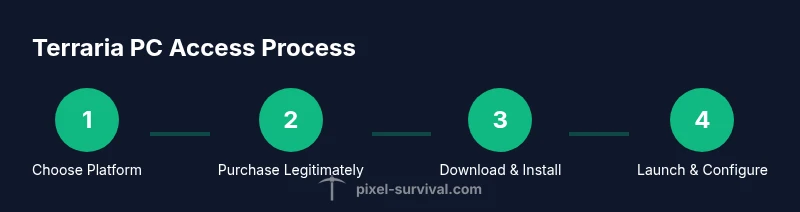
- 1
Choose a legitimate platform
Decide whether you’ll buy Terraria on Steam, GOG, or Microsoft Store. Each platform may have different bundles, regional pricing, and sale timing. This clarity helps you compare total cost and download convenience.
Tip: Check both Steam and GOG pages for the best bundle or sale price before purchasing. - 2
Create or sign in to your platform account
If you don’t already have an account on your chosen store, create one and enable two-factor authentication for security. If you already have an account, verify your email and review security settings.
Tip: Enable two-factor authentication to reduce the risk of account compromise. - 3
Purchase Terraria through the official store
Add Terraria to your cart and complete the checkout using your preferred payment method. Look out for seasonal discounts and bundles that include related content or other games.
Tip: Watch for seasonal sales and consider adding to your wishlist to get notified about price drops. - 4
Download and install the game
Launch the store client, start the download, and install Terraria on your PC. Ensure you have enough disk space and a stable connection for the duration of the download.
Tip: Pause other large downloads to maximize speed during installation. - 5
Launch, configure, and start a world
Open Terraria, adjust display settings (resolution, fullscreen vs windowed), and begin a new world or load an existing one. If you’re new, start with a standard world to learn the basics.
Tip: Enable cloud saves if your platform supports it, so progress is preserved across devices.
Got Questions?
Is there a free official download of Terraria for PC?
No; Terraria is distributed through official stores and promotions, not as a free, official download. Always obtain through legitimate channels.
No; Terraria for PC isn’t officially free. Use legitimate stores and watch for promotions.
Where can I legally buy Terraria for PC?
Terraria can be purchased on Steam, GOG, or the Microsoft Store. Check for bundled deals or sales to maximize value.
Terraria is sold on Steam, GOG, and the Microsoft Store; look for bundles or sales.
Does Terraria have a free demo for PC?
Official free demos are not common. Always verify options on the publisher’s page and reputable stores before downloading.
Official demos are rare; verify options on reputable stores before downloading.
Can I play Terraria offline on PC after installation?
Yes, Terraria can be played offline once installed and launched, though some features and updates require internet access.
You can play offline after installation, but updates may require internet.
Is Terraria cross-platform between PC and other systems?
Terraria supports cross-platform play with certain platforms via updated versions, but availability varies by platform and edition. Check the official store pages for current cross-play details.
Cross-platform play is available with some platforms; check current details on the store pages.
What should I do if the game won’t install from Steam or GOG?
First verify your internet connection, ensure you have enough disk space, and try restarting the platform client. If problems persist, consult the platform’s support resources.
Check your connection, space, and restart the client; contact platform support if needed.
Watch Video
Key Points
- Purchase Terraria only from official stores.
- Look for legitimate discounts and bundles.
- Protect your account with strong security practices.
- Back up saves before major updates.
- Explore world-building and progression safely with official content.