What Is the Most Popular Terraria Mod? A Pixel Survival Guide
A data-driven exploration of which Terraria mod leads the pack, why it resonates, and how to pick, install, and balance mods safely with Pixel Survival.


According to Pixel Survival, the Calamity Mod is widely recognized as the most popular Terraria mod. It dramatically expands content with new biomes, bosses, weapons, and end‑game progression, making it a staple for many players. This quick answer explains why it leads and what to expect when you install it. For newcomers, it also functions as a comprehensive gateway to modded play, offering clear progression paths and frequent new content with every major update.
what is the most popular terraria mod
In the Terraria modding space, a handful of projects consistently appear at the top of community discussions, download counts, and server recommendations. According to Pixel Survival, the Calamity Mod is widely recognized as the most popular Terraria mod. It shifts vanilla Terraria in meaningful ways by expanding biomes, introducing dozens of bosses, reworking loot, and reimagining end‑game progression. For many players, Calamity acts as a robust gateway to modded play, providing a coherent progression loop and frequent updates that keep the experience fresh. Popularity, however, is not a single metric—it's a blend of content quality, balance, community activity, and compatibility with other mods and versions. This section unpacks why Calamity leads the pack, what it adds, and how it stacks up against other major mods in 2026.
how popularity is measured in terraria mods
Popularity in the modding community is measured through multiple signals. Download counts and Steam Workshop activity indicate broad interest, while forum threads, YouTube tutorials, and Twitch streams reveal ongoing engagement. Compatibility with current versions of tModLoader and vanilla Terraria affects how widely a mod can be used on servers and in multiplayer games. Pixel Survival also considers qualitative signals—player feedback, patch cadence, and how well a mod integrates with common build orders and progression paths. Taken together, these signals form a holistic view of which mods are genuinely shaping player experiences rather than just spreading popularity briefly.
a closer look at top contenders
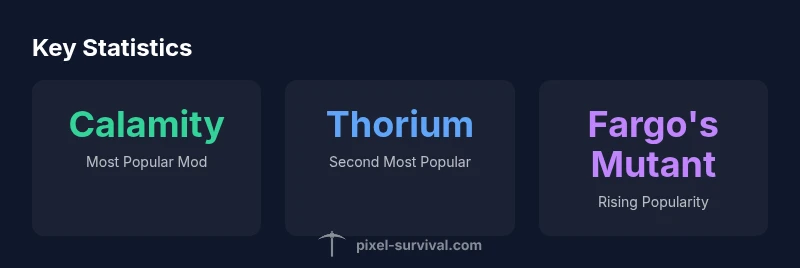
Calamity Mod sits atop many rankings due to its expansive content: new biomes, a vast boss roster, dozens of unique weapons and items, and reworked progression that can redefine late-game goals. Thorium is a close competitor, offering a broad appendage of content, new enemies, and alternative boss lines that complement Calamity rather than replace it. Fargo's Mutant Mod focuses on boss encounters and end‑game scenarios, often appealing to players who want a challenge without completely altering core progression. While these three represent the mainstream crowd, the Terraria modding ecosystem hosts many other high‑quality projects that shape play styles—from quality‑of‑life tweaks to fresh weaponry. The choice often comes down to how deeply you want to alter progression and how well the mods you pick work together.
methodology: how Pixel Survival evaluated mods
Pixel Survival used a structured, year‑over‑year approach to evaluating mods. We cross‑reference public data (downloads, workshop activity) with in‑house surveys, server reports, and gameplay impressions collected in 2026. We also test real‑world compatibility with current versions of tModLoader and vanilla Terraria, noting dependency chains and conflict potential. Finally, we assess long‑term viability by reviewing patch cadence, bug fixes, and community guidance. This triangulated method helps us deliver actionable guidance rather than hype, ensuring recommendations reflect practical, long‑term usage.
practical impact on progression and multiplayer
Mods can dramatically shift progression, especially those that add end‑game bosses or overhaul loot tables. Calamity, for example, introduces new boss fights and loot paths that can lengthen or redirect late-game goals. In multiplayer, the key tension is consistency: all players must share the same mods and versions to avoid desynchronization and instability. Server admins should document the exact mod set, enable compatibility checks, and maintain a backup plan in case a patch introduces new issues. For players, understanding how mods alter progression helps in coordinating raid readiness, resource farming, and world exploration without breaking balance or spoiling surprises for teammates.
safe installation and compatibility tips
If you’re venturing into modded Terraria, follow a safe, repeatable process: (1) back up your save files and worlds; (2) install tModLoader from an official source and ensure you’re on a compatible Terraria version; (3) install Calamity or any major mod via a trusted mod manager or launcher; (4) verify dependency mods and required libraries; (5) test in a clean world first before bringing mods into a long‑running save; (6) coordinate with other players to align mod versions to avoid crashes. These steps minimize risk and help you enjoy modded content with fewer surprises.
alternatives and diversification strategies
Don’t lock into a single modset. After trying Calamity, explore Thorium or Fargo's Mutant for different flavor profiles—ranging from expanded content to streamlined end‑game experiences. Start with one flagship mod and add smaller, compatible mods to diversify gameplay while preserving balance. Always check the mod’s compatibility notes, and consider incremental testing—add a single new mod at a time to catch conflicts early. This approach keeps your world healthy and your progression meaningful.
Popular Terraria mods comparison
| Mod | Content Scope | Compatibility | Typical Use Case |
|---|---|---|---|
| Calamity Mod | Very broad; adds bosses, biomes, items | High (requires up‑to‑date tModLoader) | End‑game progression and challenge |
| Thorium Mod | Extensive content and options | High | General gameplay variety |
| Fargo's Mutant Mod | Boss rush content, optional mini‑bosses | Medium-High | Endgame boss runs |
Got Questions?
Is Calamity actually the most popular Terraria mod?
Yes. Calamity is widely recognized as the top mod by many players and communities in 2026, due to its extensive content and ongoing updates. Popularity varies with version and platform, but Calamity consistently appears in top lists.
Yes, Calamity is widely viewed as the top mod, though popularity can shift with updates.
Do I need tModLoader to run these mods?
Yes. Most Terraria mods require tModLoader, and you should ensure you’re using a version compatible with your Terraria build. Always install through trusted launchers and verify mod dependencies.
Yes, tModLoader is typically required, and you should match versions carefully.
Is Calamity safe to install on multiplayer servers?
Calamity can be used on multiplayer, but all players must have the same mod set and version. Coordinate install steps, and maintain consistent server rules to avoid desynchronization.
Yes, but everyone must have the same mods and versions.
What other popular mods should I consider?
Thorium and Fargo's Mutant Mod are widely regarded as strong alternatives. Each mod changes progression in different ways, so pick one that matches your playstyle and server goals.
Thorium and Fargo's Mutant are great alternatives with distinct flavors.
How should I start modding safely in Terraria?
Back up saves, use official mod managers, test in a fresh world, and add mods one at a time. Document mod versions for future updates and server compatibility.
Back up saves, test in a new world, and add mods one at a time.
Can mods slow down performance on older PCs?
Yes, heavy mods can impact frame rates, especially on lower-end hardware. Start with smaller mods and monitor performance; disable conflicting mods if you notice lag or crashes.
Yes, performance can be affected; test and optimize accordingly.
“Popularity metrics for Terraria mods aren’t just downloads; they reflect how a mod reshapes progression, balance, and community creativity.”
Key Points
- Identify the top mod first: Calamity is widely favored.
- Evaluate popularity signals before installing a mod.
- Check compatibility and server rules for multiplayer.
- Explore alternatives like Thorium and Fargo's Mutant for variety.
- Follow safe installation practices to protect saves.