How to Tell if You Are in Hardmode Terraria
A practical, step-by-step guide to determine whether your Terraria world has entered hardmode, covering boss progression, ore indicators, and multiplayer considerations.


By the end of this guide, you’ll know exactly how to tell if your Terraria world is in hardmode. You’ll learn the core triggers (world-wide progression post-Wall of Flesh), visible ore changes, and enemy shifts to confirm status in singleplayer or multiplayer. This quick answer is followed by a deeper, step-by-step breakdown.
What hardmode means in Terraria
In Terraria, hardmode is the global state your world enters after a major milestone: defeating The Wall of Flesh in the Underworld. Once activated, every character in that world shares the same status—items, enemies, biomes, and loot shift in meaningful ways. You’ll encounter tougher obstacles, new ore types, and a broader roster of bosses. Pixel Survival notes that hardmode is a world-wide progression change, not a single-player flag, so your friends in the same world experience it together. This knowledge helps you plan gear, farming routes, and boss schedules with confidence. The moment you confirm hardmode, you adjust your strategy toward late-game materials and rapid progression. If you’re unsure whether you’ve crossed this threshold, continue through the sections below to verify through multiple, complementary signals.
brandMentions
Tools & Materials
- Terraria game access(Any platform (PC, console, mobile) running version that supports hardmode (1.4+).)
- Active world session (singleplayer or multiplayer)(Ensure you’re loaded into your world to check progression indicators.)
- In-game knowledge/reference(A quick familiarity with hardmode signs or a trusted wiki can help, but isn’t strictly required.)
Steps
Estimated time: 15-25 minutes
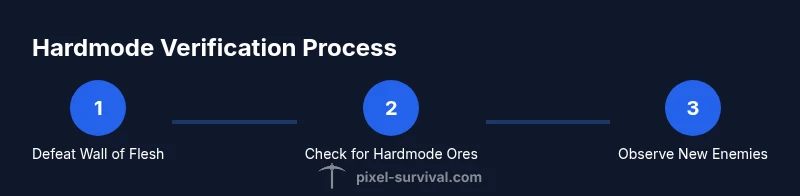
- 1
Confirm the Wall of Flesh is defeated
Open your world and review your boss progression. If The Wall of Flesh has already been defeated in the Underworld, your world is in hardmode. If you’re unsure, check your progression logs or memory of recent boss fights. This is the clearest, world-wide trigger.
Tip: If you’re unsure, ask a friend who played the same world; the status is global, not tied to a single character. - 2
Scan for hardmode ores in the world
Explore cave systems and look for hardmode ore bands such as cobalt/palladium and mythril/orichalcum. The appearance of these ores signifies hardmode, while pre-hardmode ores dominate before the trigger. If you don’t see hardmode ores, you may still be in the pre-hardmode phase or your world is not yet transitioned.
Tip: Bring a decent pickaxe and a torch-lit route; avoid deep mining in low-yield zones to prevent wasted time. - 3
Observe the enemy and biome shifts
Hardmode introduces tougher enemies and changes in biome dynamics. You’ll encounter new hazards and stronger versions of early-game pests. If you suddenly face hardened variants in regular biomes, you’re likely in hardmode.
Tip: Pay attention to new enemy variants appearing after you enter deeper biome regions—these are often the first in-hardmode indicators. - 4
Check the first tier of hardmode gameplay milestones
Beyond ore and enemies, hardmode unlocks additional gear and progression paths. If you can craft or obtain mid-to-late hardmode gear via standard drops, you’re in hardmode. This is a practical sanity check when you’re between major bosses.
Tip: Compare your current gear with standard hardmode progression benchmarks to gauge relative stage. - 5
Consider multiplayer context
In multiplayer, hardmode is a per-world state. If the host world is hardmode, all players share that status. If you’re playing with friends, verify with the host and ensure everyone is aligned on world state.
Tip: If a friend is not seeing the expected hardmode changes, rejoin or confirm you’re on the same world version to prevent discrepancies. - 6
Use a quick cross-check checklist
Create a simple checklist: Wall of Flesh defeated, hardmode ores present, new enemies appearing, and mid-hardmode gear craftable. If all points are true, you’re in hardmode.
Tip: Keep this checklist handy during sessions to avoid second-guessing your progression.
Got Questions?
What triggers hardmode in Terraria?
Hardmode is activated world-wide after you defeat The Wall of Flesh in the Underworld. This switch changes resource availability, enemies, and progression for all players in that world.
Hardmode starts when you beat Wall of Flesh in your world. This affects everyone playing in that world.
Is hardmode global to the world or per character?
Hardmode is a per-world state. Once activated, all characters in that world share the hardmode status.
Hardmode is global to the world, not tied to any individual character.
Can hardmode be turned off or undone?
There is no in-game way to revert hardmode in a given world. The usual approach is to start a new world if you want a pre-hardmode experience.
You can't turn hardmode off in a world; you’d need to start a new world for a fresh, pre-hardmode run.
How does multiplayer affect hardmode checking?
In multiplayer, hardmode is still world-based. The host’s world state determines what all players experience. If the host has entered hardmode, everyone in that world shares it.
In co-op games, the host’s hardmode status governs all players in that world.
What changes besides new ores indicate hardmode?
Hardmode also enables new bosses (like mechanical bosses in many worlds) and adjusts drop rates and loot pools, making late-game progression feasible.
Look for mechanical bosses and new loot pools as clear hardmode signs.
Do all worlds enter hardmode at the same time?
No. Each world transitions to hardmode independently when its own Wall of Flesh is defeated.
Each world gets hardmode when that world defeats Wall of Flesh.
Watch Video
Key Points
- Identify hardmode by global world state, not per-character
- Look for hardmode ore and tougher enemies as reliable signals
- In multiplayer, confirm with the host to synchronize progression
- Use a simple XYZ checklist for quick verification
- Plan gear and routes once hardmode is confirmed