Is Terraria Harder on Mobile? A Comprehensive Comparison
Explore whether Terraria is harder on mobile versus desktop, with a rigorous, data-informed look at controls, UI, performance, and progression to help players choose the best platform.


Is Terraria harder on mobile? In short, the core challenge is the same, but mobile players often encounter a higher perceived difficulty due to touch controls, compact UI, and device variability. This comparison separates platform realities from perception, highlighting where mobile can feel tougher and where it remains fully viable. For decision-making, see the detailed table and tips below.
Is Terraria harder on mobile? A practical framework
The question is frequently asked by players transitioning from PC or console to mobile. While the core game mechanics—combat, progression, item acquisition, and world exploration—remain consistent across platforms, the mobile experience introduces several frictions that can translate into a higher immediate difficulty for some players. According to Pixel Survival, the mobile version emphasizes different input methods and UI conventions that directly affect how players perceive danger, execute precise actions, and manage resources in a fast-paced dungeon or boss encounter. Because perception matters in a game built on timing and precision, understanding how mobile changes the moment-to-moment feel is essential to answering is terraria harder on mobile for your own play style.
From a design standpoint, the mobile build prioritizes accessibility and quick sessions, not a strict simplification of the game’s enemy roster or progression. The difference shows up in tiny details—where to place a healing potion during a chaotic skirmish, how quickly you can swap gear, or whether a one-second lag in input costs you precious HP. This block sets the stage for a deeper, platform-specific examination rather than a blanket verdict. Pixel Survival’s analysis highlights the practical gaps players encounter on mobile without changing the underlying game balance or progression curve.
Throughout this article we’ll separate objective platform constraints from subjective difficulty, map out how to adapt your strategies, and present a clear verdict that helps you decide where to play based on your preferred pacing and session length.
Platform differences: inputs, UI, and performance
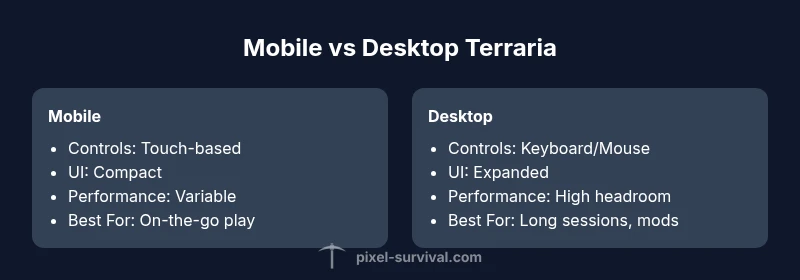
On mobile, Terraria tasks you with translating keyboard and mouse precision into touch-based interactions. The on-screen joystick, taps, and swipe gestures introduce a new rhythm to combat, aiming, and item placement. This shift can make some boss patterns feel more punishing if your thumbs lag behind the action or if you struggle to target enemies in a crowded arena. In contrast, desktop players enjoy consistent pointer accuracy, more expansive UI real estate, and a lower cognitive load when monitoring multiple hotbars or building queues.
UI density is the most visible trade-off. Text and icons on mobile must scale for smaller screens, which can crowd the field and obscure critical tooltips. On PC, high-resolution monitors allow finer readability and easier multitasking, such as inspecting a distant dungeon layout while planning a route through a cavern. Performance differences also surface: newer mobile devices can offer excellent frame rates, but older or mid-range devices may throttle or heat up during long sessions, affecting responsiveness during tense moments like a boss phase. Desktop machines generally sustain higher, steadier frame rates and provide headroom for mods or larger screen layouts that improve situational awareness.
Despite these differences, the core difficulty—managing resources, learning enemy patterns, and building with purpose—remains consistent. The real question is how much the input and display constraints alter your decision to play on mobile versus desktop, and whether you can tailor your setup to minimize the mobile friction described below.
Controls and accuracy: navigating combat on touch
Touch controls demand a different kind of muscle memory than keyboard-and-mizzle (mouse). On mobile, you rely on on-screen buttons for movement, jumping, attacking, and item usage, with the attack direction optimized by a virtual joystick orZone-based aiming. This can feel clumsy in high-speed combat, particularly during multi-phase boss fights or while dodging minions that swarm from multiple angles. While a skilled mobile player can compensate with refined finger placement and practice, the initial learning curve is steeper than on PC.
Sensitivity and button placement matter a lot. The best mobile setups map the most-used actions to larger, easier-to-reach zones and enable features like auto-aim assist or quick inventory hotkeys when available. Controllers or external grips can mitigate some issues, but not all games and devices support them uniformly. The intuitive takeaway: the mechanical challenge of hitting moving targets converges with ergonomics on mobile, which can shift the perceived difficulty upward for players who demand precision without a physical pointer.
For players who prefer precise timing and rapid response, desktop remains the most comfortable option. For others, mobile is entirely viable when you optimize input layouts, adjust sensitivity, and leverage in-game options to streamline combat.
UI readability, inventory, and hotbars on small screens
A cramped UI is one of the most frequent friction points on mobile. Key information like health, mana, hotbars, tooltips, and enemy indicators compete for screen space, which can slow decision-making during combat or heavy exploration. On desktop, wider monitors let you keep track of multiple windows—map, inventory, boss health, and world state—without juggling layers. The mobile setup requires careful prioritization: reduce on-screen clutter with toggleable panels, enable simpler hotbar configurations, and utilize larger hitboxes for actions that occur in the heat of battle.
Inventory management can also feel slower on mobile due to swiping between tabs, sorting items, and equipping gear with touch precision. Players who value detailed crafting routes or sorting by rarities may find the mobile workflow less efficient than PC. However, experienced mobile players often craft shortcuts, like pre-made gear sets for different biomes and boss encounters, which can compensate for the UI challenge. The bottom line is to tailor your UI layout to your comfort level and memorize the most critical actions for fast access during crucial moments.
Performance, stability, and device variability
Device variability is a defining factor for mobile Terraria. Modern mid-range phones can deliver smooth gameplay, while older devices may struggle with frame pacing during late-game events or crowded arenas. This variability means that the perceived difficulty on mobile can fluctuate not just from skill but from hardware: touch latency, thermal throttling, and GPU throttling all play a role in how responsive the game feels in the moment.
On the desktop side, PC hardware generally provides stable performance, even when pushing near-maximum graphics settings or running with a few mods. While this can lead to a more polished and consistent experience, it also means the game feels more predictable, letting seasoned players anticipate enemy behavior with more confidence. The practical takeaway is to profile your device before venturing into premium-tier content. If you notice stutter or delays during important sequences on mobile, consider lowering graphical effects, enabling frame-rate caps, or temporarily reducing view distance to maintain consistent action. Pixel Survival’s observations align with the idea that performance is a major lever in perceived difficulty across platforms.
World generation, exploration, and build scale on mobile
World generation is functionally identical on all platforms, yet mobile players might encounter longer initial load times or chunk loading on older devices. Exploration pace can feel slower if navigation tools scale poorly on smaller displays, or if map hints and dungeon layouts require more taps to inspect. Build scale and base design considerations also shift: large structures may appear more imposing on a tiny screen, which can affect how players plan routes, farms, or defense perimeters. On the flip side, mobile devices enable quick, opportunistic play sessions—perfect for small, incremental builds or micro-dungeons you might not tackle on a longer desktop session.
In practice, planning around screen real estate helps: create modular designs your avatar can access in a handful of taps, use zoning and waypoints to simplify exploration, and keep essential materials close to hand for rapid adjustments. These strategies reduce friction and allow mobile builds to feel more deliberate rather than rushed.
Progression pacing and boss fights across platforms
Progression pacing is a universal feature of Terraria, but the pace can feel different depending on input quality, load times, and map accessibility. On mobile, the combination of touch controls and smaller UI tends to slow micro-decisions—like swapping weapons or hooking a potion at the exact moment of a boss encounter—compared to PC where keyboard shortcuts and a mouse offer rapid, simultaneous actions. Boss fights remain functionally identical in terms of mechanics, phases, and strategy, but the execution environment can influence timing windows and dodge opportunities.
For players who want to progress efficiently on mobile, it helps to study boss attack patterns in advance, assign critical abilities to large-touch targets, and practice early-dungeon navigation with shorter sessions. This approach keeps progression steady without forcing extended play sessions that can tax device performance.
Multiplayer, servers, and cross-platform considerations
Terraria’s multiplayer experience hinges on stable connectivity and server performance. On mobile, online play can be impacted by network stability, background app behavior, and the efficiency of the mobile OS in handling network tasks. Desktop players often enjoy more robust network throughput, especially on wired connections, which translates to more reliable co-op adventures and faster world progression when playing with friends. Cross-platform play between mobile and desktop is not widely supported, which means worlds, seeds, and progression stay platform-bound unless both players are on the same ecosystem or version with built-in cross-play support. Always verify the exact platform capabilities and server settings before organizing a session with friends.
If you’re building a community around cross-device play, focus on clear rules for seed selection, dungeon access, and farm timing to minimize synchronization issues. Pixel Survival’s guidance emphasizes testing your hosted worlds across devices before inviting teammates to ensure everyone has a consistent experience.
Mobile optimization strategies to level the field
If you’re committed to playing on mobile, several practical optimization steps can reduce perceived difficulty. First, tune your device: close background apps, enable a battery saver mode that stabilizes performance, and consider a frame rate cap to reduce throttling in chaotic scenes. Next, adjust in-game settings for readability and speed: larger UI elements, simplified control schemes, and prioritized tooltips help you respond quickly during combat. Third, tailor your control scheme to your playstyle: assign essential actions to easy-to-reach zones, and test a few layouts in safe arenas before venturing into boss arenas. Finally, consider external accessories like clip-on grips or compatible controllers for improved precision. These adjustments won’t change the game’s core balance, but they will narrow the gap in the user experience between mobile and desktop.
When mobile shines: scenarios where mobile is viable
Mobile Terraria is perfectly viable for players who prioritize short, on-the-go sessions, quick exploration, or commuting play. The portability of a phone or tablet allows you to engage in micro-messions, gather resources, and plan builds in bite-sized chunks. For learners, mobile can reduce friction when you want to dip into the game during breaks or travel. The key to success on mobile is embracing the platform’s strengths—fast entry, straightforward objectives, and a mindset that leverages short, focused play rather than long, uninterrupted sessions.
For those who enjoy deep base-building and sprawling multi-hour expeditions, desktop remains the most efficient path. The Pixel Survival team notes that long-form play benefits from the greater control precision, screen real estate, and modding possibilities available on PC.
Conclusion: is terraria harder on mobile? The answer is nuanced. On mobile, the game can feel tougher in the moment due to input and UI constraints, but with optimized controls and hardware-aware settings, mobile can deliver a satisfying and on-the-go Terraria experience.
Practical decision guide: is mobile right for you?
To decide if you should favor mobile or desktop, weigh your typical play sessions. If you mostly play during short breaks or commutes, or you value portability above all else, mobile is a compelling option with the right setup. If you crave long, uninterrupted sessions, large builds, and precise control with a mouse and keyboard, desktop is likely the better choice. Remember that the core progression remains the same across platforms, so your skill and knowledge transfer between devices is mostly about how you manage inputs, UI, and performance realities.
Comparison
| Feature | Mobile | Desktop (PC/Console) |
|---|---|---|
| Controls & input | Touch controls with on-screen joystick | Keyboard + mouse; optional gamepad support |
| UI readability & scaling | Compact UI; possible crowding on small screens | Large UI; easy navigation on big screens |
| Performance & stability | Subject to device throttling; variable frame rates | Usually higher, more consistent frame rates; headroom for mods |
| Load times & world generation | Potentially longer loads on older devices | typically faster loads and smoother generation |
| Multiplayer experience | Network variability; text input and chat may lag | Stable online play with wired connections; better server performance |
| Progression pacing | Similar core progression; speed affected by input latency | Consistent pacing aided by precise controls and UI |
| Build scale & exploration | Smaller screen limits large builds visually | Unrestricted view supports expansive builds and maps |
| Cross-platform play | Limited to platform; cross-play often not supported with desktop | Strong cross-platform options exist within certain ecosystems |
The Good
- Portable play sessions fit in short breaks
- Low upfront hardware requirements on many devices
- Faster onboarding for casual players
- Easier to share progress on mobile-friendly seeds
Negatives
- Touch controls can hinder precision in boss fights
- Smaller UI can obscure critical information
- Performance variability across devices
- Long-term builds can feel cramped on small screens
Desktop offers the most consistent experience; mobile is viable with proper setup
If you prioritize precise control and long, uninterrupted sessions, desktop is the better platform. Mobile remains a strong option for on-the-go play, provided you optimize controls, UI, and device performance to minimize friction.
Got Questions?
Is Terraria harder on mobile than on PC?
The core difficulty is the same across platforms, but mobile can feel harder due to touch controls, smaller UI, and device variability. With proper setup, the gap narrows significantly.
The core game is the same, but mobile can feel tougher because touch controls and a smaller screen change how you react in fights.
Do enemies hit harder on mobile?
Enemy stats are not platform-dependent. Perceived difficulty may rise due to input latency and screen limitations, not because enemies are stronger on mobile.
Enemies don’t hit harder on mobile; it’s the control and visibility that can make encounters feel tougher.
Can mobile and PC play together?
Official cross-play between mobile and desktop is not widely supported. You’ll typically play in separate ecosystems unless a platform-specific feature enables it.
There isn’t broad cross-play between mobile and PC for Terraria, so expect separate sessions.
What mobile controls work best for combat?
Use large hit targets for actions, enable assistive aim if available, and consider a lightweight layout with essential actions on easy reach. Testing layouts in safe arenas helps.
Prioritize big touch targets and easy access to vital actions in battle.
Any mobile-specific tips to ease difficulty?
Optimize your device for performance, simplify the UI, and practice in short, focused sessions to build muscle memory for touch controls.
Tune performance and practice in short sessions to build mobile muscle memory.
Is world generation different on mobile?
World generation rules are the same across platforms; any difference in feel comes from performance and UI rather than generation logic.
Generation rules are the same; differences come from performance and UI.
Key Points
- Prioritize platform based on session length and build scale
- Optimize mobile controls and UI for quicker access
- Desktop offers more stable performance and precision
- Adjust device settings to reduce throttling on mobile
- Cross-platform play is limited by platform support