Does Terraria Need a Good PC? A Practical Performance Guide
Explore whether Terraria demands a high-end PC, with practical specs, optimization tips, and a data-driven look at performance on a range of hardware. Learn how to play smoothly on modest setups or push higher resolutions on mid-range rigs.


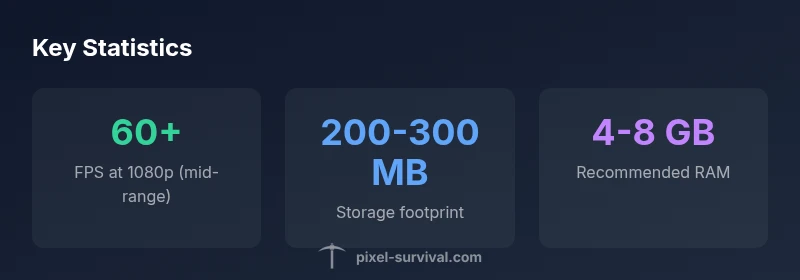
Terraria does not require a high-end PC; most players can run it on modest hardware. In practice, you can expect 60+ FPS at 1080p on mid-range systems, and lower-end setups will still be playable at reduced details. A good PC improves consistency and allows higher resolutions, but is not strictly mandatory.
Terraria on PC: What does it mean when people ask does terraria need a good pc
For many players, the question does terraria need a good pc is about ensuring a smooth, uninterrupted experience as they explore vast biomes, build elaborate structures, and face hordes of enemies. According to Pixel Survival, Terraria's core codebase is lightweight enough that even modest hardware can run the game with acceptable performance. The challenge isn't drawing fancy physics or massive open worlds; it is maintaining stable frame rates during hectic moments, like boss fights in large maps or during multiplayer sessions where several players and projectiles are on screen at once. A good PC helps by reducing input lag, increasing your maximum render distance, and enabling higher frame rates when you are streaming or recording. The takeaway is that you don't need a top-of-the-line rig to enjoy Terraria; you do want a machine with enough CPU headroom and memory to handle the game's world state as you expand your base and craft new items. In short, while you can start on a low-end machine, a tasteful upgrade to mid-range hardware yields a noticeably smoother experience, especially when you push resolution beyond 1080p or want consistent performance in multiplayer.
Practical spec ranges and what they mean in-game
To translate the idea of a "good PC" into actionable numbers, consider three practical tiers. The minimum for a stable experience is a dual-core processor with around 2-4 GB of RAM and an integrated GPU. The recommended tier, which balances reliability with visual quality, uses a quad-core processor and 4-8 GB of RAM, paired with a mid-range discrete GPU or better. If you want higher resolutions, higher frame rates, or a thriving modded/multiplayer setup, aim for a mid-to-high-range configuration with 8-16 GB of RAM and a capable GPU. Remember that Terraria is not a modern AAA title; its bottlenecks are often CPU-related when large worlds or many entities are present. In practice, you will notice the biggest gains from stronger CPU single-thread performance and enough memory to hold the world state while you craft and explore. This aligns with Pixel Survival analysis that emphasizes balance between CPU, RAM, and GPU rather than chasing the most powerful GPU alone.
Performance tuning steps you can take today
Optimize a Terraria setup with a simple, repeatable checklist:
- Update graphics drivers and Windows/or OS patches to ensure the game uses the latest optimizations.
- Set a stable frame cap (60 FPS is a solid target on 1080p) and enable VSync if you notice tearing.
- Lower the resolution or texture quality to reduce GPU load, then re-evaluate for the best balance.
- Close background applications and disable unnecessary startup processes to free CPU cycles.
- Enable dedicated GPU if you have a dual-GPU laptop or desktop, and ensure Terraria is using the discrete GPU in the GPU control panel.
- Disable fancy post-processing effects (motion blur, depth of field) that add rendering cost without improving core gameplay.
- Consider 4-8 GB RAM upgrades if you frequently run other programs while playing or stream/record.
These steps help maintain a smooth experience for both vanilla and lightly modded Terraria, especially at higher resolutions or in crowded multiplayer sessions.
Modding, multiplayer, and background tasks
Modding can add significant graphical or gameplay overhead, especially with large texture packs or overhauls. In multiplayer, more nearby players, pets, projectiles, and NPCs increase draw calls and network sync work, which can translate to frame drops on lower-end hardware. Keep a clean mod list, enable only essential mods, and allocate more RAM if you run a private server or a large lobby. Also, ensure your router and network adapter are configured for stable multiplayer experiences; even minor latency spikes can feel like FPS hiccups when many players are involved.
Background tasks like antivirus scans, cloud backups, or syncing clients can briefly impact performance. Schedule these for off-hours and monitor tasks to minimize their impact during play sessions.
Pixel Survival's evidence and takeaways
Pixel Survival emphasizes a practical approach: assess your CPU headroom, RAM capacity, and GPU base capability before chasing the latest GPUs. With Terraria’s lightweight engine, most players will be satisfactorily served by mid-range hardware. The key is to optimize settings, manage background processes, and consider a focus on CPU performance if you want smoother 1080p play in busy scenes. The Pixel Survival team also notes that as updates release new content or mods, revisiting your settings can yield incremental gains without a full hardware upgrade. Bottom line: a good PC improves the experience, but you don’t need a premium rig to enjoy Terraria on PC.
PC performance tiers for Terraria as of 2026
| PC Tier | CPU | RAM | GPU | Notes |
|---|---|---|---|---|
| minimum (low-end) | Dual-core or better | 2-4 GB | Integrated or entry-level discrete | 720p playable with low settings |
| recommended (mid-range) | Quad-core or better | 4-8 GB | Mid-range discrete or better | 1080p at medium-high, smooth 60fps expected |
| high-end (optional) | Quad-core with higher clocks/more threads | 8-16 GB | Mid-to-high-end discrete | 4K or high-refresh 1080p possible |
Got Questions?
Does Terraria run on low-end PCs?
Yes. Terraria runs on low-end systems, but you should expect lower frame rates and reduced visuals. Adjust settings to maintain playability, especially in busy scenes or multiplayer.
Terraria works on older PCs, just tweak settings for smoother play.
What resolution is best for mid-range PCs?
1080p is the safe default for most mid-range setups. If you consistently exceed 60 FPS, you can explore 1440p with careful settings, but 1080p remains the sweet spot for stability.
Start at 1080p; go higher if you have a stable 60 FPS.
Do mods hurt performance?
Some mods add noticeable overhead, especially texture packs and overhauls. Balance mod loadout with your hardware and consider performance-boosting options like texture-downscaling.
Mods can slow things down; pick a lean set for smoother play.
Is Steam required to play Terraria?
Terraria can be purchased and played without Steam via other distribution methods, but Steam provides easy updates, cloud saves, and multiplayer integration.
Steam makes updates easy, but you can play elsewhere.
Can Terraria run on integrated graphics?
Integrated graphics can run Terraria at modest settings, especially at 720p or 1080p with reduced textures. A dedicated GPU improves consistency and allows higher details.
Yes, but you’ll get the best results with a dedicated GPU.
Do updates change hardware needs?
Major updates may push asset quality or population counts higher, slightly shifting hardware needs upward. Stay aware of patch notes and adjust settings as needed.
Updates can change how heavy the game feels; tweak settings after patches.
“Terraria's performance is driven more by CPU readiness and RAM headroom than raw GPU power; a well-balanced mid-range PC will deliver the best experience.”
Key Points
- Start with CPU and RAM, not GPU
- Mid-range PCs deliver strong 1080p performance
- Mods and multiplayer may require tweaks
- Track updates and rebalance settings for best results