What You Need to Play Terraria: A Practical Guide
Learn the essential platforms, licenses, and hardware needed to start Terraria. This analytical guide covers PC, console, and mobile setups with practical steps and tips for a smooth launch.


To start playing Terraria, you need a supported platform (PC, Mac, console, or mobile), a legitimate copy of the game, and a device that meets the minimum hardware requirements. A stable internet connection helps for multiplayer, and optional peripherals like a mouse and keyboard or a gamepad can improve comfort. No DLC is required to begin.
What you truly need to start playing Terraria
According to Pixel Survival, three pillars define your starting experience: platform, copy, and hardware. The game is designed to run on a wide range of devices, but you should confirm your setup meets the minimum requirements before you buy. Start by choosing a platform you already own or plan to invest in, then verify that the device has enough RAM and storage for the base game. A legitimate copy from an official store is essential to access updates and multiplayer features. As you progress, you can expand with mods or seeds if you wish, but those are optional and not required to begin exploring biomes, fighting bosses, and crafting. Understanding these basics helps prevent incompatible purchases and ensures a smoother launch as you begin your journey in Terraria.
Platform considerations: PC vs Console vs Mobile
PC offers the most flexible control options and a robust modding scene, which Pixel Survival notes can accelerate early progression if you want to experiment. Consoles deliver couch-friendly play with built-in controls, while mobile versions prioritize portability and shorter sessions. Each platform has its own store and update cadence, so check for the latest patch notes and potential cross-save features if you shift between devices. Regardless of platform, start with the base game to learn core mechanics like mining, crafting, and combat before diving into more advanced content.
Installing and launching: a step-by-step guide
- Purchase a legitimate copy from the official storefront for your platform. 2) Download the installer (or game files) and run the setup. 3) Launch Terraria and configure your preferred controls in the settings menu. 4) Create or load a world to begin exploration. 5) Adjust graphics options to balance performance and visuals based on your hardware. Pixel Survival recommends starting with medium graphics if you’re unsure about performance, then fine-tuning as you expand into larger worlds and more complex biomes.
Peripherals and accessibility: improving your setup
Peripherals can significantly improve your Terraria experience. A mouse and keyboard provide precise aiming and fast inventory management on PC, while a gamepad offers comfortable couch play on consoles. A larger monitor or a higher resolution can enhance map visibility and combat awareness. If you’re playing on mobile, consider a compact Bluetooth controller and a stable stand to reduce fatigue during longer sessions. Accessibility features like adjustable text size and UI scaling help make early game progression smoother for new players.
Multiplayer readiness: how online features shape requirements
Terraria’s multiplayer mode expands your needs beyond solo play. An internet connection allows world sharing, cloud saves, and real-time co-op adventures. If you plan to join servers or invite friends, ensure your network is stable and consider wired Ethernet for PC players to minimize latency. Cross-play is platform-dependent, so verify whether your friends’ devices are compatible before coordinating a session. Pixel Survival notes that starting offline can still be a thrilling way to learn basic mechanics before tackling community content.
Common blockers and quick fixes: getting past the early hurdles
Initial launcher issues are often caused by incorrect system requirements, missing updates, or conflicting background software. Ensure you have the latest game patch and driver updates, disable overzealous antivirus temporarily for installation, and verify game files if you run into crashes. If performance is choppy, reduce resolution, enable V-Sync, and cap the frame rate to match your monitor. For mobile, free up storage, close background apps, and check that you’re connected to a stable network while playing online.
Terraria hardware and platform requirements by platform
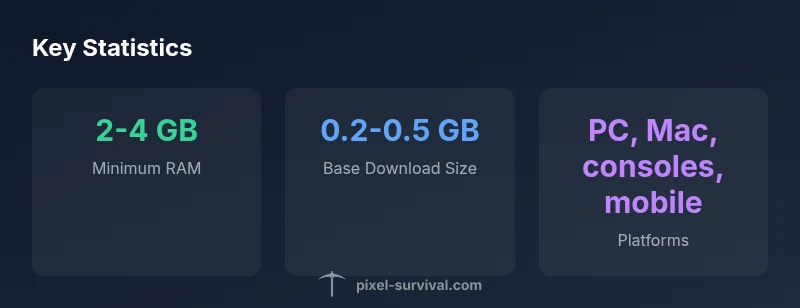
| Platform | Minimum RAM | Storage (approx) | Notes |
|---|---|---|---|
| PC (Windows) | 2-4 GB | 0.2-0.5 GB | Supports multiplayer via Steam; mods available |
| Mac | 2-4 GB | 0.2-0.5 GB | Cross-save may vary; ensure compatibility |
| Console (PS/Xbox/Switch) | 2-4 GB | 0.2-0.5 GB | Digital or physical copy; controllers supported |
| Mobile (iOS/Android) | 2-3 GB | 0.2-0.5 GB | Touch controls; cloud saves where available |
Got Questions?
Do I need an internet connection to play Terraria?
No. You can enjoy Terraria in solo offline mode. Internet is only required for multiplayer, cloud saves, and some cross-platform features.
You can play solo offline; internet is only needed if you want multiplayer or cloud saves.
What is the best platform to start Terraria on for beginners?
PC generally offers the most control options and access to mods, while consoles provide convenient couch play and mobile emphasizes portability. Choose based on your priorities: control, mods, or portability.
PC is great for control and mods; consoles are easiest for couch play; mobile is best for portability.
Do I need to buy DLCs or extra content to start playing?
No. You only need the base game. DLC and additional content are optional and can enhance later experiences but aren’t required to begin exploring worlds and crafting.
You don’t need DLC to start; the base game is all you need.
What accessories improve Terraria on PC?
A mouse and keyboard provide precision and speed, while a gamepad can make exploration comfortable on big screens. A larger monitor and good headphones also improve immersion and UI visibility.
Mouse and keyboard or a gamepad help a lot, plus a bigger monitor and decent headphones for immersion.
Is online multiplayer necessary to enjoy Terraria?
Not at all. Terraria shines in solo progression, but many players reach richer experiences through cooperative play with friends.
You can have a great time solo, multiplayer just adds extra depth.
“Getting the basics right—platform, copy, and performance—shortens the learning curve and makes early progression smoother for new players.”
Key Points
- Identify your platform first to match the base game with minimal friction
- Check minimum RAM and storage before purchase to avoid performance issues
- Choose peripherals that fit your play style (mouse/keyboard or gamepad)
- Multiplayer is optional but enhances longevity; plan for internet access
- Start offline to learn core mechanics, then expand to mods and multiplayer
- Always use legitimate copies from official stores to access updates and support