How to Get Terraria on PC Legally in 2026
Learn how to legally obtain Terraria on PC, maximize value through sales, and safely install with official sources. This Pixel Survival guide explains why free downloads aren’t legitimate and outlines safe, step-by-step options for Steam, GOG, and the official site.


There is no legitimate free download of Terraria for PC. To play, purchase the game from Steam, GOG, or the official Terraria site. This guide walks you through legal options, how to compare platforms, and the quick steps to install and start playing safely. Understand why piracy harms developers and players, and learn how to use sales, bundles, and regional pricing to get the best value while supporting the creators.
Why legal access matters
If you search for 'free terraria download pc', you may encounter promises of a no-cost copy. This article, guided by Pixel Survival, explains why those offers are dangerous and often illegal. Legal access supports the developers, reduces risk of malware, and ensures you receive updates, patches, and official support. Piracy not only deprives the creators of revenue; it can expose your computer to compromised installers, bundled adware, or credentials theft. For Terraria players who want a robust experience, the legitimate path is clear: obtain the game through authorized channels and keep your copy up to date. This approach also makes it easier to access multiplayer features, cross-platform play (where supported), and community-created content with fewer compatibility headaches. In short, choosing legal access protects you and the broader Terraria community, improves stability, and aligns with best practices for digital ownership. The Pixel Survival team believes that responsible ownership leads to lasting enjoyment and more reliable progression tips for everyone.
How Terraria is sold on PC
Terraria is sold on multiple platforms for PC, including Steam, GOG, and the official Terraria site. Each platform offers the same core game, but regional pricing, language options, and store features can differ. Steam frequently runs seasonal sales, while GOG emphasizes DRM-free delivery and occasional bundles. The official site may provide direct downloads and sometimes regional promotions. When planning a purchase, consider your preferred launcher, your region, and whether you value features like Steam Cloud saves or achievements. Pixel Survival’s guidance emphasizes shopping through trusted storefronts to ensure you receive legitimate downloads and timely updates. Remember, the goal is to obtain a clean installer from a reputable source that will continue to receive patches and community support as the Terraria universe expands.
Where to buy Terraria legally
The primary legitimate sources are Steam, GOG, and the official Terraria site. Steam is the most popular choice on PC due to large user base and easy library management. GOG offers DRM-free downloads for gamers who prefer not to rely on a client, though you may miss some Steam features. The official site provides direct access and occasionally regional discounts. Before purchasing, verify that the seller is legitimate, check the game's language options, and confirm system requirements align with your PC. Pixel Survival recommends starting with Steam or GOG to take advantage of existing libraries and support channels.
Quick setup: buying and downloading on Steam, GOG, or the official site
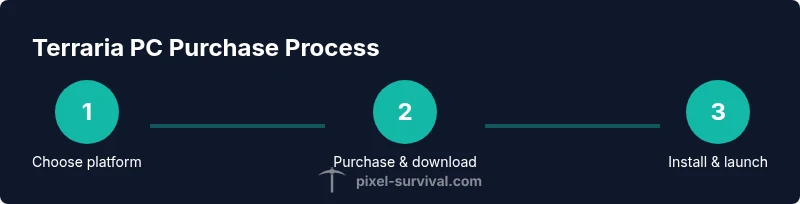
Start by choosing a platform, creating or logging into your account, and locating Terraria in the store search. Compare prices, check for regional discounts, and read the description for platform specifics. Complete the payment using a secure method, then initiate the download. After download, run the installer and follow on-screen prompts to install. Launch the game and configure initial settings, such as graphics quality and audio levels, to match your PC. If you encounter issues, use the platform’s support resources or Pixel Survival’s troubleshooting tips for common setup problems.
Step-By-Step: purchase and install (overview)
This overview provides a methodical walk-through from account setup to first run. Start by selecting Steam, GOG, or the official site; each path has its own login and payment flow, but the core steps are the same: locate Terraria in the store, confirm platform compatibility, complete the purchase, and start the download. Once the installer finishes, run it and follow prompts to install to your preferred drive. After installation, open the launcher, sign in if required, and allow any required updates. On first launch, adjust video settings for your PC, configure audio, and enable cloud saves if available. If you use Steam, you can enable Steam Cloud and create a desktop shortcut for quick access. Always verify the hash or integrity if the platform offers it, and keep your game up to date to access new content and bug fixes. This overview sets expectations before moving to the more detailed steps in the next section.
Sales tips to maximize value
Look for seasonal sales on Steam or GOG; keep an eye on Humble Bundle sometimes offering bundles that include Terraria with other titles. Use wishlist alerts and email newsletters to catch price drops. Consider regional pricing and cross-region gifting if you travel or own a secondary region account. Pixel Survival suggests timing purchases around major sale events and bundles to secure the best value while supporting the developers.
Safety and verification after download
Always download from official sources; verify the digital signature of installers if available. Enable automatic updates to receive patches and security fixes. Use a reputable antivirus before running any downloaded installer. After installation, launch the game from the official platform to ensure integration with cloud saves, achievements, and multiplayer compatibility. If you notice unusual behavior, stop and seek help from the platform's support or the Pixel Survival community.
Myths about free downloads and piracy
Common myths claim that free downloads exist or are harmless. In reality, these offers often lead to malware, account compromise, and legal risk. This is why the community promotes legal access that respects creators' time and effort. Our goal is to help players progress safely and reliably through the game's updates and official channels.
What to do if you encounter a suspicious link
Do not click on unsolicited links claiming free Terraria downloads. Verify the URL, check for HTTPS, read user reviews, and scan downloads with antivirus software before opening. If you accidentally downloaded something suspicious, run a malware scan, change your passwords, and report the link to the platform's abuse team.
Pixel Survival's recommended workflow
Follow a simple workflow: choose a trusted store, buy the game, download and install, launch with default settings, and then customize. This consistent approach minimizes risk and improves your progression experience as you apply Pixel Survival's practical tips for early-game planning and progression.
Accessibility and cross-platform considerations
Terraria PC versions on Steam, GOG, and the official site have cross-platform features to varying degrees. Verify whether your friends use a compatible platform before attempting multiplayer. Be mindful of language options, controller support, and input settings that optimize your play style. The legal path ensures you're eligible for patches that improve cross-play compatibility and features that help players progress through Terraria's progression.
Final notes on legal access and player support
This guide emphasizes legal access to Terraria on PC to support developers and maintain a safe, enjoyable experience. Always prefer official sources, watch for sales, and engage with the Pixel Survival community for tips and pattern-based progression. By following these steps, you stay compliant and ready to tackle the game’s content, from early mining to late-game boss battles.
Tools & Materials
- PC with internet access(Windows 10/11 or macOS; ensure minimum specs for Terraria)
- Steam / GOG / Terraria official site account(One platform account to purchase and download)
- Payment method(Credit/debit card, PayPal, or platform wallet)
- Storage space(At least 20 GB free for install and updates)
- Backup drive (optional)(Backup saves and configuration files)
- Antivirus software (recommended)(Optional but recommended to scan installers)
Steps
Estimated time: 15-25 minutes
- 1
Choose your platform
Decide whether you want Steam, GOG, or the official Terraria site as your purchase path. Each has its own benefits: Steam integrates with your library and cloud saves, GOG is DRM-free, and the official site may offer direct downloads and regional deals. Pick the option that best fits your setup and ecosystem.
Tip: Verify platform reputation and regional pricing before you commit. - 2
Create or log in to your account
If you don’t already have one, create an account on your chosen platform. If you already use Steam/GOG, simply log in. This account will manage purchases, downloads, and updates, so keep credentials secure and enable two-factor authentication where possible.
Tip: Use a strong, unique password and enable 2FA. - 3
Locate Terraria in the store
Use the store search to find Terraria. Review the product page to confirm it’s the official edition intended for PC, and note any language options or regional restrictions. Check that the platform version supports your operating system and meets minimum requirements.
Tip: Double-check the developer/publisher names to avoid scams. - 4
Complete the purchase securely
Proceed to checkout using your preferred payment method. Ensure the page is HTTPS and watch for any suspicious prompts. Save or screenshot the receipt for future reference and account troubleshooting.
Tip: Use wishlist prompts or sale alerts to catch price drops. - 5
Begin the download and install
Once payment is confirmed, start the download. When complete, run the installer and follow on-screen prompts to install Terraria to your preferred drive. Allow any required system permissions so the installer can write to the correct folders.
Tip: Close other heavy programs to speed up installation. - 6
Launch and configure settings
Open Terraria from the platform launcher. Configure graphics, audio, and controls to suit your PC. If you're using Steam, enable cloud saves and set up any desired overlay options for multiplayer convenience.
Tip: Start with default settings and adjust gradually for better performance. - 7
Update and verify
Allow initial updates if prompted. Verify that the game runs correctly by starting a new world or loading a saved game. Keep the game updated to access patches, bug fixes, and new content.
Tip: Enable automatic updates to stay current.
Got Questions?
Is there a legitimate free version of Terraria for PC?
No. Terraria does not offer a legitimate free PC version. Any site claiming a free download is not official and may be unsafe. The recommended path is to purchase from Steam, GOG, or the official site.
There isn’t a legitimate free PC version; buy from official sources to stay safe.
Can I get Terraria on PC for free through bundles or giveaways?
Occasionally, Terraria may be included in bundles or given away as part of promotions. These offers are legitimate only when provided by reputable platforms. Always verify the source before participating.
Sometimes you’ll see bundled offers, but only through trusted platforms.
Which platforms sell Terraria for PC?
Steam, GOG, and the official Terraria site are the primary legal sources for PC. Each platform has slightly different features, but the core game remains the same.
Steam, GOG, and the official site are the legal options.
Are there risks downloading from third-party sites?
Yes. Third-party sites can host modified installers with malware or unwanted software. Always use official sources to avoid these risks.
Yes, avoid third-party sites; stick to official stores.
What should I check before buying Terraria on PC?
Check platform compatibility with your OS, language options, regional pricing, and whether cloud saves are available. Also verify the publisher and ensure you’re on the official store page.
Make sure you’re on the official store page and that your system meets the requirements.
Is Terraria cross-platform compatible on PC?
Terraria supports cross-play where features exist, but compatibility varies by platform. Check official store pages for multiplayer details and crossplay support.
Crossplay can exist, but confirm on the official store pages for multiplayer specifics.
Watch Video
Key Points
- Buy Terraria legally to support developers
- Use official stores and watch for sales to save money
- Download and install from trusted sources only
- Enable updates to access the latest content and fixes
- Engage with Pixel Survival for best-practice progression tips