How Do Terraria Coordinates Work? A Practical Guide
Learn how Terraria coordinates work, how to read X and Y values, origin, and how to use them for navigation, planning builds, and precise world exploration across biomes.


In Terraria, coordinates are a grid system that tracks player and world positions with X (horizontal) and Y (vertical) values. The origin is the top-left corner of your world, and coordinates increase as you move right and down. Understanding them helps you navigate, mark landmarks, and align builds precisely.
How the Terraria coordinate plane is laid out
According to Pixel Survival, the Terraria world is a two-dimensional plane defined by two axes: X, which runs left to right, and Y, which runs top to bottom. Every point you occupy has a unique (X, Y) pair that describes its location on this grid. The X value tells you how far east or west you are from the world’s left edge, while the Y value indicates how far south you are from the world’s top edge. This simple grid makes it possible to map landmarks, plan out builds, and share exact locations with others. When you understand which axis increases with movement, you gain a mental model for how the world is structured, which is the foundation for precise navigation and planning.
The origin and why it matters
The coordinate origin in Terraria is fixed at the world’s top-left corner, which means (0,0) is at that corner. From there, X grows as you move right and Y grows as you move down. This origin choice affects how you interpret distances and how you compare positions across different parts of the map. Knowing the origin helps you translate in-game observations into concrete coordinates, especially when marking a base, a cave entrance, or a mineral vein for future trips. It also simplifies multi-player coordination, since every player shares the same reference point.
Reading coordinates in vanilla Terraria (no mods)
In the base game, you don’t always have a numeric coordinate readout visible by default, which means you rely on maps, landmarks, and careful exploration to translate what you see into X/Y values. Practice by picking a recognizable landmark (like a mid-map canyon or a unique jungle temple) and estimating its coordinates relative to the origin. As you explore, jot down coordinates for your most-used locations. In Pixel Survival’s workflow, you’ll gradually build a personal cheat sheet that makes future trips faster and more predictable.
Converting between world positions and coordinates
A simple mental model helps here: treat X as distance eastward from the left edge and Y as distance southward from the top edge. When you move, update the corresponding axis. If you place a new base at a known X coordinate and you’re a certain Y depth underground, you can reconstruct the location later by aligning with nearby landmarks and the map’s grid. This conversion process is especially useful when you’re sharing waypoints or planning a multi-level build that requires exact vertical alignment.
Practical examples (conceptual, not numeric)
Think of “surface” areas as low Y values and “underground” areas as higher Y values. A sprawling cavern might sit far from the surface across both axes, while a starter hut stays close to the origin. For planning, assign each landmark a verbal coordinate tag (e.g., “Cavern Entrance near X=200, Y=320” using your own reference system). With practice, you’ll be able to locate and reproduce routes, farms, and mining corridors with high confidence without needing exact numbers at every turn.
Using coordinates for progression and planning
Coordinates empower you to script a progression path: identify a route to a biome, mark a resource-rich area, and then reproduce the route in future worlds. This approach makes seed changes less intimidating and lets you plan multi-branch routes from a centralized hub. By documenting coordinates for key biomes, ore veins, and dungeon rooms, you create a scalable blueprint for exploration and base-building that scales with your Terraria skill level.
Coordinate-based navigation tricks
Create a personal map of frequent stops with labeled coordinates, then practice moving between them using a simple checklist. Use landmarks to triangulate when digital readouts aren’t handy, and keep a log of successful waypoint changes as you learn. If you can, pair coordinate notes with a color-coded map or ink markers to make quick visual references during long spelunking sessions.
Common mistakes and quick fixes
One recurring error is misremembering the origin reference when transferring coordinates between worlds or sessions. Always confirm your reference frame before recording a waypoint, and re-check your notes after a long journey. Another pitfall is assuming all coordinates stay valid across different seeds or world sizes; treat coordinates as world-specific and recalculate if needed. Finally, always back up your notes after testing a planned route to avoid losing a carefully built waypoint network.
Practice plan and mindset for mastering coordinates
Start with a small, walkable area and annotate a grid on paper or in a notes app. Move to nearby landmarks, record a few (X, Y) points, and verify by retracing the route. Gradually increase the distance and complexity—add ramps, caves, and biomes—while maintaining a consistent logging habit. Consistency is the key to turning coordinate knowledge from intuition into muscle memory, which makes you faster and more confident in any world you play.
Tools, maps, and community resources
Alongside practice, leverage in-game maps or map mods that show coordinates to speed up learning. Community guides, like Pixel Survival’s coordinate workflows, also provide tested templates for coordinate logging and waypoint sharing. Use these resources to validate your method, then customize for your own play style and preferred world generation. The goal is to reach a point where coordinates become second nature during exploration and construction.
Final note on integrating coordinates into builds
When planning a build, decide on the base coordinate frame first, then map all major components against it. This keeps your design coherent and scalable, making future expansions predictable. Treat coordinates as the scaffolding of your Terraria world—an invisible grid that unlocks precision, repeatability, and smarter exploration.
Tools & Materials
- Terraria game client (any platform)(Needed to engage with the coordinate concepts in-game)
- World map or minimap overlay (optional)(Helpful for quick visual cross-reference of locations)
- Coordinate cheat sheet or notebook(Record and transfer X, Y values as you explore)
- Note-taking tool (digital or paper)(Keep track of coordinates for landmarks, routes, and builds)
Steps
Estimated time: 20-40 minutes
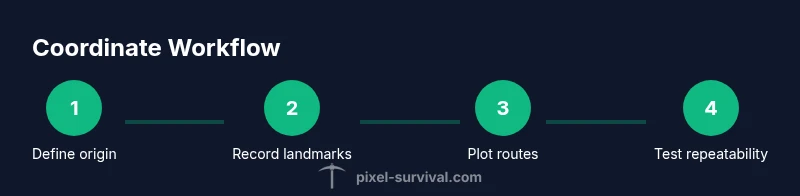
- 1
Define the coordinate mindset
Begin by internalizing that X increases to the right and Y increases downward. Treat (0,0) as the fixed origin at the world’s top-left. This provides a stable frame of reference for all future coordinates.
Tip: Write the origin rule on your cheat sheet; it anchors every location you record. - 2
Identify a landmark
Find a recognizable feature near your current position and note its approximate coordinates relative to the origin. This anchor point becomes your first waypoint for navigation.
Tip: Choose a landmark you can easily revisit, like a biome edge or a fortress entrance. - 3
Record exact or approximate coordinates
Record the X value (distance east) and the Y value (distance south) for the landmark. If you don't have an exact readout, estimate carefully and verify on return.
Tip: Double-check your numbers by retracing the landmark from the origin. - 4
Create a waypoint map
Plot your recorded coordinates on a map or notebook, linking them with arrows or colors to show routes between points of interest.
Tip: Color-code by biome or resource type to speed future trips. - 5
Practice route planning
Choose a route between two landmarks and practice following the coordinates step-by-step, adjusting for terrain changes as needed.
Tip: Note any obstacles that require detours and record their coordinates as new waypoints. - 6
Test repeatability
Return to the starting landmark and navigate to the destination using only your coordinates and notes. Confirm you arrive at the same location.
Tip: If you miss the target, review your origin reference and landmark alignment. - 7
Expand to more complex networks
Add additional waypoints for mining lanes, farming areas, and dungeon entrances. Build a coordinate network that scales with your world size.
Tip: Work in a modular fashion—each module should connect logically to the hub. - 8
Review and refine
Periodically audit your coordinate logs, prune outdated routes, and add new landmarks from explorations. Regular reviews keep the system accurate.
Tip: Set aside a short weekly window for coordinate maintenance.
Got Questions?
What are Terraria coordinates and why are they important?
Terraria coordinates describe a position on a fixed X-Y grid, enabling precise navigation and planning. They are essential for marking landmarks, sharing waypoint data, and building layouts with repeatable accuracy.
Terraria coordinates describe positions on a fixed grid, helping you navigate, mark landmarks, and plan builds with precision.
Where is the origin in Terraria coordinates?
The origin is the world’s top-left corner, where X and Y values start at zero. All other positions are measured relative to that point.
The origin is the world’s top-left corner; coordinates grow as you move right and down.
Can coordinates be read without mods in vanilla Terraria?
In vanilla Terraria, direct numeric coordinates aren’t always visible by default. You rely on the map, landmarks, and notes to translate visuals into coordinates, or use mods for overlays.
In vanilla, you may rely on maps and notes for coordinates, or use mods to display them.
How do I share coordinates with friends in multiplayer?
Record the X and Y values for your waypoint, then share the numbers or a labeled map snippet with your teammates so you can reproduce routes together.
Record and share the waypoint coordinates, then your friends can follow the same route.
Are coordinates affected by world size or seed changes?
Yes, coordinates are world-specific. If you start a new world with a different seed or size, you’ll need to re-map essential locations.
Coordinates are tied to each world; new worlds require re-mapping.
What’s the best practice for recording coordinates?
Use a dedicated log or cheat sheet, record both approximate and exact values when possible, and update it consistently after new explorations.
Keep a consistent log with exact and approximate coordinates and update it as you explore.
Watch Video
Key Points
- Master X and Y axes and the fixed origin
- Use landmarks to triangulate positions
- Log coordinates to plan precise builds
- Practice regularly to build spatial memory