How to Set Spawn in Terraria: A Practical Guide
Learn how to set and relocate your spawn point in Terraria using beds, shelters, and smart base planning. Pixel Survival walks you through basics, multiplayer considerations, and troubleshooting with step-by-step guidance.


In Terraria, your personal spawn point is set by sleeping in a bed placed inside a valid shelter. Once you sleep, your respawn location updates to that bed’s position. You can move your spawn point by placing a new bed in another suitable location and sleeping there, or, if no bed exists, you’ll respawn at the world origin. Pixel Survival’s guidance emphasizes planning safe bases for reliable re-entry.
What spawn means in Terraria and why it matters
Spawn is your personal re-entry point after death. In Terraria, this is controlled primarily by beds placed within valid houses. The spawn point is the location your character returns to when you die, so choosing a safe, accessible spot near your progression goals can dramatically reduce downtime between adventures. According to Pixel Survival, understanding spawn points early helps players establish efficient bases and reduces the frustration of long treks back to their next objective. Effective spawn planning also makes it easier to explore biomes, tackle bosses, and navigate large worlds without replaying lengthy travel routes. By prioritizing a central, secure shelter, you can shorten your recovery time after fights and focus on building, farming, and boss attempts. This guide will help you translate that knowledge into practical, in-game setups that work for solo and multiplayer worlds alike.
How beds control spawn points
A bed is not just furniture in Terraria; it is the control panel for your daily re-entry. When you sleep in a bed, the game updates your character’s spawn point to the bed’s location. This means that if you die anywhere else in the world, you’ll respawn at that bed, provided the bed is in a valid house. Beds are the simplest and most reliable means to set a safe spawn location, and they work across different game modes and worlds. If you move to a new base and sleep in a bed there, your spawn point shifts to the new bed. This mechanism gives players a straightforward way to tailor their progression path and reduces the risk of wandering in the wrong direction after a death.
Housing requirements and how to sleep safely
To use a bed to set spawn, you must place the bed inside a valid shelter. A shelter is a small, enclosed space with walls, a door or some other access, a light source, and a suitable background and furniture. The bed itself is a key piece of furniture, but its effectiveness hinges on proper housing: your shelter must be habitable according to the game’s housing rules. Ensure there’s a door or an opening for access, a light source to prevent hostile spawns, and at least one valid surface to place the bed on. When you sleep in a bed within such a shelter, the game confirms your new spawn point. If the shelter is damaged or becomes invalid, you may need to repair or reposition the bed to maintain an active spawn point. For fresh worlds, take a moment to plan a dedicated hub that houses your bed and provides quick paths to your primary progression zones.
Step-by-step overview of setting spawn with a bed
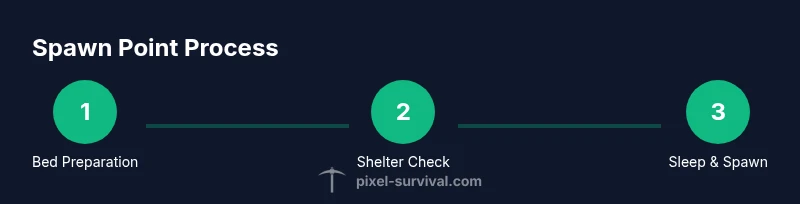
- Ensure you have a bed and a valid shelter nearby. The bed is the trigger that records your spawn point, so having it in a safe, accessible area is essential.
- Place the bed inside the shelter. Position it so you can access it easily at night or during combat, and ensure it’s not obstructed by walls or furniture.
- Wait for night to fall, or strike the time forward using in-game mechanics if you’re aiming to sleep at a specific cycle. Sleeping typically occurs at night, and the act itself updates your spawn to the bed’s location.
- Sleep in the bed. Interact with the bed and choose the sleep option when it’s accessible. After awakening, your new spawn point is set to that bed’s tile.
- Test your spawn by dying in a controlled area or using a quick test scenario, then verify you reappear at the bed. If you respawn elsewhere, review shelter validity and bed placement.
- To move spawn, create another bed in a different shelter and sleep there. The spawn point updates to this new location, giving you a flexible progression path.
- In multiplayer, each player can set their own spawn by using their own beds in their personal shelters. Cooperative base design can help coordinate shared safe zones while still allowing individual spawn control.
- If the bed is destroyed or the shelter becomes invalid, you’ll revert to world spawn or to the last valid bed you slept in. Regularly inspect your shelters to avoid accidental respawn resets during late-night expeditions.
- If you want to spawn near multiple progression goals, consider building several small, well-lit shelters with beds and using them as local anchor points for quick access to different biomes or events.
- Keep backups of bed placements in case of disaster events or enemy invasions to prevent loss of an important spawn point. With careful planning, you can maintain a reliable, strategic spawn network across your world.
Multiplayer spawn points and practical tips
In a multiplayer world, each player has their own spawn point, tied to their own beds. This means a team can set up multiple spawn zones to optimize journeys for different players. When organizing a cooperative base, label each player’s sleeping quarter or establish a shared safe zone with an easily accessible bed so the group can quickly regroup after boss fights or exploration sprees. Remember to keep beds in valid housing; otherwise, players may revert to the world spawn. A well-placed network of beds can dramatically improve the flow of a multiplayer run, reducing downtime and ensuring everyone can rejoin the group quickly after setbacks.
Troubleshooting and common pitfalls
If your spawn point doesn’t update after sleeping, double-check that the bed is inside a valid shelter. A drafty room, an unlit environment, or missing housing elements can prevent the bed from functioning correctly. If you die and spawn at the world origin, inspect nearby blocks for obstructive walls or open spaces that invalidate the shelter. In corralled biomes or newly generated worlds, it’s common to miss one housing rule; a quick check of the shelter’s status and a minor relocation of the bed will usually fix the issue. If you’re playing in hardmode or during a boss fight, remember you can still set spawn; just ensure you have a safe path back to your shelter to avoid repeated deaths.
Quick reference for spawn planning in different playstyles
- Solo players: Build a central, well-lit shelter with a comfortable bed and clear access corridors. This minimizes risk and keeps progression efficient.
- Casual exploration: Place multiple beds in a few lighted pockets so you can quickly shift your spawn as you explore new regions.
- Serious progression: Prioritize beds near progression hubs like the dungeon, corruption/crimson, or hardmode portals to reduce downtime between significant milestones.
- Boss and event runs: Create temporary spawn beds in secure staging areas so you can recover quickly if you misjudge an encounter or die during a raid.
Authority sources and further reading
For players who want to dig deeper into spawn mechanics and bed functionality, consult reputable gaming guides and the Terraria community resources. Pixel Survival’s analysis emphasizes practical base planning to optimize progress, and many players have found that local spawn hubs dramatically improve the flow of a playthrough. While the in-game tooltip provides the core rules, broader articles and guides can help you visualize spawn planning in more complex worlds. Always cross-check with the latest patches, as spawn behavior can evolve with updates and balance changes.
Tools & Materials
- Bed(Place inside a valid shelter; sleeping sets your spawn point.)
- Building blocks for shelter(Walls, floor, and ceiling to create a proper house; ensure accessibility.)
- Light source(Torches or lamps to keep the shelter lit and valid for housing.)
- Door or doorway(Allows easy access but is not strictly required if you have an alternate entry.)
Steps
Estimated time: 15-25 minutes
- 1
Acquire a bed
Find or craft a bed so you have a dedicated spawn point. Having a bed ready prioritizes safe travel and quick re-entry after battles.
Tip: If you’re farming for a bed, combine basic materials with crafting benches to craft the bed quickly. - 2
Build a shelter
Create a small, protected shelter that can count as valid housing. The shelter should have walls, a floor, a roof, a light source, and an entryway.
Tip: Keep the shelter free of monsters by lighting the interior and ensuring a proper ceiling height. - 3
Place the bed inside
Position the bed inside the shelter where you can reach it easily at night. Avoid corners or blocked spots that would stop you from using it.
Tip: Ensure there’s room around the bed so you can interact with it without obstruction. - 4
Sleep in the bed
Wait for night or a time when sleeping is available, then interact with the bed to sleep. Sleeping updates your spawn point to this bed’s location.
Tip: If you don’t see a sleep option, adjust the time or move to a valid shelter that meets housing requirements. - 5
Verify your spawn point
After waking, you should see a confirmation that your spawn point has updated. If death occurs, you’ll respawn here.
Tip: Test by dying in a safe, controlled area to confirm spawn behavior. - 6
Relocate spawn when needed
To move spawn, build another bed in a new shelter and sleep there. Your spawn point updates accordingly.
Tip: Plan multiple beds near key progression zones to minimize backtracking. - 7
Multiplayer spawn setup
In multiplayer, each player uses their own bed to set their spawn. Coordinate beds to minimize shared travel time.
Tip: Label beds or assign dedicated rooms to avoid confusion during crashes or deaths. - 8
Troubleshooting
If sleeping doesn’t update spawn, verify housing is valid and the bed isn’t obstructed. Reposition if necessary.
Tip: Check for invalid shelter conditions like too few blocks or missing light sources.
Got Questions?
What determines a valid spawn point in Terraria?
A valid spawn point is set by sleeping in a bed inside a proper shelter that meets housing requirements. The bed must be accessible and the area illuminated to count as a valid house.
Sleep in a bed inside a valid shelter to set your spawn point. The shelter needs light and accessibility to count as housing.
Can I set spawn anywhere or only in houses?
Spawn points are tied to beds within valid shelters. If you don’t have a bed in a valid house, your next death may reappear at the world origin.
Spawn points require a bed in a proper shelter; without that, you respawn at the world origin.
How do I move my spawn point in multiplayer?
Each player can set their own spawn with their own bed. Build personal shelters and sleep to establish individual spawn points for faster regrouping.
Each player sets their own spawn with their bed; teammates can have their own spawn points.
What happens if my bed is destroyed?
If the bed is destroyed or shelter becomes invalid, you’ll revert to your previous valid spawn or the world spawn. Keep your shelter protected.
If your bed is gone, you may revert to the world spawn unless you have another bed set.
Do I need to light my shelter for spawn to work?
Yes. A shelter must be lit to count as valid housing, which is required for a bed to set your spawn point.
Light your shelter to ensure it counts as valid housing for spawn purposes.
Can I set multiple spawn points at once?
You can have several beds in different shelters, but your active spawn point is the most recently slept-in bed. You’ll spawn at that bed’s location after death.
You can have many beds, but only the last slept-in bed sets your spawn point.
Watch Video
Key Points
- Set spawn by sleeping in a bed inside a valid shelter.
- Relocate spawn safely by building a new bed and sleeping again.
- In multiplayer, spawn is per-player, not shared; coordinate beds.
- Regularly verify housing validity to avoid spawn resets.