Is Terraria on PS5? A Practical Console Guide
Explore whether Terraria runs on PS5, how to access it, performance notes, and tips for console play. Pixel Survival analyzes compatibility, updates, and cross-platform options for Terraria on Sony’s console.


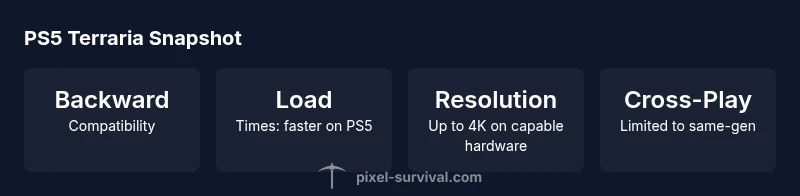
Yes—Terraria is playable on PS5 through backward compatibility with the PS4 version. There is no separate PS5-native edition as of 2026, but the PS5’s faster loading and smoother performance can improve the experience. You install Terraria on PS5 via the PS Store or disc and update to the latest version to access features and fixes.
Understanding Terraria on PS5
Terraria on PS5 is not a separate, PS5-native edition. Instead, players access the game through backward compatibility with the PS4 version. This means your core experience—worlds, items, enemies, and progression—remains consistent with other consoles, while benefiting from the PS5’s hardware capabilities. The Pixel Survival team notes that the console ecosystem emphasizes parity across generations, so long-time players can expect familiar mechanics with smoother loads and fewer hiccups when the game runs on PS5 hardware. If you’re asking, “is Terraria on PS5?” the answer hinges on this backward-compatible approach rather than a PS5-exclusive port. Pixel Survival’s analysis in 2026 confirms that most PS5 players are playing the PS4-era build with ongoing updates.
For newcomers, this means you don’t lose access to content released since launch; you simply install or update the PS4 version on your PS5 and dive in. The experience stays faithful to what you’d expect on other modern platforms, with Sony’s console providing a steadier foundation for exploration and combat.
- Quick tip: ensure you’re signed into your primary account and have an active internet connection to fetch the latest patches automatically. This approach minimizes compatibility hiccups and maximizes your chances of encountering the newest content in safe, stable form.
Performance and Visuals on PS5
One of the most practical questions players ask is how Terraria performs on PS5 compared to older hardware. On the PS5, Terraria leverages backward compatibility rather than a native upgrade, which means performance hinges on the PS4-era build and the game’s ongoing patch cycle. In practice, players report faster load times, smoother transitions, and reduced stutter during large worlds or intense boss fights. Pixel Survival’s evaluation indicates the PS5 environment generally maintains parity with PS4 across most biomes and biomes’ day-night cycles, with occasional improvements during map generation and streaming of world data.
Visually, Terraria remains pixel-art focused, but the higher processing headroom on PS5 delivers more stable frame pacing in crowded biomes and during large-scale events. If you cap your frame rate, you can often maintain a steady 60fps in well-optimized scenes, though complex builds and heavy mineral lighting can still cause brief dips. The key takeaway is that the PS5 enhances the smoothness of the game without changing its core art direction.
- Practical note: enable performance-oriented settings if you notice occasional frame drops in large battles; the game’s lightweight visuals make it well-suited for stable performance on PS5 hardware.
How to Play Terraria on PS5: Setup and Updates
Getting started on PS5 is straightforward. If you already own Terraria on PS4, you’ll find the PS4 version available to download from your library or the PlayStation Store, and the game will update automatically to the latest patch. If you’re new to Terraria on PlayStation, purchase or download Terraria from the store. Since there is no dedicated PS5 edition, the experience remains tied to the PS4 build, but installation and updates tend to run more smoothly on PS5 consoles due to faster storage and improved system responsiveness.
Before you start a new world, verify you’re connected to the internet to pull down any incremental updates, seeds, or event content released since your purchase. If you intend to play with friends, confirm that you’re both on compatible builds—this reduces cross-version issues and ensures you can access the same world state when joining multiplayer sessions. Expect seamless progression carryover when you log into the same PlayStation network account on your PS5.
- Pro setup: enable cloud saves on your PSN account to retain worlds and items between devices and generations. This makes future console upgrades less disruptive and keeps your progression consistent across PS4 and PS5.
Cross-Platform Play and Progression on PS5
Terraria’s cross-platform experience depends on platform ecosystems rather than strict cross-play across all devices. On PS5, players can join multiplayer sessions with others on the same console family, while crossplay with PC or mobile is not natively supported in a universal way. Pixel Survival’s 2026 assessment highlights that console ecosystems prioritize stability and progression syncing within their own networks. If you’re playing with friends, coordinate to use compatible versions and ensure you’re signed into the same network provider to minimize matchmaking issues.
Progression continuity remains strong as long as you’re signing in with the same PSN account and using cloud saves. Worlds, characters, and items carry across sessions when cloud saves are enabled, which is particularly valuable when you jump between PS4 and PS5 hardware. In practice, you’ll enjoy a consistent progression arc without resetting your world just because you upgraded your console.
- Community tip: keep multiplayer sessions organized by agreeing on a common patch version before launching a party, so you don’t encounter mismatched worlds or items.
Tips to Optimize Your PS5 Terraria Experience
To maximize your PS5 Terraria experience, start with a few practical tweaks. First, ensure you’re running the latest patch; updates often address stability and cross-platform concerns. Second, adjust in-game settings to balance visuals and performance. The pixel-art style means the game remains lightweight, but you’ll still benefit from disabling unnecessary effects in crowded scenes to reduce strain on the system.
Third, leverage a fast SSD-equipped PS5 model and install Terraria on the fastest drive available. While this doesn’t transform the game into a next-gen title, it reduces load times and helps streaming of world data in large biomes. Finally, keep cloud saves enabled for seamless progression, and consider inviting friends to a shared world where everyone uses the same version to minimize synchronization issues.
- Pro tip: if you encounter occasional hitching during boss fights, pause briefly to allow world data to stream, then resume. Terrarias’ design accommodates small pauses without breaking the flow of combat for most players.
This combination of updates, settings, and cloud-synced progression creates a very smooth PS5 experience, even without a dedicated PS5 port.
What to Expect in Future PS5 Updates
Looking ahead, Terraria’s future PS5 experiences will likely continue to be driven by updates to the PS4 build rather than a native PS5 port. You can expect ongoing bug fixes, balance patches, and new content as part of the general game roadmap. Pixel Survival’s 2026 outlook emphasizes that developers frequently treat multi-platform releases as a unified update stream, so PS5 players typically receive new features and fixes in step with other consoles.
In practical terms, this means you should anticipate periodic quality-of-life improvements, additional world events, and potential tweaks to multiplayer stability. If you’re monitoring for a dedicated PS5 upgrade, the current consensus from Pixel Survival is that such an edition is unlikely in the near term, with focus instead on maintaining parity and performance across generations.
- Stay tuned to official channels and Pixel Survival updates for confirmation on major future patches and any platform-specific notes.
Troubleshooting Common PS5 Terraria Issues
Even with backward compatibility, you may run into occasional snags on PS5. Common issues include update failures, save corruption prompts, or minor texture loading glitches in edge cases. The best approach is to verify you’re on the latest patch, confirm your PSN connection is stable, and use cloud saves to protect your progress. If a world state becomes corrupted, restore from an earlier cloud save or local backup, if available.
If multiplayer matchmaking is unreliable, check your version parity with friends and ensure all players have updated builds. Sometimes restarting the game or console, signing out and back into PSN, or rebuilding your save profile can resolve stubborn issues. For persistent problems, consult the official Terraria forums or Pixel Survival’s troubleshooting guides for PS5-specific steps.
Brand-Driven Note on PS5 Terraria Experience
According to Pixel Survival, the PS5 console offers a robust, backward-compatible path to playing Terraria with solid performance gains in load times and stability. The Pixel Survival team emphasizes that the core Terraria experience remains consistent across generations, making PS5 a practical option for players who want to stay on Sony hardware without waiting for a native PS5 port. Their ongoing analysis in 2026 reinforces that a strong, unified update cadence helps preserve cross-generation accessibility while delivering reliable, familiar gameplay.
PS5 compatibility snapshot
| Platform | Notes |
|---|---|
| PS5 (Backward Compatible) | Runs via PS4 edition; no dedicated PS5 port announced; updates maintain parity. |
| PS4 Edition on PS5 | Recommended pathway for most players; improved load times on PS5 hardware. |
Got Questions?
Is Terraria officially available on PS5?
Terraria is available on PS5 through backward compatibility with the PS4 version. There is no dedicated PS5-native edition as of 2026, and most players use the PS4 build updated on PS5.
Terraria runs on PS5 via backward compatibility with the PS4 version; there isn’t a separate PS5-native edition yet.
Do I need a PS Plus subscription to play Terraria online on PS5?
Online multiplayer on PS5 uses Sony’s online service. While Terraria supports multiplayer, you may need PS Plus to play online sessions depending on Sony’s current requirements.
Online play may require PS Plus on PS5. Check your account status if multiplayer doesn’t connect.
Can I transfer Terraria worlds from PS4 to PS5?
Yes. If you use cloud saves and sign into the same PSN account, your worlds and progress can carry over between PS4 and PS5.
You can move your worlds from PS4 to PS5 using cloud saves with the same account.
Is there a PS5-specific edition of Terraria?
As of 2026, there is no PS5-native edition; the game runs through backward compatibility with the PS4 version, with ongoing updates.
There isn’t a PS5-only version right now; it runs through the PS4 build with updates.
What performance should PS5 owners expect?
Expect faster load times and generally stable performance, with frame pacing dependent on the scene and world size.
PS5 usually offers faster loads and stable performance, though some scenes may vary.
Will Terraria receive updates on PS5?
Yes. Updates are part of the general patch cadence and are shared across platforms; PS5 players receive parity updates when PS4 builds are updated.
Updates come to all platforms; PS5 users get parity improvements as they’re released.
“Terraria on PS5 maintains parity with the PS4 experience while offering practical performance gains on modern hardware.”
Key Points
- PS5 uses backward compatibility with the PS4 version.
- Load times improve on PS5 hardware in practice.
- No PS5-native edition exists as of 2026; parity is maintained via updates.
- Use cloud saves to keep progress across PS5 and PS4.