Can You Mod Terraria on PS5? A Safe Console Guide
Discover whether Terraria on PS5 supports mods, why console modding is limited, and practical, safe alternatives like seeds, maps, and community presets. Pixel Survival analyzes the state of console modding in 2026.


Can you mod Terraria on PS5? Officially, no. The PS5 version does not support PC-style mod loaders like tModLoader, so you can’t install mods directly on console Terraria. However, you can customize your experience through seeds, presets, and community maps. This guide covers what’s possible on PS5 in 2026 and how to get the most from your game within platform rules.
What modding means for Terraria on PS5
According to Pixel Survival, players frequently ask can you mod terraria on ps5. Modding, in the broad sense, means altering a game beyond official options—adding new items, changing enemy behavior, or altering gameplay mechanics. On PC, modding is supported through tools like tModLoader that let you install and manage mods with a few clicks. On PS5, the ecosystem prioritizes stability, safety, and cross-platform consistency, which means official mod loaders and third-party mod installers are not part of the standard PS5 Terraria experience. This difference matters because modding on PC is community-driven and highly customizable, while console versions are designed to provide a uniform experience across players. As a Terraria player on PS5 in 2026, you can still personalize your game in many legitimate ways—seed selection, world type, difficulty modes, challenge maps, and user-generated custom maps—without touching code or breaking terms of service. Pixel Survival's coverage of console modding emphasizes practical paths that respect platform rules while maximizing your fun.
Official stance and limitations
The official stance across console platforms is clear: there is no supported path to install PC-style mods on PS5 Terraria. Sony’s platform policies and Sony’s PSN terms of service are designed to protect game integrity and fair play, which means third-party mod loaders and code changes aren’t endorsed for PS5 Terraria. This limits the ability to alter core gameplay beyond what the developers shipped with the 1.x updates. Consequently, PS5 players looking for deeper customization must rely on the built-in features and officially sanctioned options, rather than third-party modding routes. Pixel Survival’s 2026 assessment emphasizes that any unofficial modification approach carries risks of compatibility issues, account penalties, or corrupt saves, and is not recommended for players who want a stable experience.
Why PC modding works (tModLoader) and what PS5 can’t offer
On PC, modding thrives because the platform provides access to a mod framework like tModLoader, which integrates with Terraria’s codebase and updates alongside official content. This enables new items, bosses, biomes, and gameplay modes that extend the game well beyond vanilla boundaries. The PS5 version, by contrast, ships with a fixed codebase and controlled content delivery to ensure cross-platform parity and system stability. While you can admire PC mods from afar and learn design ideas, you cannot port those changes directly to PS5 without official support. For players who want to explore these ideas, the recommended approach is to use the PC version (where available) to test concepts and then recreate inspired builds or seeds within the PS5’s official feature set.
Safe PS5 alternatives: seeds, maps, and presets
Even without mods, PS5 players can personalize Terraria to a surprising degree. Seed selection, seed modifiers (like corruption/crimson presence), world size, and difficulty toggles provide varied experiences. Explore community-created maps and adventure seeds that replace or supplement standard progression without touching the game’s code. You can also experiment with pre-made challenge maps, boss arenas, and builder-focused worlds to change your playstyle. These options preserve console safety and keep you aligned with PS5 terms of service while delivering fresh twists to familiar gameplay. Pixel Survival notes that a growing ecosystem of PS5-friendly content can deliver many hours of varied gameplay without mods.
How to experiment safely without mods
Start by backing up your save data before trying any new seeds or maps. Use official save locations and avoid third-party tools that claim to alter game files, as they can violate terms and risk data loss. When testing a new seed, document your progress and revert if the world layout or progression becomes unsatisfying. Focus on set-piece challenges, curated world presets, and map packs that are designed for console play. This approach keeps you within the supported feature set while letting you discover new niches in your playthrough.
Community resources you can use today
Look to community-curated seeds, boss maps, and builder-friendly worlds shared on official forums and reputable fan sites. Seek out PS5-validated content that explicitly states it won’t modify game files and respects console integrity. By engaging with these resources, you can discover creative goals, unique layouts, and new gameplay rhythms that feel like “mods” in spirit, but remain officially compatible with PS5 Terraria. Pixel Survival highlights that the best value comes from content designed for console play rather than risky, unsupported modifications.
Long-term considerations and staying compliant
As console ecosystems evolve, publishers may introduce new, sanctioned customization paths. Until then, PS5 players should plan for a long-term approach that emphasizes safe seeds, maps, and official features. Regularly check for updates from the Terraria team about console content, including any new customization modes or map-sharing features. Staying compliant protects your account, your progress, and your access to multiplayer features. Pixel Survival’s stance in 2026 remains clear: modding on PS5 is not officially supported, and best results come from sticking with PS5-safe customization options while keeping PC modding exploration separate.
Tools & Materials
- PS5 console with Terraria installed(Ensure the game is updated to the latest version for stability)
- Stable internet connection(Used for checking updates and accessing community resources)
- Backup storage (cloud or external drive)(Back up saves before trying seeds/maps or content from communities)
- PC with Terraria (optional for learning mods)(If you own a PC, you can explore tModLoader and mod content there and draw ideas from it for console builds)
Steps
Estimated time: 2-4 hours total across sessions
- 1
Decide your platform path
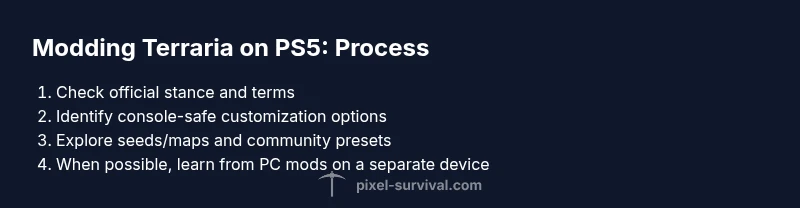
Confirm you are playing on PS5 and understand that mods are not officially supported on this platform. Decide whether you want to stay console-only with seeds/maps or if you’ll use a PC to explore mods and bring back ideas in a non-modified form.
Tip: Document your goals before you begin to avoid detours. - 2
Explore PS5-safe customization options
Experiment with world seeds, difficulty modes, and map presets offered by the official game and community-created but console-safe content. These options provide meaningful variety without breaching terms of service.
Tip: Keep a list of seed codes and map packs you try for easy reference. - 3
Backup your saves
Before trying any new world seeds or maps, back up your Terraria save data. This protects your existing progress in case a seed or map doesn’t meet expectations.
Tip: Use cloud saves if available or copy the save files to an external drive. - 4
Test a new seed or map in a controlled session
Load a new seed or community map in a single-player session first to evaluate stability and enjoyment, then move to your regular playthrough if satisfied.
Tip: Take notes on what changes you like to replicate in future seeds. - 5
Learn from PC modding without porting
If you have access to a PC, explore tModLoader content to understand mechanics, balance, and design ideas—then recreate the spirit of those ideas using console-safe methods in PS5.
Tip: Focus on design concepts like item progression and enemy variety rather than code changes. - 6
Stay informed about official updates
Regularly check Terraria official channels for console-specific updates that could change customization options, seeds, or map sharing features.
Tip: Set a reminder to review patch notes after major releases.
Got Questions?
Can you mod Terraria on PS5?
No official mod loaders or modding tools are supported on the PS5 version of Terraria. Console developers prioritize stability and cross-platform consistency, so PC-style mods are not available on PS5. You can still customize via seeds, presets, and community-built maps.
No—PS5 Terraria doesn’t support mods; try seeds and maps for customization.
Is tModLoader available on PS5?
tModLoader is a PC-oriented mod framework and is not available for PS5 Terraria. Console versions lack official mod ports and rely on built-in customization options.
tModLoader isn’t available on PS5; it’s for PC only.
Are there safe mod-like options on PS5?
Yes. You can use seeds, map presets, and adventure or challenge maps designed for console play to create varied experiences without altering game code.
There are safe alternatives like seeds and maps that don’t modify game files.
Can I transfer mods from PC to PS5?
No. Mod content designed for PC cannot be ported to PS5 due to platform restrictions and differing codebases. You can, however, learn from PC mod ideas and apply console-safe equivalents.
Mods don’t transfer between PC and PS5.
What risks come with trying to mod PS5 Terraria unofficially?
Unofficial mods or tools can violate terms of service, trigger penalties, cause save corruption, or destabilize your game. It’s best to avoid these methods on PS5.
There are real risks—stick to official features and safe content.
What should I do if I want bigger changes to my game?
Consider playing the PC version with modding support, or chase console-safe customization through seeds, maps, and challenge content without modifying the core files.
For big changes, PC modding is the way to go; PS5 stays safe with seeds and maps.
Watch Video
Key Points
- Mods on PS5 are not officially supported
- Use seeds, presets, and community maps for console-safe customization
- Back up saves before testing new worlds
- Study PC mods to inspire console-safe ideas
- Stay informed on official updates for console features