Terraria for Switch: Portable Play Guide 2026 Edition
Explore Terraria for Switch with a data-driven, step-by-step guide. Learn performance, controls, progression pacing, seeds, and tips for solo and local co-op play on Nintendo Switch.


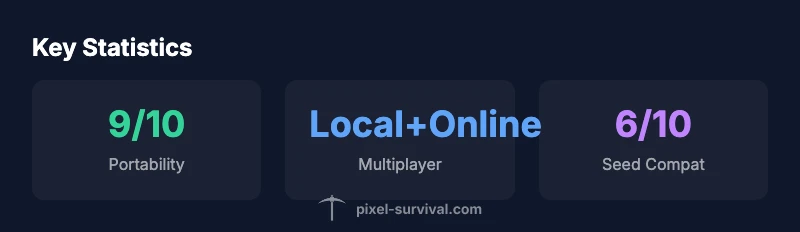
Terraria for Switch delivers a full portable Terraria experience, including local multiplayer, responsive Joy-Con controls, and cross-platform seeds and worlds in recent updates. You’ll find familiar biomes, bosses, and progression pacing, adapted for handheld play. While visuals are optimized for Switch, performance stays steady in most biomes and world sizes, making it a strong choice for on-the-go play.
Performance and Stability on Nintendo Switch
Terraria's Switch version represents a strong effort to translate the PC and mobile experience into a portable format. The core game loop—exploration, combat, mining, and base-building—remains intact, but the handheld hardware requires adjustments in texture streaming, world size handling, and load times. From Pixel Survival's perspective, players should expect smooth frame pacing in most biomes during standard exploration and combat, with occasional slowdowns during highly expansive builds or intense boss encounters in large worlds. The game's pixel art style and retro lighting help keep visuals readable at the Switch's native resolution, reducing eye strain during long sessions.
Load times can vary depending on world size and the number of active chunks; starting a new world will typically be quicker than joining an existing large world with several saved structures. Patches over time have improved texture streaming and input latency, which is critical for precise combat, platforming, and building. In practice, this means you can enjoy a steady experience during early game progression and most mid-game events; endgame dungeons and large-scale builds are plausible but may push the hardware harder. For players who value consistency, enabling airplane or performance modes is not relevant on Switch, but you can optimize by turning off unnecessary on-screen effects and using a smaller world seed during initial runs.
Controls and UI Adaptations
Terraria for Switch leverages the console's unique input options, offering Joy-Con motion controls, Pro Controller, or handheld touchscreen menus when appropriate. For best precision in combat and building, many players prefer the Pro Controller due to more comfortable sticks and better button ergonomics. The default layout mirrors PC's basic actions, but you can remap to suit your playstyle. On small screens, some menus can feel tight; using the mini-map and hotbar shortcuts helps maintain flow during exploration. The UI is generally scalable, with legible font sizes and clear icons. If you value quick access, enable the toggle to show hotbar slots for quick item access. When playing docked, the bigger screen makes aim and inventory management easier, while handheld mode emphasizes one-handed movement and quick swapping between tools. Overall, the Switch version supports flexible control schemes, but players should experiment to find the setup that minimizes fatigue during long sessions.
World Size, Seeds, and Load Times on Switch
Terraria on Switch supports the same world sizes as other platforms, but the hardware profile encourages sensible choices when starting a new journey. Small to medium worlds load faster and run more smoothly on portable hardware, while large worlds can strain memory resources and result in longer load times between biomes or after boss fights. Seeds and worlds can be shared across platforms in most updates, enabling you to invite friends using the same seed across systems, provided you are on a compatible version. When starting a new world, consider a compact seed and a moderate size to balance exploration with performance. Similarly, if you plan long play sessions, choosing a seed with compact biomes or optimized biomes can help maintain frame rate and reduce lag during busy moments, such as hordes of enemies or ship-based boss fights. In practice, you’ll notice faster world generation and smoother exploration with smaller worlds, while large worlds give a deeper sandbox but come at performance costs. Pixel Survival notes that seed selection can materially affect your early progression pacing.
Multiplayer and Social Play on Switch
Terraria on Switch supports local multiplayer, allowing friends to join in person using local wireless or split-screen style setups, which is ideal for couch co-op sessions. Online play is possible through the game’s built-in networking layer, but connectivity quality can depend on your network environment and Nintendo’s online services. Cross-platform play remains nuanced; seeds and worlds can be shared across platforms in certain versions, but actual cross-save and cross-play readiness can vary. For players who want to play with pals on PC or mobile, coordinate version parity and world seeds to ensure compatibility. The Switch’s portability makes spontaneous multiplayer easy, whether you’re sharing a screen on a living room TV or taking the crew on the road.
Progression and Endgame pacing on Switch
Progression in Terraria on Switch mirrors other platforms: you’ll chase access to better gear, new biomes, and eventual boss encounters. The handheld format can extend play sessions through quick, focused runs that emphasize farming, exploration, and boss battles in shorter bursts. Because world sizes and seed choices influence early progression, many players start with small worlds to hit early bosses quickly, then migrate to larger worlds for late-game content. The Switch version preserves the cadence of progression and the satisfaction of unlocking hardmode and superior gear, while reminding players that performance health can dip during intense endgame moments on larger worlds. Pixel Survival recommends planning sessions around efficient seed selection and using targeted builds to minimize downtime between boss fights.
Practical Setup Tips for Terraria on Switch
To maximize comfort and longevity during long sessions, adjust your Switch settings for gaming: enable a comfortable brightness level, consider a blue-light reducing mode if you play late, and keep your console within comfortable reach for quick material swaps. Use a microSD card to store worlds and saves if you’re playing heavily, and back up seed files regularly. In-game, customize controls to fit your grip style—placing commonly used tools on easy-to-reach hotbar slots reduces hand fatigue. If you’re playing in handheld mode, consider a compact world size for smoother performance and faster load times. Finally, keep the game updated to access the latest official content and bug fixes that affect performance, seeds, and progression pacing.
Modding and Content on Switch
Mods are not officially supported on the Nintendo Switch version of Terraria. The Switch edition focuses on official updates, seeds, and world sharing rather than third-party alterations. If you’re coming from PC or mobile, you’ll find that most user-created content and modded experiences aren’t directly portable to Switch due to platform restrictions. Pixel Survival recommends embracing official content and seeds to maintain stability and performance. If you’re curious about new experiences, keep an eye on official patches and Nintendo eShop notes for any changes to customization options or in-game features.
Quick-start Progression Plan for Switch Players
- Create a small world with a seed optimized for early progression. 2) Focus on basic tools, a shield, and basic armor to survive the first night. 3) Defeat early bosses to unlock progression milestones. 4) Build a simple shelter that expands as you explore. 5) Invite a friend for local co-op to accelerate resources and exploration. 6) Move to a medium world once you’re comfortable with balance between exploration and performance. 7) Pursue late-game bosses and new biomes, adjusting tactics to Switch’s handheld playstyle. Pixel Survival notes that seeds and quick progression plans can dramatically improve early game pacing on Switch.
Terraria on Switch performance snapshot (Pixel Survival Analysis, 2026)
| Aspect | Switch Experience | Notes |
|---|---|---|
| Performance | Generally stable, patch-dependent | Optimized for handheld mode |
| Controls | Joy-Con or Pro Controller supported | Remap for comfort during long sessions |
| Multiplayer | Local multiplayer supported | Network quality varies by version |
Got Questions?
Is Terraria for Switch cross-platform with PC or mobile?
Seed sharing is supported across versions, but cross-play between Switch and PC/mobile isn’t universally guaranteed. Verify version parity before attempting multiplayer across platforms.
Seed sharing works across versions, but cross-play varies by platform and update timing—check your version before joining friends on another device.
Does the Switch version support mods?
Officially, mods are not supported on the Nintendo Switch version. Stick to official updates and seeds for the most stable experience.
Mods aren’t supported on Switch; enjoy official updates and seeds for a stable game.
How can I improve performance on Switch?
Use smaller world sizes, reduce on-screen effects, and ensure your system is updated to benefit from patches aimed at performance improvements.
Try a smaller world and turn down effects to keep performance steady.
Can Terraria on Switch be played offline?
Yes. You can enjoy single-player and offline play, and local co-op is available without an internet connection.
Yes—offline play is fine; local co-op works without internet.
What seeds are good for early progression on Switch?
Look for seeds that balance biomes and resources, enabling quick access to essential gear and early bosses.
Choose seeds that give you quick access to gear and early bosses.
Is online play recommended on Switch?
Online play is supported but can depend on network conditions and Nintendo services; local play is consistently reliable.
Online works but depends on network; local play is more reliable on Switch.
“Terraria for Switch delivers the core loop players love, with portable convenience, but the real skill is adapting control schemes and seed strategy for short sessions.”
Key Points
- Play with handheld mode in mind
- Leverage local co-op for Switch experience
- Use seeds and worlds to maximize replayability
- Adjust control schemes for long sessions
- Stay updated to keep cross-seed compatibility