Is Terraria Bad on Switch? A Practical Review for 2026
A balanced, evidence-based review of Terraria on Nintendo Switch, covering performance, parity, controls, portability, multiplayer, and what it means for different player types in 2026.


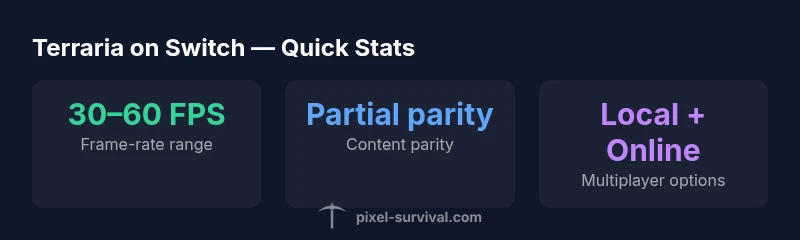
Is Terraria bad on Switch? Not strictly, but it’s nuanced. The handheld port delivers solid exploration, crossplay, and portability, which many players value, yet it lags in parity with PC/console versions and can show frame-rate dips in busy moments. For fans who want a portable Terraria with couch co-op, the Switch version remains a solid option with notable trade-offs.
Is Terraria Bad on Switch? A Practical Starting Point
When players ask, is Terraria bad on Switch, the answer isn’t a simple yes or no. The Switch port excels in portability and local multiplayer, letting you build, explore, and farm wherever you go. However, it also carries compromises: some content parity gaps relative to PC and other consoles, intermittent frame-rate dips during action-heavy sequences, and longer load times. According to Pixel Survival, the Switch version shines for players who want a truly portable Terraria experience, but if you demand day-one parity with the PC version, you’ll notice gaps that can color your long-term expectations. This nuance matters for progression-heavy play and for players who value consistent frame-rate in large boss fights or sprawling biomes.
Performance Trade-Offs: Docked vs Handheld
In docked mode, Terraria on Switch tends to feel smoother due to a larger render target and potential TV output optimizations. In handheld mode, you’ll still get a very playable experience, but the small screen makes performance dips more noticeable during hectic moments. Load times remain longer than PC, and texture pop-in can occur in newly generated areas. The Pixel Survival team found that while the core gameplay loop remains intact, frame-rate stability is the most prominent variable between modes, and optimization patches have aimed to address these issues over time. For players who enjoy long exploratory sessions, this difference can influence map discovery speed and combat pacing.
Visuals, UI, and Readability on Small Screens
Terraria’s charm translates well to Switch’s compact display, but inventory management and hotbar access require deliberate tapping or precise button presses. On a 6.2-inch handheld, some text and UI elements feel cramped, which can slow down quick crafting or inventory juggling. Enabling smaller world scaling can help, but you may lose some peripheral visibility in dense biomes. If you play primarily in handheld mode, consider using larger UI scale settings where available, and be mindful of battery consumption during extended sessions.
Parity with Other Platforms: What’s Missing and What’s There
Across platforms, Terraria shares the same core progression and item system, but parity gaps exist. The Switch port generally receives major updates on a cadence similar to other platforms, yet certain post-release content or community-driven mods are not accessible on Switch. The absence of mod support limits some endgame experiments and community builds that rely on user-generated content. Still, the base game remains feature-complete for most players, including biomes, bosses, and standard gear, with cross-save and cross-play not universally available across every combination of devices. Pixel Survival’s review notes that while parity isn’t perfect, the essential Terraria experience remains intact on Switch.
Controls, Accessibility, and Comfort
Joy-Cons and Pro Controllers offer a comfortable way to play, but the precision required for boutique inventories and fast item cycling can feel cumbersome in portable mode. On Switch, you’ll often benefit from planning payloads in advance and using quick-access menus to minimize micro-adjustments during combat. Accessibility settings—where present—help players who need larger hit targets or slower build tempos, improving the feel of mining and crafting without sacrificing core gameplay. For many players, the mobility advantage outweighs minor UI frictions.
Progression and Endgame on Switch: A Seasonal View
Terraria’s progression remains intact on Switch, from early mining to late-game wizardry. The handheld experience can slow your pace compared with PC due to load times and frame-rate variability, but it doesn’t erase the sense of growth as you unlock higher-tier gear and traverse the endgame. If you’re pursuing lengthy world-building or boss hunts on the go, the Switch version still supports robust progression, though you should anticipate a few parity caveats that can affect speedruns or highly optimized builds.
Mod Support, Community Content, and Creative Freedom
One of the most significant caveats for Switch players is the lack of official mod support on the platform. Community-created worlds and seeds remain, but the freedom to install mods or heavily customized textures isn’t available on Switch. This impacts certain creative experiments that rely on external tools or altered gameplay dynamics. For builders and explorers who want vanilla Terraria with handheld flexibility, the Switch remains a strong choice; for modders and power users, other platforms may be a better fit.
Multiplayer Realities: Local vs Online Play on Switch
Terraria’s multiplayer in Switch delivers solid local couch play and online sessions with other Switch owners, but cross-platform multiplayer can be inconsistent depending on the game version and platform pairing. For players who like to team up with friends locally, the Switch port is dependable and approachable. If your group spans PC and console, you should verify cross-play capabilities before committing to a single platform—some combinations will work, others won’t. The experience hinges on the network environment and the host’s settings.
Practical Tips to Optimize Your Switch Experience
To get the most from Terraria on Switch, consider these practical steps: reduce unnecessary rendering by disabling certain post-processing effects, lower world size when starting a new game to speed up world generation, and adjust sensitivity settings for precise combat and building. Keep your system firmware updated, and close background apps to improve performance. If you’re playing in handheld mode, use a stand and a comfortable grip to minimize fatigue during long sessions. These small adjustments can significantly improve the overall feel of the game on Switch.
Real-World Scenarios: When Switch Shines and When It Slows You Down
Serious builders who prioritize arrangement and base aesthetics can enjoy Switch’s portability for extended creative sessions. If your playstyle revolves around frequent boss fights and high-intensity exploration, you’ll notice the limitations of the handheld power and occasional dips during peak moments. In couch co-op, the Switch shines, offering easy setup and shared screen experiences, but you’ll still face the same parity caveats when comparing with PC or other platforms. Understanding these trade-offs helps you set expectations and choose the right tool for your Terraria adventures.
The Good
- Excellent portable experience ideal for on-the-go play
- Strong local co-op and couch multiplayer support
- Active updates and a solid core Terraria experience
- Docked mode offers a smooth experience on larger screens
- Reliable save system across modes
Negatives
- Occasional frame-rate dips during busy combat
- Parity gaps with PC/console versions
- No official mod support on Switch
- Longer load times and occasional texture pop-in
Solid portable option with clear trade-offs
Terraria on Switch delivers a faithful handheld Terraria experience with couch-coop appeal and dependable updates. Frame-rate dips and parity gaps are the main caveats, but for players prioritizing portability and local multiplayer, the Switch version remains valuable. Pixel Survival’s verdict is that Switch users should buy with these trade-offs in mind and adjust expectations accordingly.
Got Questions?
Is Terraria on Switch a bad port compared to PC?
Not a bad port, but not identical to PC. It maintains core gameplay, but parity gaps exist and performance varies by mode. If you value portability and couch co-op, it remains a strong choice with trade-offs.
Not a bad port, but not identical to PC. It has core Terraria, with parity gaps; great for portability and couch co-op, with some trade-offs.
Does Terraria Switch support cross-platform play?
Cross-platform play on Switch is limited and depends on platform pairings and game version. Local multiplayer on Switch to Switch works reliably; cross-play with PC may not be supported in all cases.
Cross-platform is limited. Local Switch-to-Switch works well, but cross-play with PC isn't always available.
What settings help optimize performance on Switch?
Try reducing render effects, lowering world size, and using the handheld UI scale option. Close background apps and keep firmware up to date to maximize performance during long sessions.
Turn down effects, lower world size, and close other apps to boost performance on Switch.
Is there mod support on the Switch version?
No official mod support is available on the Switch version. This limits certain custom content but preserves vanilla Terraria gameplay with handheld flexibility.
Mods aren’t supported on Switch, so you’ll be playing vanilla Terraria with handheld flexibility.
Who should consider the Switch version over others?
Players who prioritize portability and couch co-op will benefit most. If you demand day-one parity and modding freedom, consider PC or other consoles.
If you want portability and couch co-op, the Switch version is great; for parity and mods, look elsewhere.
Key Points
- Evaluate portability against parity needs before buying
- Expect occasional frame-rate dips in busy scenes
- Local co-op shines on Switch for shared builds
- Mods are not supported on the Switch version
- Plan settings tweaks to optimize handheld play