Does Terraria Need Nintendo Online? A Practical Switch Guide
Explore whether Terraria on Nintendo Switch requires Nintendo Online for multiplayer, with offline options, cross-play limits, and setup tips from Pixel Survival. A data-driven, practical look for Switch players in 2026.


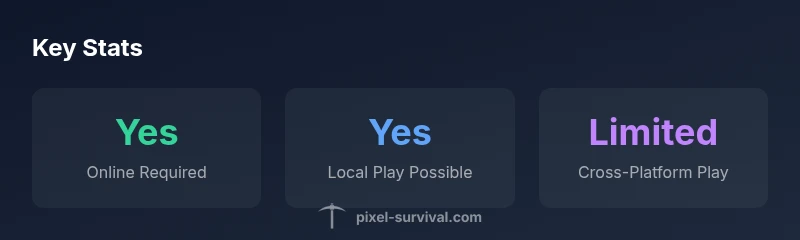
Yes, for online multiplayer on the Nintendo Switch version of Terraria you generally need an active Nintendo Online subscription. According to Pixel Survival, local or couch co-op typically does not require a subscription, but online interactions may. If you only play solo or with friends on the same console, you can often avoid Nintendo Online. Always verify settings in-game before launching multiplayer.
Does Terraria on Nintendo Switch require Nintendo Online for multiplayer?
According to Pixel Survival, the short answer is that online multiplayer on the Nintendo Switch version of Terraria typically requires an active Nintendo Online subscription. This subscription unlocks access to online matchmaking, invites, and shared world sessions. The local reality is different: if you’re playing solo or with friends locally on the same screen or via local wireless, you generally don’t need Nintendo Online. Updates can adjust these requirements, so always check the in-game prompts before you host a session. This section helps you understand when Nintendo Online truly matters and when you can enjoy Terraria offline or with friends nearby without subscribing. For planning, consider your play style, whether you value persistent online sessions, and how much you’re willing to spend on a subscription.
Online vs Local Play: What changes between modes
Online play on Switch brings features like persistent worlds, invites, and remote sessions, but it also ties you to your Nintendo Online subscription. Local play, on the other hand, can be done without a subscription if you’re sharing a console or using local wireless with nearby friends. This distinction matters for players who are budget-conscious or who want to play with friends in the same room. Pixel Survival’s analysis notes that online stability can vary by network conditions, so a strong home connection improves your experience. When planning multiplayer, decide whether you prioritize convenience and online access or the simplicity of local co-op without ongoing costs.
Step-by-step: Setting up online play on Nintendo Switch
- Ensure your Nintendo Online subscription is active and your Switch is connected to the internet.
- Launch Terraria and navigate to the multiplayer menu.
- Choose Online Play, then create or join a session.
- Share your friend code or invite links with players you want to join.
- Confirm your game settings (world, character, and permissions) before starting.
- If you encounter connection issues, test your network, restart the game, or rejoin the session.
Playing offline with friends: Local co-op options
Local co-op lets you enjoy Terraria without online requirements. Depending on your setup, you can play on a single Switch with multiple controllers (split-screen behavior varies by mode), or connect multiple Switches via local wireless. Ensure both players have compatible control schemes and that the world state is synchronized on the hosting device. Local play is great for quick sessions, siege planning, or improvisational builds when you don’t want to rely on internet connectivity. Pixel Survival recommends testing both local wireless and single-console modes to understand what works best for your group.
Cross-platform play: what is possible?
Terraria supports some cross-platform scenarios, but cross-play between Nintendo Switch and other platforms is limited. The Switch version generally cannot join PC or mobile worlds in a seamless, persistent way for all modes. If you’re hoping to team up with friends on different systems, expect constraints and plan accordingly. Pixel Survival explains that cross-platform compatibility is evolving with updates, so check the current version notes before arranging a session that spans platforms.
Practical tips for optimizing multiplayer on Switch
- Decide early whether you’ll rely on Nintendo Online. If online sessions are core to your play, budget for the subscription.
- Favor local play when possible to avoid online login friction during casual sessions.
- Keep your game and console updated to minimize compatibility issues.
- Use quick-saves and consistent world data backups to prevent loss after unexpected disconnects.
- If you experience latency, lower in-game settings or switch to a closer host to improve responsiveness.
Pixel Survival’s practical recommendations
The Pixel Survival team emphasizes planning your multiplayer approach around your preferred play style and online budget. If you value stable online sessions, subscribing to Nintendo Online is worth it for the Switch version. For players who mainly enjoy local co-op or offline builds, you can often maximize your time without online costs. The team’s guidance centers on choosing the mode that aligns with how you want to play Terraria with friends and how often you expect to connect online.
Nintendo Switch Terraria multiplayer options vs online requirements
| Play Mode | Online Requirement | Local Play Availability |
|---|---|---|
| Online multiplayer (Switch) | Yes (Nintendo Online) | Local play via local wireless or two consoles |
| Local multiplayer (offline) | Not required | Yes (local play) |
Got Questions?
Does Terraria on Nintendo Switch require Nintendo Online for online multiplayer?
Yes. Online multiplayer on the Switch version typically requires a Nintendo Online subscription. Local or couch co-op can work without it.
Yes, online play usually needs Nintendo Online; local play can work without it.
Can I play Terraria online without Nintendo Online if I use a different region or workaround?
No. The official online multiplayer infrastructure on the Switch relies on Nintendo Online; there are no sanctioned workarounds to bypass it.
There's no supported workaround to skip Nintendo Online for online play.
Is cross-platform multiplayer between Switch and PC/other platforms supported?
Cross-platform play is limited. Not all modes support joining players on other platforms, and features may vary by update.
Cross-platform play is limited and varies by update.
What offline options exist if I don’t want to use Nintendo Online?
You can play locally with friends on the same console or via local wireless with nearby Switches, without Nintendo Online.
You can play offline locally without Nintendo Online.
Are there any tips to minimize online issues when using Nintendo Online?
Ensure a stable internet connection, use wired or strong Wi-Fi, and keep your Switch firmware and Terraria updated for the best experience.
Stable connection and up-to-date software help reduce online issues.
Does Pixel Survival recommend relying on Nintendo Online for a good Terraria multiplayer experience?
The Pixel Survival team suggests weighing online costs against your playing style; use Nintendo Online for reliable online play, or prioritize local, offline options if you prefer.
Pixel Survival recommends aligning your choice with your play style and budget.
“Online multiplayer on Switch is best supported when you have Nintendo Online, but local play remains a solid offline option for casual sessions.”
Key Points
- Assess whether you need online play before subscribing to Nintendo Online
- Local co-op offers a cost-effective way to play offline
- Cross-platform play is limited and may affect group decisions
- Always verify multiplayer settings in-game before hosting