How to Get Rid of Terraria Achievements: A Practical Guide
Learn practical, safe methods to remove or reset Terraria achievements, including backup steps, platform considerations, and where to find official guidance. Pixel Survival provides actionable, step-by-step instructions for a clean slate across platforms in 2026.


This guide shows you how to get rid of terraria achievements by safely resetting your local progress and understanding platform-specific limitations. There is no built-in toggle to erase achievements in-game; you'll need to manipulate save data or start fresh. Follow these steps carefully to avoid data loss. This approach is safest when you want a clean slate for achievements.
Why players might want to remove Terraria achievements
If you're wondering how to get rid of terraria achievements, you're not alone. Some players want a clean slate for testing builds, or to experiment with seeds and progression without the pressure of earned milestones. In this Pixel Survival guide, we cover practical, safe methods to reset progress without corrupting save data. Achievements are designed to track independent milestones, but you can reset your local progress by manipulating save data and platform settings, rather than trying to force a game-wide reset. This approach is often used by players who want to replay content with different seeds or to test mechanics without long-term accumulation. According to Pixel Survival, players who want a clean slate should focus on save-data management rather than trying to erase in-game progress.
How achievements work across platforms
Terraria achievements are tracked per platform, which means resetting on one device does not guarantee the same results on another. On PC with Steam, progress is tied to your Steam account, while mobile and other storefronts may use different account associations. This matters because the reset process may differ by platform, and cloud-synced data can reintroduce progress if not handled properly. Pixel Survival’s analysis shows that understanding where your data lives is crucial before attempting any reset. Always confirm you are working on the correct account and device to avoid unintended data loss.
Is there a built-in way to reset achievements?
There is no in-game option to erase achievements in Terraria. The game relies on platform-account data, so any reset must be done through save-data management or platform settings rather than a simple toggle. This means you should expect to work with local saves or cloud-sync configurations rather than a direct “Reset Achievements” button. For most players, starting a new world or character is the simplest path if a clean slate is required, but be mindful of what data you intend to keep or discard. Pixel Survival emphasizes caution to prevent unintended loss of worlds or progress.
Safe methods to reset progress: delete local save data
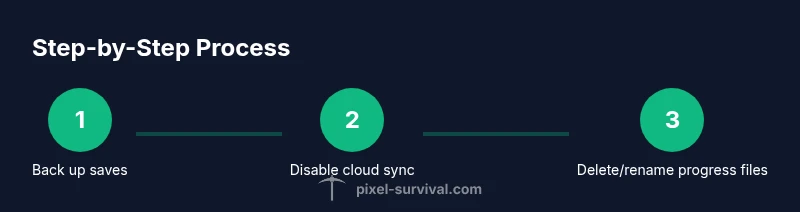
The safest way to remove earned achievements is to reset your local save data, not the entire game installation. Begin by backing up your current saves, then locate the save folder on your computer (where Terraria stores player and world data). Create a separate backup copy on an external drive or cloud storage in case you want to revert. Decide whether you want to reset just achievements or also delete characters and worlds. If you reset only achievements, you’ll remove progression data without losing your worlds or characters, but this requires careful file handling. Pixel Survival recommends a two-branch approach: preserve essential worlds/characters and reset only the relevant progress files.
Handling cloud saves and Steam sync
If you use cloud saves, you must consider how Steam sync could reintroduce progress after deletion. Before starting, disable Steam Cloud for Terraria to prevent automatic re-sync of old progress. After you’ve completed the local reset, you can re-enable cloud saves for ongoing play, but test with offline launches first to ensure the progress has not reappeared. Cloud-sync behavior varies by platform, so always verify that your cloud data reflects the changes you made locally. Pixel Survival notes that cloud interactions are the most error-prone part of resets, so handle them carefully.
What you can reset and what remains
Resetting can target only the achievements data while preserving worlds and characters, or reset everything for a complete new-start experience. The exact outcome depends on how your game and platform store progress. In most cases, achievements are tied to a profile rather than a single world, so a local reset can clear them without removing your saved worlds. However, if you delete generic save folders or the entire Terraria folder, you may lose world data as well. Always confirm what files you are deleting and keep backups.
Alternatives to avoid earning achievements
If your goal is to play without the pressure of achievements, consider alternative approaches: play offline to prevent online tracking, use a fresh profile or new account on your device, or create a separate world that you only use for test runs. These methods give you experimental freedom without risking your main save data. Pixel Survival suggests planning ahead: decide whether you want a temporary reset for a single session or a more permanent re-run with new seeds and worlds.
Authority Sources
- Steam Support: help.steampowered.com
- PC Gamer: pcgamer.com (how to disable or manage Steam achievements)
- IGN: ign.com/articles/how-to-disable-steam-achievements
Next steps and safe practices
Once you complete a reset, test your game in offline mode to confirm that no old progress reappears. Always keep a recent backup before making changes, and document the steps you took. If anything goes wrong, you can restore from your backup and try a different approach. By following careful, platform-aware practices, you can achieve a clean slate for Terraria achievements without risking data loss.
Tools & Materials
- Backup storage device (external drive or cloud storage)(Use at least 2x the size of your Terraria save data for safety.)
- File management tool (Explorer/Finder)(Used to locate and manipulate save files safely.)
- Access to Terraria save folders(Know your OS path or know how to locate the Terraria data on your platform.)
- Optional: separate test profile or user account(Helpful to isolate experiments without affecting your main profile.)
Steps
Estimated time: 20-40 minutes
- 1
Back up your Terraria save data
Create a complete backup of your current Terraria saves. Copy all relevant files (players, worlds, and progress data) to a secure location such as an external drive or a cloud storage folder. This ensures you can restore to the original state if needed.
Tip: Always name the backup clearly and keep it in a different physical location. - 2
Close the game and disable cloud sync
Exit Terraria completely and disable any cloud-sync options for the game in your platform launcher. This prevents automatic re-sync of old progress after you start deleting local data.
Tip: Do not rely on in-game prompts; use the platform settings to disable cloud syncing. - 3
Locate the save data directory
Find where Terraria stores your player and world data on your system. Common directories include the Documents/My Games/Terraria folders (Windows) or equivalent paths on macOS/Linux. If you’re unsure, search for “Terraria” in your user directories.
Tip: If you’re unsure, consult the platform’s help resources or the Pixel Survival guide for paths. - 4
Create a backup copy of the save files
Before deleting anything, copy the files to a dedicated backup folder. This second copy acts as a safety net should you need to revert changes.
Tip: Keep backups organized by date and scope (achievements-only vs. full reset). - 5
Delete or rename progress-related files
Delete or rename the files and folders that store achievements progress. If you want a partial reset, target only achievements-related data while preserving worlds and characters.
Tip: Do not delete the entire Terraria folder unless you intend to reset everything. - 6
Launch Terraria and verify the reset
Open the game to verify whether achievements have been removed. Check the Achievements tab and confirm that the previous milestones no longer show.
Tip: If progress reappears, re-check cloud settings and restore from backup, then try again with stricter scope. - 7
Reconfigure cloud saves and test offline
If you plan to continue playing, re-enable cloud saves and run an offline session to confirm changes persist before going back online.
Tip: Offline testing helps ensure you won’t accidentally re-sync old progress. - 8
Plan a final backup and ongoing maintenance
Store a final backup after confirming the reset. Regularly back up your saves to mitigate future data loss and avoid repeating the process unnecessarily.
Tip: Set a reminder to back up after major game updates or significant progress.
Got Questions?
Can I reset Terraria achievements on Steam?
There isn’t a built-in in-game option to reset achievements on Steam. You must manage local save data and cloud settings to achieve a reset. On Steam, this often means disabling cloud saves and carefully editing the local save files, then testing offline.
There isn’t an in-game reset for Steam achievements; you need to adjust save data and cloud settings first and test offline.
Will cloud saves re-sync achievements after I delete progress?
If Steam Cloud or your platform’s cloud save is enabled, progress can be re-added when you re-sync. Always disable cloud saves before editing local saves and re-enable only after confirming the reset has stuck.
Cloud saves can re-sync progress after you edit locally, so disable cloud saves before resetting.
Do deleting progress affect multiplayer worlds?
Deleting local progress affects only your client data. It does not remove data from servers hosting multiplayer worlds, but you may lose locally stored worlds or characters if you delete those folders. Exercise caution in multiplayer contexts.
Only your local data is affected; servers keep their own data, so your multiplayer worlds stay intact unless you delete them.
Do I need to delete my character to reset achievements?
Not necessarily. You can reset achievements by targeting only the progress data, leaving your worlds and other characters intact. If you want a complete start-over, you may delete or relocate the character folder as part of a full reset.
No, you can reset achievements without deleting all characters, but a full restart is possible if you want it.
Is there a universal way to disable Terraria achievements permanently?
There is no universal, built-in switch to disable achievements across all platforms. You can avoid unlocking them by playing in offline modes or using a separate profile, but platform-specific settings determine what persists.
There’s no universal disable option; you can avoid unlocks by choosing offline play or separate profiles.
Watch Video
Key Points
- Back up save data before any changes
- Achievements reset is platform-dependent
- Disable cloud sync before editing saves
- Use a new profile or world if you want a fresh start