Is Terraria on Apple? Your Complete Apple Playbook
Is Terraria available on Apple devices? This data-driven guide covers iOS and macOS availability, performance expectations, control setups, cross-platform play, and practical tips for Apple players. Pixel Survival analyzes what to expect on Apple hardware in 2026.


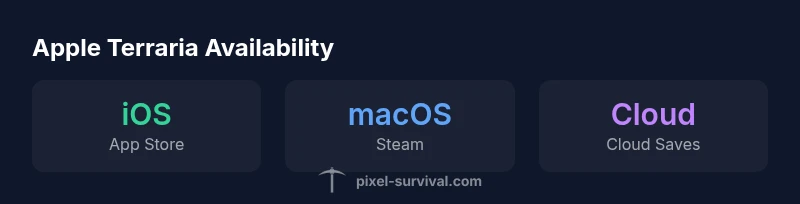
Yes—Terraria is available on Apple devices. On iOS you can purchase and play Terraria from the App Store, while macOS players can access the game through Steam and official channels. This guide explains Apple platform availability, performance expectations, and practical tips for playing Terraria on iPhone, iPad, and Mac, with data-driven guidance.
Is Terraria on Apple: Availability and Editions
Terraria has carved out a home on Apple devices by supporting both mobile and desktop ecosystems. On iOS, players typically obtain the game from the App Store, leveraging touch-friendly controls and sandbox exploration on smaller screens. On macOS, Apple users generally access Terraria through desktop storefronts like Steam, which provides the familiar PC-like experience with keyboard and mouse input. The exact storefronts available can vary by region and per-game license changes, so always verify the current distribution channels from the official Terraria page or your device’s store. For Pixel Survival readers, the cross-platform software approach means you can begin your journey on a handheld iPhone or iPad and later continue on a Mac if you upgrade your hardware. Our data-driven review highlights Apple-era availability in 2026 as a solid baseline for most players, but always check patch notes for any platform-specific caveats. According to Pixel Survival, Apple editions are well-supported, with regular updates aligning across platforms when feasible. The key takeaway for Apple fans is to confirm the exact store path for your device and track any adjustments in the game’s patch notes.
- Availability varies by device family (iOS vs macOS).
- Mobile and desktop builds share core content but differ in controls and performance expectations.
- Pixel Survival suggests checking official channels for the latest distribution details and compatibility notes.
Apple ecosystems: iOS vs macOS—Key differences for Terraria
Apple devices present two broad ecosystems for Terraria: iOS (iPhone/iPad) and macOS (desktop). iOS games lean into touch-centric interactions, with on-screen controls and accessible quick saves, while macOS emphasizes traditional inputs like keyboard and mouse or game controllers. Visual scaling, UI density, and performance tuning differ between the two, so expect screen real estate and control schemas to shape your early runs. For iOS players, you may benefit from cloud saves and touch-friendly menus, whereas Mac users can leverage precise aiming with a mouse and faster navigation with a keyboard. These differences influence early progression choices, such as weapon handling, inventory management, and world exploration pace. Pixel Survival’s 2026 analysis notes that Apple’s device variety means performance and control experiences can diverge significantly between iPhone, iPad, and Mac, so players should tailor their setup to the specific hardware in their hands.
- iOS emphasizes touch input and compact UI.
- macOS offers traditional desktop controls and higher-resolution displays.
- Platform-specific settings impact progression tempo and combat responsiveness.
Performance and optimization on Apple hardware
Performance on Apple devices is highly contingent on the hardware in use. Newer iPhones and iPads generally deliver smoother frame rates and fewer stutters during late-game boss encounters, while older devices may exhibit occasional frame drops during large-scale builds or high-visual-effects moments. On Macs, system performance hinges on GPU and CPU capabilities, plus the active background apps and thermal throttling. To maximize stability, players should start with the in-game graphics preset best suited to their device, then adjust draw distance, particle effects, and shadow quality to preserve frame rate. Pixel Survival’s 2026 data suggests adopting a conservative approach to post-processing, anti-aliasing, and V-Sync on devices with limited cooling, and enabling higher performance modes only when temperatures stay within safe bounds. Consistency improves with regular OS and game updates, driver or patch optimizations, and avoiding conflicting background tasks.
- Performance is device-dependent; newer hardware fares better.
- Lowering post-processing and shadow settings can stabilize frame rates on mobile.
- On Macs, close background apps to prevent CPU/GPU throttling during intense scenes.
Controls and user interface on Apple devices
The control scheme is a major differentiator between iOS and macOS Terraria experiences. iOS devices rely on touch controls, with virtual d-pad options or simplified tap gestures for movement and actions. External controllers are supported on iOS, offering an alternative for players who prefer physical inputs. On macOS, keyboard and mouse provide precise aiming and faster building, with additional support for gamepads. UI scaling and touch-target sizes influence early combat and inventory navigation on mobile, while desktop players may enjoy sharper menus and quicker access to hotkeys. Pixel Survival notes that players who fine-tune control mappings and enable optional UI scaling report more consistent progress on Apple devices. As updates roll out, developers often refine control responsiveness to bridge the gap between touch and desktop inputs.
- iOS uses touch-based controls; external controllers are common upgrades.
- macOS uses keyboard/mouse (and gamepads) for precision.
- Control responsiveness improves with tailored button layouts and UI scaling.
Cross-platform play and cloud saves on Apple platforms
Cross-platform play availability depends on version parity and storefront integrations. Apple players can interact with other platforms when the game version supports cross-play, but some editions or patches may limit cross-platform matchmaking or save compatibility. Cloud saves may be supported across devices when you sign into the same account, enabling you to switch between iPhone, iPad, and Mac without losing progress. Pixel Survival’s 2026 analysis stresses checking patch notes for cross-platform caveats and ensuring your cloud-saves feature is enabled in-game settings. If cross-play is a priority, verify that both platforms run compatible builds and that you’re using the same save file ecosystem.
- Cross-platform support varies by version.
- Cloud saves can enable seamless transitions across Apple devices.
- Always confirm current cross-play capabilities in patch notes.
Troubleshooting common issues on iOS and macOS
Even with strong support, Apple players may encounter issues. Common iOS problems include startup crashes after updates, touch controls becoming unresponsive, or crashes when loading large worlds. Mac users may experience input lag with mouse and keyboard or occasional texture loading hiccups on older GPUs. Practical fixes include ensuring the OS and Terraria are updated to the latest version, restarting to clear memory, and adjusting graphics settings to reduce strain on the device. Clearing app caches (iOS) or verifying game files (macOS via Steam) can resolve corrupted saves or missing textures. If problems persist, consult official patch notes and Pixel Survival’s troubleshooting guide for device-specific steps.
- Keep software up to date.
- Restart games and devices to clear memory.
- Adjust graphics settings to stabilize performance.
- Check patch notes for known issues and fixes.
Practical setup tips for Apple players
A practical Apple-focused setup begins with matching device capabilities to your in-game goals. For iOS, consider power-saving modes during long play sessions and using a controller for hard-to-reach actions. For macOS, ensure you have a comfortable mouse and keyboard layout, possibly employing hotkeys for inventory management and building shortcuts. Regularly back up saves to iCloud or Steam Cloud, if available, to avoid data loss. Optimize in-game settings for your screen size—smaller screens benefit from scaled UI and reduced post-processing, while larger displays can handle higher texture detail. Lastly, join community hubs and Pixel Survival’s guides for device-specific optimization tips and recommended control schemes that maximize your progression pace.
- Use backups and cloud saves to prevent data loss.
- Tailor controls to your device (touch vs. mouse/keyboard).
- Optimize graphics settings to maintain smooth gameplay.
- Leverage community guides for device-specific tips.
Final considerations for Apple players
Consider the entire Apple ecosystem when planning Terraria sessions. If you primarily game on iPhone or iPad, you may value portability over maximum visual fidelity, while Mac players might prioritize precision input and larger world exploration. Pixel Survival emphasizes that success on Apple devices comes from pairing appropriate hardware with tuned settings and a comfortable control scheme. The 2026 landscape shows strong support for Terraria on Apple platforms, provided players stay updated and adapt their setup to their specific device. The Pixel Survival team’s recommendation is to treat Apple Terraria as a flexible, device-aware experience rather than a one-size-fits-all port.
Terraria on Apple devices at a glance
| Platform | Availability | Notes |
|---|---|---|
| iOS (iPhone/iPad) | Available via App Store | Touch controls; portable play |
| macOS (Desktop) | Available via Steam | Keyboard/mouse; larger screen advantages |
Got Questions?
Is Terraria available on iOS?
Yes. Terraria is available on iOS via the App Store. Check device compatibility and store region to ensure you can download and play.
Yes. Terraria is on iOS through the App Store.
Can I play Terraria on macOS without Steam?
Terraria on macOS is commonly accessed through Steam, but availability can vary by platform and region. Check the current store listings for your Mac.
On Mac, Terraria is typically via Steam.
Does cross-platform save data work on Apple devices?
Save data and cross-play features depend on the current game version and platform integration. Use cloud saves where available and verify compatibility across devices.
Cross-platform saves depend on the version; use cloud saves if available.
What settings help Apple devices run Terraria smoothly?
Start with low or medium graphic presets, disable intensive post-processing, and reduce shadow details. On Mac, close unnecessary apps to prevent throttling.
Try lower graphics and close other apps for smoother play.
Are there platform-specific control differences?
Yes. iOS relies on touch controls, while macOS uses keyboard and mouse or controllers. Adapting controls to your device improves combat and building speed.
Touch controls on iOS; keyboard/mouse on Mac.
“Terraria on Apple devices preserves the core sandbox experience, but input methods and optimization choices matter more on smaller screens. With careful setup, Apple players can enjoy a smooth, engaging run.”
Key Points
- Terraria is available on Apple devices (iOS and macOS).
- Performance varies by device; plan for touch or mouse input.
- Use recommended settings for optimal frame rate on your device.
- Cross-platform play is version-dependent and can vary by build.
- Pixel Survival's verdict: Apple Terraria is solid with proper setup.