Can You Craft from Chests in Terraria? A Step-by-Step Guide
Discover whether Terraria supports crafting from chest inventories, how to move materials, and step-by-step strategies to speed up crafting with smart chest organization.


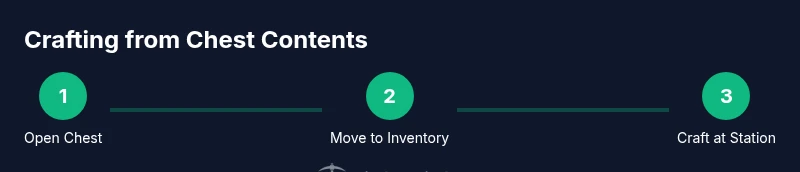
In Terraria, you cannot craft directly from chest inventories. Crafting uses items in your own inventory or at a crafting station. You can access chest contents by opening a chest and transferring needed items into your inventory, then craft from your hotbar or nearby station. Pixel Survival notes that organizing chests to mirror your planned recipes speeds up crafting.
How crafting actually works in Terraria
Crafting in Terraria is item-centric. Most recipes require specific quantities of materials that must exist in your player inventory to be executed at a crafting station or, in some cases, directly from the player's hands. The game distinguishes between items you carry and items stored in chests. While chests are excellent for organization, they aren’t a direct source of craftable items. To turn chest contents into crafted gear, you move the necessary materials from the chest into your inventory, then access the Crafting UI at your current position or at a nearby crafting station. According to Pixel Survival, understanding this distinction is foundational for progression. Keep in mind that some recipes explicitly require a workstation like a Workbench, Furnace, or Anvil, while others can be crafted on the move without a dedicated station. This system rewards intentional planning: you’ll save time by keeping the right materials close to your crafting spots and by knowing which recipes require which station. When you start a new world or a new playthrough, prioritize building a small crafting area near your early chests so you can quickly access the items you need as you progress.
The chest twist: what chests hold and how to access them
Chests are storage cabinets scattered across the world. They hold a wide range of materials, blocks, tools, and sometimes rare drops. You access a chest by clicking or pressing the interaction key, which opens a dedicated inventory window separate from your own. This separation means you can steal materials from a chest and move them into your own inventory to craft. A common strategy is to organize chests by material type or by recipe family so you can quickly locate the exact components you need. Quick-stacking or moving items into the closest chest to your workstation reduces travel time. Pixel Survival stresses that clean, predictable chest organization translates directly into faster crafting sessions because you don’t waste precious time rummaging through mixed loot when a recipe calls for a handful of components. Remember: chest contents can be your source, but the actual crafting takes place in your inventory or at a crafting station.
When you need a crafting station
Many Terraria crafts require a crafting station. The most common is the Workbench, which unlocks essential early recipes. Other stations include the Furnace, Anvil, Loom, Sawmill, and more specialized workbenches tied to particular materials or classes of items. If you want to craft items like weapons, armor, or tools, you’ll typically need to stand near a station or have a portable crafting setup in your inventory. This means that even if your chest holds all the raw materials, you’ll still need to retrieve them into your inventory and position yourself near the appropriate station to complete the craft. Pixel Survival emphasizes building a compact crafting area near your primary chests to minimize travel and keep materials accessible. In multiplayer, shared stations can significantly speed up teamwork and progression, so coordinate station placements with your allies for maximum efficiency.
Step-by-step scenario: crafting a simple item using chest contents
Let’s walk through a practical example: crafting a Wooden Sword using wood stored in a chest. First, open the chest and locate at least 5 Wood. Move those Wood blocks into your inventory. Next, position yourself near a Workbench (the most common early station). Open the Crafting UI, which appears when you hover over an item in your inventory near a Workbench. Click the Wooden Sword recipe to craft it. Finally, pick up the crafted weapon from the output slot. If you don’t see the recipe, ensure you have a Workbench placed and that you are standing close enough to the station. This flow highlights the essential pattern: chest -> inventory -> crafting station, with the Workbench serving as the engine for early tools and basic weapons. Pixel Survival notes that planning inventory moves ahead of time will make this process much more efficient as you accumulate more materials and expand your chest network.
Organizing chests for faster crafting
A well-structured chest system dramatically reduces the time spent gathering materials. Group chests by material type (e.g., all woods together, all ores together) and place the crafting area nearby. Use color-coded keys or signs to indicate contents, and implement a “one-tap transfer” workflow by keeping the required items in your immediate vicinity or in a chest within arm’s reach. When you search for materials, a predictable layout means fewer trips and less back-and-forth between storage and workshop. Pixel Survival recommends setting up a dedicated chest near your Workbench containing basic crafting components (wood, stone, torches) for ultra-fast basics. For more advanced play, expand storage with additional chests to house refined items, components, and finished goods, ensuring your most-used recipes are always within reach.
Common misconceptions and clarifications
A frequent misconception is that chests themselves enable crafting. In reality, you craft from items in your inventory, often at a crafting station. Some players worry that you must carry every potential recipe’s materials, which is not the case; you only need to gather what you plan to use soon and keep it organized. Another misconception is that you can create items by clicking inside a chest’s interface. You cannot — you must transfer items to your inventory and use the Crafting UI from there. Lastly, some players assume you need to be in a specific biome or location to craft. While certain recipes require specialized stations, the act of crafting itself is universal as long as you have the materials and a valid station.
Advanced tips: inventory management and automation
As you progress, consider expanding your inventory management with automation-friendly practices. Label and group chests by material families, and reserve a central “crafting hub” area with a Workbench, Furnace, and Anvil. Use the proximity principle: keep commonly used inputs in the chest closest to your workstation, and store more exotic items farther away. If you’re playing with friends, assign players to keep different resource groups stocked and accessible to the shared crafting station. This coordination minimizes downtime and fosters smoother progression, especially in larger worlds. Pixel Survival stresses that intentional organization is a core skill of Terraria progression; the easier crafting is, the more you can focus on exploration and combat.
Troubleshooting: items not producing expected results
If you attempt to craft and nothing happens, check three things: 1) Do you have the required materials in your inventory? 2) Are you standing near a valid crafting station? 3) Is the recipe known to your current progression? Some items require a specific stage or a particular station to unlock. If you’re sure you meet all conditions, try moving the materials from a chest into your inventory again, then reopen the crafting UI. Keep your village or base organized so you can verify the presence of essential components quickly. Pixel Survival recommends a quick audit of your chest organization whenever progress stalls; a minor reorganization often unblocks a lot of confusion and speeds up the crafting loop.
Realistic expectations and progression
Crafting from chests isn’t a magical shortcut; it’s a matter of moving materials efficiently and exploiting the right stations at the right times. Early in the game, you’ll rely heavily on Wood and basic ores, and you’ll craft small, practical items to survive the first night. As you acquire more complex components, you’ll unlock tiered stations and batches of recipes that dramatically broaden what you can craft. The core habit is to keep materials close to your crafting zone, use chests to maintain a clean inventory, and upgrade stations as you gain access to new materials. The Pixel Survival team consistently emphasizes consistent organization and deliberate preparation as the fastest path to early-game success and mid-game mastery.
Tools & Materials
- Workbench(Basic crafting station; many recipes require it.)
- Chest (storage)(Use to organize materials; not required for crafting itself.)
- Player Inventory(Where you perform crafting; move materials from chests here.)
Steps
Estimated time: 15-20 minutes
- 1
Open the chest and locate materials
Approach a nearby chest, press the interact key, and scan for the materials you plan to use. Focus on keeping at least a small batch of essentials accessible for quick crafting sessions.
Tip: Use the search or visual cues in your chest to quickly identify common components. - 2
Move required materials into your inventory
Drag or transfer the materials you identified into your inventory or hotbar so they’re available for crafting. Chest contents cannot be used directly; you must carry the items into the Crafting UI.
Tip: Aim to assemble a minimal set of items for your immediate recipe to reduce clutter. - 3
Position near a crafting station
Move to a Workbench or appropriate crafting station. Ensure you’re close enough for the crafting window to monitor the recipe progress. If you don’t have a station yet, place a basic Workbench in your base area.
Tip: Having a dedicated crafting corner speeds up every session. - 4
Open the Crafting UI and select the recipe
Open your inventory near the Workbench, hover over the item you want to craft, and click to craft. The UI shows the required materials; ensure you have them before proceeding.
Tip: If a recipe is unavailable, double-check material counts and station proximity. - 5
Collect and equip the crafted item
Move the crafted item from the output slot into your inventory. Equip or store it as needed. Deeper progression will require planning future crafts and stocking related materials.
Tip: Update your chest organization after crafting to reflect new items.
Got Questions?
Can you craft directly from a chest without moving items to your inventory?
No. Terraria requires materials to be in your inventory or at a crafting station to craft. Chest contents can be accessed by transferring items to your inventory first.
No, you need to move materials from the chest into your inventory or craft at a station nearby.
What if I don’t have a Workbench yet?
Some early recipes require a Workbench. Place a Workbench to unlock those recipes, then continue gathering basic materials in chests for faster crafting.
If you don’t have a Workbench, you’ll need to craft or place one to unlock most early recipes.
Do chests affect which recipes I can craft?
Chests don’t alter recipes themselves; they only store materials. Accessing the right materials in your inventory is what enables crafting.
Chests store items, but your crafting depends on having the materials in your inventory and the right station.
How can I speed up crafting sessions near chest setups?
Create a compact production area: keep a Workbench nearby, organize nearby chests by material, and practice quick transfers to minimize walking time.
Set up a small crafting zone close to your chests and practice fast transfers.
What should I do if a recipe doesn’t appear?
Check your proximity to a valid craft station, ensure you have the required materials, and verify that you already learned the recipe. If still stuck, move materials into your inventory and try again.
If a recipe is missing, make sure you’re near a station and have the necessary materials in your inventory.
Watch Video
Key Points
- Craft from inventory, not directly from chest contents
- Keep a dedicated crafting area near your chests
- Organize chests to mirror recipes for faster retrieval
- Verify station proximity before crafting
- Move materials to inventory before using the Crafting UI