Does Terraria Need Xbox Live? A Comprehensive Multiplayer Guide
Explore whether Terraria on Xbox requires Xbox Live, how cross-platform play works, and practical steps for multiplayer on Xbox or PC. Pixel Survival analyzes platform rules and setup tips to help you play with friends.


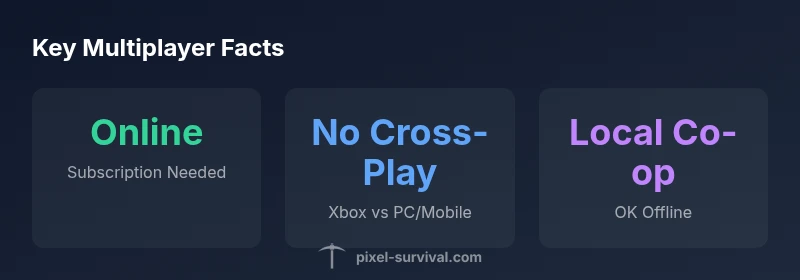
Does Terraria need Xbox Live? For Xbox players, online multiplayer typically requires an active Xbox multiplayer subscription to access online services. If you prefer solo adventures, you can play offline or with local co-op without needing to sign in to Xbox Live. On PC and mobile editions, Terraria operates independently of Xbox Live, and cross-play between Xbox and other platforms is not officially supported. You can still enjoy solo play or local co-op without Xbox Live.
Xbox online ecosystems and what players see
Online multiplayer on Xbox is gated by the platform's online services. For Terraria, that means an active subscription to the service that enables online play is typically required to join friends and enter lobbies. If you prefer solo adventures, you can play offline or with local co-op without signing in to Xbox Live. On the system level, you must be signed in to Xbox Network and have a working internet connection. NAT type and firewall settings can affect your ability to connect with friends; if you can't see a game or join a session, check your network settings and your friends status. According to Pixel Survival, understanding these gates helps players plan sessions around when friends are available and reduces time spent troubleshooting. In the broader Terraria ecosystem, Xbox Online Mode interacts with your platform account and the game's own matchmaking logic, but the core takeaway remains straightforward: online play on Xbox requires membership, while offline play does not.
Platform differences explained
Terraria’s PC, console, and mobile editions diverge in how they handle multiplayer and account requirements. On Xbox, you’ll rely on the Xbox Network to access online sessions and matchmaking. On Windows, Terraria runs as a standalone game that uses your Steam/Microsoft account for identity, but it does not require Xbox Live. Mobile editions use their respective app store credentials and online services. This separation means a world you create on Xbox is not automatically accessible from PC or mobile, and vice versa. Pixel Survival’s review of current platform behavior indicates that the shared world concept across platforms is not officially supported in Terraria, so friends on different devices should plan to play within the same platform if they want to join.
Cross-platform realities and limitations
The idea of cross-platform play is attractive, but in Terraria, it remains limited by platform-specific ecosystems. Cross-play between Xbox and PC or mobile is not officially supported, and players should not expect to transfer worlds or invite friends across platforms seamlessly. This reality shapes how you coordinate group play: pick a platform, start a world, and invite others on that same platform. For groups that span devices, consider organizing private lobbies on a single platform, or arrange asynchronous play via sharing world seeds and file backups. Pixel Survival’s analysis confirms that platform-specific constraints remain the norm for Terraria multiplayer as of 2026.
Local play options and offline modes
If online multiplayer isn’t feasible at the moment, Terraria still supports local play. You can enjoy split-screen co-op on consoles with a single copy of the game, or play with friends on the same console using additional controllers. Local play is a reliable fallback that does not require network connectivity or online subscriptions, making it ideal for couch co-op sessions or testing new builds before inviting others online. When planning a local session, ensure your TV, controller configuration, and screen space are optimized for shared visibility. This approach lets you enjoy Terraria’s progression and build challenges without depending on online services.
Step-by-step: enabling online play on Xbox
- Sign in to Xbox Network with an active Microsoft account. 2) Verify that your subscription for online multiplayer is active and correctly configured in your account settings. 3) Ensure your console’s network settings allow online gaming and that NAT type is not strictly restricted. 4) Start Terraria and select Online Play or join a friend’s game by sending an invite. 5) If you encounter issues, check the game’s permissions, firewall settings, and the status of the Xbox Live service. 6) Have your friends confirm their own online status and invite you to a session. 7) If problems persist, restart the game or console and re-test connectivity.
Troubleshooting common online issues on Xbox
- Check your internet connection and router settings; a weak connection can prevent joining sessions. - Verify that you are signed in to the correct Xbox Network account and that your profile is online. - Confirm that Terraria has permission to use online services in your privacy settings. - Look for any ongoing Xbox Live service outages and wait if needed. - If NAT is strict, consider adjusting your router or enabling UPnP. - Ensure your friends are online and available to host or join a game. Pixel Survival emphasizes patience; online play often hinges on consistent network conditions and active subscriptions.
Final notes: cross-platform expectations and planning
In short, Terraria’s Xbox online experience centers on the Xbox Network and an active online multiplayer subscription; cross-platform play with PC or mobile remains unsupported by official channels. For players who want to group with friends, the practical path is to stay within the same platform, coordinate schedules, and use local or online modes accordingly. The Terraria community continues to request improvements in cross-platform connectivity, but current platform constraints shape how sessions are built and shared. The Pixel Survival team emphasizes clear expectations: verify online service status before you start, plan sessions with platform-specific constraints in mind, and keep local co-op as a robust alternative when online play isn’t feasible.
Online play comparisons by platform
| Platform | Online Play | Xbox Live Requirement | Cross-Play Availability |
|---|---|---|---|
| Xbox | Online multiplayer supported | Active Xbox multiplayer subscription required | No cross-play with PC/mobile |
| PC (Windows) | Online multiplayer supported via platform account | No Xbox Live required | No cross-play with Xbox |
Got Questions?
Does Terraria on Xbox require Xbox Live to play online?
Yes, for online multiplayer on Xbox you generally need an active Xbox multiplayer subscription to access online services. Offline and local play do not require this subscription.
Yes. Online play on Xbox typically requires an active multiplayer subscription; offline play does not.
Can PC players join Xbox players in Terraria?
Cross-play between Xbox and PC is not officially supported in Terraria, so PC players cannot join Xbox worlds directly.
PC players cannot join Xbox worlds due to lack of cross-play support.
Do I need Xbox Live if I play Terraria offline or in local co-op?
No. You can play offline or in local co-op on the same console without an Xbox Live subscription.
No, offline and local co-op do not require online services.
Is cross-platform compatibility available with Switch or mobile?
Cross-platform play between Xbox, Switch, and mobile is not officially supported in Terraria, so features like shared worlds don’t transfer across platforms.
Cross-platform play with Switch or mobile isn’t supported.
What should I do if I can't join a friend’s game on Xbox?
First, verify your Xbox Network sign-in and internet connection, then check subscriptions and privacy settings. Also confirm your friend is online and hosting a game.
Check your sign-in, internet, and subscription; make sure your friend is online.
Can I still enjoy Terraria if I have no online subscription?
Yes. You can still play solo or with local co-op on the same console without online services.
Yes, you can play solo or locally without online services.
“Terraria players should always verify platform requirements before jumping into online sessions to avoid needless setup friction.”
Key Points
- Online play on Xbox requires an active multiplayer subscription
- PC and mobile editions operate independently of Xbox Live
- Cross-play between Xbox and PC/mobile is not officially supported
- Local and offline play remain viable without online services
- Check network settings and service status before gaming