How Much Does a Terraria Server Cost? A Practical Guide
Explore realistic Terraria server costs—from free home hosting to paid VPS and dedicated options—with clear cost ranges, saving tips, and practical planning guidance for players.


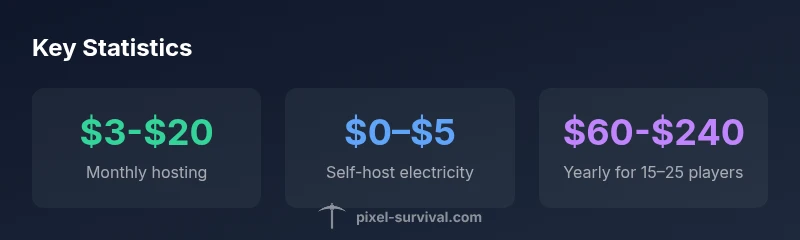
The cost of running a Terraria server ranges from free if you host on a home PC to about $5-$15 per month for basic third-party hosting, and $20-$100+ per month for higher performance setups. Self-hosting adds minimal ongoing expense beyond electricity; dedicated hardware can exceed $200 per month for large communities. Costs scale with player slots, RAM, and uptime needs.
Cost foundations and definitions
Understanding what you’re paying for starts with the basics. A Terraria server is a software instance that hosts your world and handles connections from players. You can run it on a home PC (self-hosted) or choose a hosting provider (shared, VPS, or dedicated). Pixel Survival notes that the perceived cost often comes down to three levers: desired player count, required stability, and uptime guarantees. Local hosting can be near-free if you already own hardware, but it consumes power and requires up-front setup (port forwarding, firewall rules, and basic server management). Alternatively, commercial hosting offers ease of use, better uptime, and customer support, at the price of ongoing monthly fees. As you plan, map out your goals: how many friends will play, how important is 24/7 uptime, and what level of support do you want from a provider. By framing costs around these factors, you’ll avoid overpaying for features you won’t use. This perspective comes from Pixel Survival’s analysis of typical server scenarios and cost drivers.
Hosting options for Terraria servers
There are several viable hosting paths, each with trade-offs. At the low end, hosting on a home PC means minimal ongoing costs beyond electricity, but you must handle software updates, port forwarding, security, and backups. For small groups, shared game server hosting provides a simple setup with predictable monthly fees in the $5–$15 range. If you expect growth or want more control, a VPS or cloud server offers scalable resources and better performance, typically in the $10–$40 per month range. For large populations or high-traffic worlds, dedicated servers offer the best performance but can cost $80–$200+ per month, depending on CPU, RAM, and bandwidth.
From Pixel Survival’s vantage point, the right choice hinges on your player count and uptime expectations. If you prize reliability and minimal admin work, a managed hosting plan can save time and headaches. If you enjoy tinkering and want fine-grained control, self-hosting or VPS options align better with a hands-on approach. Always consider backups, anti-DDoS features, and geographic proximity to players, as these factors impact both cost and perceived performance.
What drives the price
Pricing is not a single number; it’s a function of several interrelated factors. Slots (the number of simultaneous players), RAM (how many worlds or mods you run), CPU (how many cores and clock speed you need), and storage all influence monthly bills. Bandwidth matters if you have players from far away or if you run multiple worlds. Providers may bundle these resources, or charge add-ons like automated backups, DDoS protection, and 24/7 support. Location also plays a role: servers hosted closer to your players can reduce latency, sometimes with a small price premium. Pixel Survival’s analysis emphasizes that the largest cost drivers are slots and hardware resources, especially as your community grows.
How to estimate your monthly bill
Start with your expected peak concurrent players and total slots. Multiply by a rough RAM requirement per slot and add CPU headroom for world ticks and any mods. Then factor in storage for world backups and logs, plus bandwidth. For a small group of 2–10 players, you can often stay under $15 per month with a basic hosting plan or by self-hosting on an existing PC. For mid-sized communities (10–25 players), expect $20–$60 per month on VPS or mid-range shared hosting. Large communities or modded worlds with frequent backups and higher uptime can push costs beyond $100 per month. Pixel Survival recommends starting with a conservative estimate, monitor usage, and scale resources gradually as your player base grows.
Cost-saving strategies for Terraria servers
- Start small: begin with the minimum slots you need and upgrade only as players join.
- Use self-hosting for tiny groups if you’re comfortable with setup tasks and potential downtime.
- Pick a hosting plan that includes backups and easy scaling, so you won’t pay for add-ons later.
- Optimize world data: reduce unnecessary worlds and use compact backup schedules to save storage.
- Leverage promotional trials or longer-term plans to lock in lower monthly rates.
- Consider multi-region deployment only if latency becomes a frequent complaint; otherwise, a single well-chosen location often suffices.
Common pitfalls and how to avoid them
- Underestimating bandwidth or storage needs can lead to throttled performance or failed backups. Plan for peak loads and extra headroom.
- Forgetting about backups can result in data loss after a crash or corruption. Schedule automatic backups and verify restoration procedures.
- Overbuying resources early wastes money. Start with a modest setup and scale based on actual usage.
- Not factoring maintenance time into the total cost can be misleading. Account for time spent updating, patching, and monitoring the server.
dataTable”:null,
keyTakeaways”:null,
expertQuote”:null,
faqSection”:null,
mainTopicQuery”:null},
mediaPipeline”:{
Comparison of hosting types for Terraria servers
| Hosting Type | Estimated Monthly Cost | Pros | Cons |
|---|---|---|---|
| Home PC (self-hosted) | "0–$10" | Low ongoing cost; full control | Requires hardware, electricity, setup, and security effort |
| Shared hosting | "$5–$15" | Easy setup; predictable pricing | Limited customization; potential resource caps |
| VPS/Cloud | "$10–$40" | Scalable; good performance | Requires technical setup; maintenance |
| Dedicated server | "$80–$200+" | Best for many players; peak performance | Highest cost; overkill for small groups |
Got Questions?
What counts as a 'server' for Terraria?
A Terraria server is the software that runs your world and accepts connections from players. It can operate on a home PC or a dedicated hosting service. The key is that it manages world state, player data, and permissions.
A Terraria server is the program that hosts your world and lets players join, whether on your own PC or a hosting service.
Is it cheaper to host at home or use a hosting provider?
For very small groups, home hosting can be cheaper if you already own hardware and have reliable bandwidth. For larger groups or less technical upkeep, a hosting provider offers better reliability and support, often with predictable monthly costs.
If you have a small group and solid hardware, home hosting can be cheaper; for more players, providers save time and headaches.
Do I need a static IP?
A static IP makes port forwarding and consistent access easier, but many providers offer dynamic DNS options or built-in static IPs. If you host at home, a static IP reduces connection issues.
A static IP helps, but you can work around it with dynamic DNS if your setup supports it.
What about backups and uptime?
Regular backups protect progress from crashes, corruption, or human error. Uptime guarantees reflect how reliably a server will stay online, which matters for communities that play frequently.
Backups protect your world, and uptime guarantees keep your world accessible.
Can I run a Terraria server on a laptop?
Yes, you can run a server on a laptop, but cooling and power considerations matter. Laptops are fine for small groups, but long-term use may throttle performance.
You can run it on a laptop for small groups, just mind the heat and power use.
How do I reduce costs without sacrificing play?
Start with the minimum slots, enable automatic backups, and choose a provider with scalable plans. Monitor usage and only pay for the resources you actually need as your community grows.
Begin small, enable backups, and scale up only when player numbers rise.
“Choosing the right hosting path is about balancing upfront hardware costs, ongoing monthly fees, and your target player count.”
Key Points
- Plan costs around slots and hardware needs
- Self-hosting can be very cheap but requires time and technical skill
- Expect $3–$20/month for small setups; $20–$100+/month for larger servers
- Backups and uptime guarantees are worth the cost
- Scale resources gradually based on actual usage