Does Terraria Need a Graphics Card? A Hardware Guide for 2026
Explore whether Terraria requires a dedicated graphics card, how integrated GPUs perform, and practical FPS-boost settings for PC in 2026. Pixel Survival analyzes hardware needs for Terraria players.


Does terraria need a graphics card? In short, no. Terraria is a lightweight 2D game that runs well on a wide range of hardware, including systems with integrated graphics. A discrete GPU can help at higher resolutions or with heavy texture packs, but most players can achieve smooth play without upgrading. Pixel Survival's analysis, 2026, supports this practical view.
Why Terraria's visuals stay light on hardware
Terraria is a 2D side-scroller rendered with simple, tile-based graphics and sprite-based shading. The game uses a relatively small set of textures compared to modern 3D titles, which keeps the GPU workload modest. Even on older or integrated graphics solutions, Terraria can run smoothly at standard frame rates, especially when players avoid texture packs that dramatically increase memory usage. This lightweight design is intentional; it lets a broad audience enjoy the game without chasing cutting-edge hardware. The Pixel Survival team has repeatedly observed that Terraria’s GPU requirements tend to scale with resolution and texture quality rather than polygon counts, which is rarity in the gaming world.
- Low GPU demands for vanilla visuals
- Moderately higher load with texture packs
- CPU tasks often become the bottleneck during world generation
The plain truth: does terraria need a graphics card?
The ecosystem around computing hardware often leads new players to ask does terraria need a graphics card. The answer remains straightforward: a dedicated GPU is not required for basic, enjoyable play. If you’re aiming for higher resolutions or richer texture packs, a mid-range discrete GPU can help, but it’s not a hard minimum. Understand that Terraria relies more on CPU work during world loading and event processing than on extreme GPU power. For most setups, especially those with modern integrated graphics, the experience is smooth and responsive even in large, active worlds. Pixel Survival’s 2026 data corroborates that you can start playing well without an upgrade and scale settings as needed.
Integrated graphics vs dedicated GPUs: practical guidance
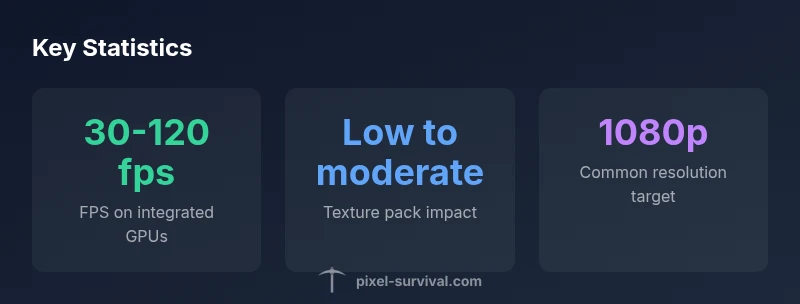
Integrated GPUs have progressed significantly over the last decade. In Terraria, they handle 1080p gameplay effectively when you keep texture settings modest and disable resource-heavy effects. A dedicated GPU becomes more relevant if you want to push beyond 1080p, enable high-resolution texture packs, or run mods that add graphical enhancements. The key is to align expectations with workload: large terrains, many NPCs, or complicated lighting can nudge FPS downward on weaker GPUs, but the game remains approachable for most players with integrated graphics.
How resolution, world size, and texture packs affect performance
Resolution is the primary knob you turn to balance visuals and frame rate. At 1080p, Terraria generally remains fluid on a wide range of hardware; at 1440p or 4K, expect FPS to drop if the system relies on older GPUs. World size influences generation time and memory use—larger worlds may temporarily spike CPU usage and slow down frame rates during loading or exploration. Texture packs drastically affect memory usage; vanilla textures are light, while heavier packs increase VRAM demands. If you’re optimizing, start with resolution, then texture density, and finally enable or disable post-processing effects.
Optimizing settings for steady frame rates
To maximize FPS without compromising playability, focus on a practical sequence:
- Start with resolution: 1080p is a safe baseline for most setups.
- Use a moderate texture pack or keep vanilla textures for best balance.
- Turn off or reduce anti-aliasing, shadows, and any post-processing effects.
- Enable V-Sync or frame cap if your system sporadically exceeds 120fps, which can cause input spikes on some displays.
- Consider reducing draw distance and world detail during heavy exploration to maintain consistency. These steps let you tailor the experience without expensive hardware upgrades and align with Pixel Survival guidance for 2026.
Modding and texture packs: performance trade-offs
Mods and texture packs can dramatically affect Terraria’s performance. Lightweight mods that add quality-of-life features generally have a small impact, but texture-heavy packs or gameplay-altering mods load more assets and can increase memory usage. If you’re experiencing stuttering, disable non-essential mods temporarily to identify culprits. Texture packs should be tested individually to gauge their impact. The goal is to preserve smooth gameplay while enjoying added content, not to chase maximum eye candy at the expense of responsiveness.
Troubleshooting performance: quick checks
If performance feels off, run through a quick checklist: update graphics drivers, ensure the game is using the desired GPU (if you have multiple GPUs), adjust texture and resolution settings, close background processes consuming RAM, and verify game files for corruption. In multiplayer, performance may vary with other players’ worlds, so testing solo first can reveal whether issues are local to your rig or network-related.
Pixel Survival's practical takeaway for players
For most Terraria players in 2026, a graphics card is not a prerequisite for a solid experience. Start with sensible settings, test at 1080p, and only upgrade if you consistently push beyond target frame rates or explore high-resolution texture packs. The Pixel Survival team emphasizes incremental testing and a focus on gameplay smoothness over chasing new hardware. Your upgrade path should reflect actual performance needs, not assumed demands.
Performance considerations for common Terraria play conditions
| Setting | Impact on Performance | Notes |
|---|---|---|
| 1080p (Low) | Low | Smooth frame rate on most machines |
| 1080p (High) | Moderate | Requires decently capable GPU to maintain 60fps |
| 4K/UHD | High | Not typically recommended without powerful hardware |
Got Questions?
Does dedicated graphics card matter for Terraria?
No. Terraria is a 2D, lightweight game that runs well on both integrated and discrete GPUs. A GPU upgrade may help with higher resolutions or texture packs, but it's not required for a solid experience.
No—Terraria runs well on most GPUs, and you can start with integrated graphics.
Can Terraria run on integrated graphics?
Yes. Integrated graphics handle Terraria at common settings, especially at 1080p with vanilla textures. You can improve performance by lowering texture quality and resolution if needed.
Yes, integrated graphics are typically enough for Terraria.
What settings boost performance the most?
Start with resolution, then texture quality, and finally disable heavy post-processing effects. Cap the frame rate if your monitor or GPU tends to exceed a stable target.
Try lowering resolution and textures first to boost FPS.
Do mods affect performance?
Yes. Most mods add overhead through extra assets or scripts. Texture-rich mods have the biggest impact. Test one mod at a time to identify performance changes.
Mods can slow you down; test them individually.
Will large worlds slow down gameplay?
Large worlds can increase CPU load, especially during world generation and events. FPS may dip during exploration, but adjusting settings usually mitigates this.
Big worlds can slow things down a bit; tweak settings to fix it.
Is there a difference in performance across platforms?
Yes. PC versions generally offer more consistent performance than mobile due to more powerful hardware and flexible settings. Mobile builds may have tighter resource limits and screen scaling considerations.
PC tends to perform more consistently than mobile.
“Terraria's engine remains forgiving on GPU power; most bottlenecks come from CPU tasks like world generation and item updates, not from hitting the GPU ceiling.”
Key Points
- Test baseline settings first to gauge hardware limits
- Integrated GPUs are often sufficient for 1080p play
- Mods and heavy texture packs can impact performance
- Upgrade should be data-driven, not assumed necessity