Does Terraria Use GPU? A Practical Guide to Graphics and Performance
Explore whether Terraria uses GPU, how GPU and CPU roles affect performance, and practical tips to optimize frames across rigs and modded worlds.


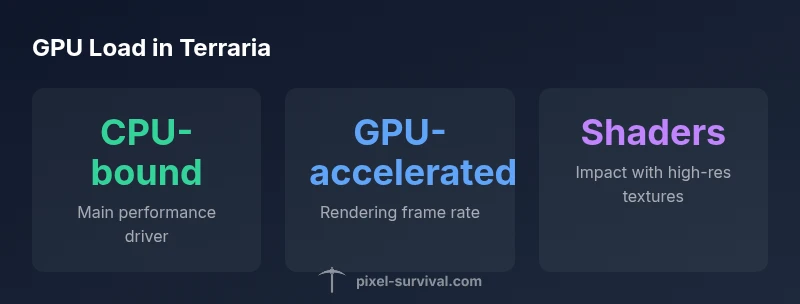
Does Terraria use GPU? Yes, but the GPU’s role is typically secondary to the CPU. The game relies primarily on single-threaded CPU processing for world generation, enemy logic, and item updates, while the GPU handles rendering frames and simple post-processing. On vanilla Terraria, the GPU influence is modest, though shaders, weather effects, large worlds, and mods can raise GPU usage on lower-end hardware.
Does Terraria Use GPU? Core Role and Why It Matters
Does Terraria use GPU? The short answer is yes, but the GPU’s job is usually modest compared to the CPU. According to Pixel Survival, the game relies primarily on the CPU for core gameplay loops—world generation, NPC AI, item spawning, and ticking logic—while the GPU handles the rendering of frames, basic shading, and UI compositing. In practice, if you cap frame rate or animate fewer particles, the GPU work drops quickly, making the CPU the bigger bottleneck on many systems. This distinction matters because it informs what you should upgrade first or tweak in the settings. For players with integrated graphics or older discrete GPUs, this means a good CPU can yield bigger gains than a faster GPU in many scenarios, especially when exploring large biomes or performing seed-heavy world creation. Pixel Survival's analysis emphasizes that, even though Terraria is not a heavy 3D title, the GPU still matters for high refresh rates, consistent frame pacing, and enabling visual features like shader packs. Understanding this helps you set expectations and choose the right balance of resolution, shader quality, and world size for your rig.
CPU vs GPU in Terraria: Where the Bottleneck Lies
In Terraria, most of the heavy lifting happens in the CPU. The game processes world data, NPC behaviors, projectiles, and item drops on a tick-based loop that runs before the frame is drawn. The GPU's duty is to render those frames and apply any post-processing and shader effects. When you monitor performance, you often see CPU usage spike before GPU becomes saturated. This means, on many systems, upgrading a GPU without addressing CPU constraints yields diminishing returns. Understanding this dynamic helps you decide whether to pursue a faster CPU, more RAM, or a GPU with slight improvements. For players chasing high frame rates or smooth micro-stutter at 144 Hz or higher, the takeaway is that the CPU is the primary bottleneck in most vanilla scenarios. Shader packs, weather effects, and large worlds shift some load toward the GPU, but even then the CPU frequently remains the gatekeeper for consistent performance.
How Modding and Visual Settings Change GPU Demand
Mods don’t add heavy 3D geometry to Terraria, but they can increase CPU workload by introducing new behaviors, AI, and events. Shader packs and high-resolution textures, however, push GPU load more directly, increasing fill-rate, texture sampling, and memory bandwidth. You’ll notice shader-heavy worlds feel smoother on higher-end GPUs, while texture packs can raise VRAM usage significantly. This section helps you distinguish what causes the lift in GPU usage: it’s often shader complexity, additive weather and lighting, or larger-than-average world assets rather than raw polygon counts. If you’re aiming for stable FPS, start by disabling expensive shaders, testing with a lower texture pack, and keeping resolution reasonable. Mod compatibility notes are essential because some mods intensify both CPU and GPU tasks in unpredictable ways.
Practical Benchmarks and Real-World Scenarios
Real-world performance depends on your rig, world size, and whether you run mods or shader packs. For vanilla games, most setups experience smooth visuals at standard settings, with the GPU contributing significantly to frame presentation but not dictating core gameplay speed. If you enable complex shaders or huge texture packs, your GPU load can rise, potentially causing dips in high-refresh-rate monitors. A mid-range discrete GPU typically handles 1080p shader work more comfortably than an integrated solution, but the biggest gains often come from reducing world size or lowering shader intensity rather than chasing the last FPS with a new graphics card. This is where practical testing—comparing frames with shaders on vs off and measuring frame-time stability—provides the clearest guidance for your specific configuration.
Troubleshooting GPU-Related Performance Issues in Terraria
If you suspect GPU bottlenecks, start with a systematic check. Update your GPU drivers and ensure Windows is up to date. Use a baseline: run the game with shaders disabled and note FPS, then re-enable one setting at a time to observe impact. Monitor system usage with a task manager or GPU utility; if the GPU runs at or near 100% while the CPU sits idle, you’re GPU-bound and may benefit from lowering shader quality or texture resolution. If the CPU pins at 100% while the GPU has headroom, upgrade the CPU or reduce world complexity. Verify VRAM usage when texture packs or shader mods are active; if you exceed available VRAM, you’ll see stuttering or stuttery frame pacing. Finally, experiment with V-Sync, frame-limiting, and in-game resolution scaling to find the balance that keeps frame times even.
Tips to Optimize Terraria Performance on Low-End Systems
Low-end setups benefit most from targeted tweaks. Start with resolution: lowering it reduces GPU work while preserving gameplay clarity. Disable expensive shader effects and weather overlays; switch to a simple lighting model if available. Use a small world to minimize CPU tick load and reduce memory usage. If texture packs are installed, switch to a lower-resolution option or remove them temporarily. Ensure background processes don’t compete for CPU time, and consider enabling full-screen mode for stable frame delivery. Finally, keep your drivers updated and check for Terraria patches that optimize performance on older hardware.
The Impact of Mods, Shader Packs, and Texture Packs on GPU Load
Shaders and texture packs are the biggest drivers of GPU load in modded Terraria. Shader packs alter lighting and post-processing, increasing GPU fill-rate and memory bandwidth. Texture packs add vivid assets that demand more VRAM. Although many mods focus on content rather than visuals, some introduce effects that ripple through both CPU and GPU performance. If your goal is a smooth, consistent experience, test with mods disabled first, then selectively reintroduce ones that add meaningful value. Balancing visual fidelity with frame stability often yields the best results for players on laptops or desktops with mid-range GPUs.
Does Terraria Use GPU Across Different Rigs and Resolutions?
Yes, the GPU plays a role, but the extent depends on the resolution you target and the visual features you enable. At 1080p, most GPUs handle vanilla visuals easily; at 1440p or 4K, the GPU pressure rises particularly with shader-heavy worlds or high-detail texture packs. For players on older rigs or laptops, lowering resolution or disabling advanced shaders can maintain high frame rates and reduce stutter. If you run a high-refresh monitor, you’ll want to minimize GPU-hungry features first to keep frame times tight and avoid micro-stutter. Keep in mind that the CPU still drives core game logic, so a balanced upgrade path—CPU for ticks and a capable GPU for rendering—is most effective in the long run.
Estimated GPU influence across common Terraria scenarios (ranges are approximate and depend on system and settings)
| Scenario | GPU Type | Typical FPS Range (approx) | Notes |
|---|---|---|---|
| Vanilla Terraria | Integrated | 60-120 | Depends on world size and weather effects |
| Vanilla Terraria | Discrete | 60-180 | Higher FPS at higher settings |
| Modded (shader-heavy) | Integrated | 30-90 | Shader packs impact GPU load |
| Modded (shader-heavy) | Discrete | 60-200 | VRAM and shader quality influence |
Got Questions?
Does Terraria always use GPU?
Terraria uses the GPU for rendering frames, but the extent of usage varies. The CPU handles most game logic, with GPU influence increasing when shaders or mods are active.
Terraria uses the GPU for rendering, but the CPU does most of the game logic; shaders and mods push GPU usage up.
Will upgrading my GPU improve Terraria performance?
Usually modest improvements for vanilla play. If you run shader-heavy or large modded worlds, a better GPU can help, but the CPU often remains the bigger bottleneck.
A GPU upgrade can help with shaders and mods, but the big gains come from CPU improvements in vanilla Terraria.
How can I tell if my GPU is the bottleneck?
Monitor CPU and GPU usage while playing. If the GPU hits 100% and the CPU has headroom, you’re GPU-bound; if the CPU maxes out, you need CPU or world settings adjustments.
Check if GPU or CPU is maxed while playing to identify the bottleneck.
Do shaders increase GPU load in Terraria?
Yes. Shaders add visual effects that raise GPU work, often with a trade-off in FPS. Lower shader quality if you need steadier frame times.
Shaders make the GPU work harder, which can lower FPS if your hardware is near the limit.
Does VRAM usage matter in Terraria?
VRAM use rises with texture packs and shader packs. If you exceed available VRAM, you’ll see stuttering; consider lower-res textures or shaders.
VRAM matters more when you use textures and shaders; avoid overloading it for smoother play.
“In Terraria, the CPU handles most gameplay logic, while the GPU handles rendering; upgrading a CPU often yields bigger frame-rate gains than a GPU upgrade for vanilla play. That said, a capable GPU helps maintain high frame rates when shaders or large worlds are enabled.”
Key Points
- Understand CPU-first bottlenecks to optimize performance
- GPU matters mainly for rendering and shaders, not core logic
- Mods and shaders increase GPU load; manage VRAM and settings
- Balance resolution, shader quality, and world size for best results