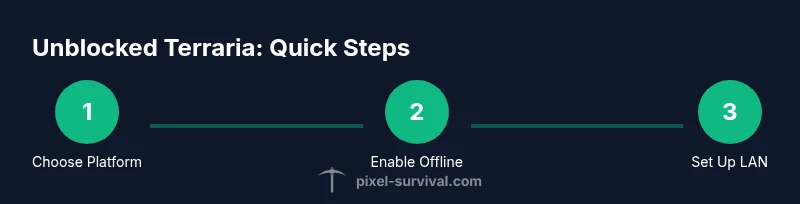
Unblocked Terraria: Safe Ways to Play in Restricted Networks
Learn safe, legal paths to enjoy Terraria when access is blocked. This guide covers offline play, official platforms, and admin-approved options with practical steps for Pixel Survival's expert guidance.


This quick answer explains how to access Terraria when networks block it, focusing on legal options like offline play, official platforms, and admin-approved access. You’ll learn practical steps to start offline, set up LAN play, and avoid policy violations while enjoying unblocked Terraria. This emphasizes offline modes and admin-approved access rather than bypassing security.
What Unblocked Terraria Really Means
Unblocked Terraria, in practice, means accessing the game in ways that respect network policies while preserving the ability to play. For many players, particularly students and workers, school and corporate networks block game ports or game-related services. The goal is to enjoy Terraria without running afoul of rules. According to Pixel Survival, unblocked Terraria guidance emphasizes legal access and safe play when school or network policies block the game. In this context, unblocked does not refer to illegal hacks or pirated copies; it refers to legitimate options like offline play, local LAN sessions, or administratively permitted online access. The difference matters because bypassing security can lead to disciplinary action or legal issues. In the right conditions, you can still enjoy Terraria’s progression, exploration, and community features by staying on approved paths. The key concept is choosing paths that respect policy and preserve your data and device integrity. Ultimately, unblocked Terraria should feel like a friendly extension of your normal gameplay, not a breach of rules. The following sections walk you through practical, safe approaches that maximize your playtime while keeping everything above board.
Why Networks Block Terraria (and What You Can Do Legally)
Many organizations implement firewalls or content filters that block multiplayer ports, game servers, or even game update services. Terraria, being a dynamic online title, can trigger these blocks when attempted from restricted networks. The legal way to approach this remains clear: work within the rules or seek permission from the network administrator. Pixel Survival emphasizes that legitimate access is possible through offline play, local LAN sessions, or officially sanctioned online access. Understanding the difference between a policy block and a technical misconfiguration is key; sometimes apps are misclassified and simply need whitelisting. If you’re unsure, ask your IT department or school admin for guidance. Attempting to bypass blocks with unauthorized tools can expose devices to malware, violate terms of service, and risk suspension. The ethical play approach prioritizes safety, compliance, and a consistent gaming experience over quick fixes that could backfire.
Official Ways to Play on Restricted Networks
There are several legitimate avenues to enjoy Terraria without running afoul of restrictions. On PC and mobile, you can use offline modes or locally saved worlds that don’t require a constant internet connection. Console versions generally offer robust offline play, cloud saves, and optional online features that can be used when permitted by the network. Always verify with your administrator whether online features can be enabled on a given network; many institutions support configurable access rather than blanket blocks. When offline, you retain full control of your progress, storage, and mods within the bounds of the game’s terms of service. Pixel Survival recommends prioritizing official storefronts and platform-specific offline modes to ensure your setup remains compliant while you enjoy Terraria’s exploration and progression.
Offline Play: How to Enjoy Terraria Without Internet
Offline play is a cornerstone for players dealing with network restrictions. Start by ensuring you have the official game installed on your device. Launch the game in offline mode to access your existing worlds and download any required updates ahead of time while you’re still connected. When you’re offline, you can roam, build, explore, and farm resources just as you would online, with the caveat that you won’t access multiplayer features unless the network allows it. Regular backups are essential because offline environments lack cloud synchronization. If you plan to play on a laptop or portable device, keep a local copy of your world files on an external drive for safety. Pixel Survival emphasizes that offline play doesn’t compromise your enjoyment; it simply requires a little extra preparation and discipline to avoid accidental online attempts on blocked networks.
LAN Play and Local Co-Op Without Internet Access
Local area network (LAN) play lets you enjoy Terraria with friends on the same shared network without needing internet access. To set this up, one device should host a world while others join using the LAN IP or local network session. Ensure every player has a valid, licensed copy of Terraria and that your router allows local traffic on the required ports. This approach preserves multiplayer fun without violating network policies and it’s supported by the game’s infrastructure. If you’re new to LAN hosting, a simple diagram or step-by-step setup guide can prevent misconfigurations. Pixel Survival suggests keeping a documented backup of your worlds before attempting new LAN configurations, so you can recover quickly if something goes wrong.
Safe Alternatives and Where to Buy
If your goal is to experience Terraria with minimal friction, consider safe alternatives like official platforms (Steam, Google Play, App Store, etc.) where offline modes are explicitly supported. Purchases and downloads from legitimate stores ensure you receive updates, security patches, and customer support. For school or work environments, you can request access to specific features rather than bypassing blocks; administrators can sometimes create exceptions or allowlist Terraria servers. Pixel Survival notes that adult supervision and policy compliance often lead to smoother experiences. By sticking to legitimate access paths, you reduce risk while still enjoying the game’s progression, exploration, and community aspects.
Common Myths About 'Unblocked' Games
A common myth is that “unblocked” means using cracked or modified copies. This is false and dangerous. Another myth is that if one method works, you should replicate it across all networks; in reality, policies vary, and what’s allowed at school may not be allowed at a workplace. The safest approach is to pursue offline play, admin-approved access, or authorized local networks. Pixel Survival encourages players to verify policies and to avoid tools that could compromise device security or violate terms of service. By debunking these myths, you can focus on legitimate play strategies that honor both the game and your environment.
Quick Start: Getting Set Up on One Device
To get started quickly, pick a device you own, install Terraria from an official store, and prepare an offline world since you won’t rely on online services initially. Launch in offline mode to confirm your worlds load correctly, then copy important files to an external drive for safekeeping. If you want multiplayer, test a simple LAN session with a friend on the same network. The more you plan ahead, the smoother the experience will be when network restrictions are in place. Pixel Survival’s guidance here is to keep things simple, secure, and policy-compliant while enjoying Terraria.
Tools & Materials
- Official Terraria client for your platform(Obtain from the official store or Terraria site)
- Compatible device(PC, tablet, smartphone, or console that meets system requirements)
- Offline installer or game data file(Download while connected; keep a local copy on the device)
- External storage (USB drive or external HDD)(Carry offline installers or world backups for safety)
- Controller/keyboard/mouse(Personal input preference for comfort)
Steps
Estimated time: 20-45 minutes
- 1
Choose platform and verify license
Identify the device you will use (PC, mobile, or console) and confirm you hold a valid Terraria license for that platform. This ensures you can access all offline features without policy conflicts. If you’re unsure, check your account on the official storefront.
Tip: Keep a copy of your license verification handy in case you’re asked for it by a network admin. - 2
Check offline availability
Open the game on a connected network and verify that offline mode is available for your version. Some builds require initial online activation, so complete that step before going offline.
Tip: Note any offline limitations, like lack of cloud saves or online features, so you’re not surprised later. - 3
Download official offline files
Download the offline installer or game data while you’re connected. Store a local copy on your device or external drive for quick access when you’re offline.
Tip: Verify the file integrity after download to avoid corrupted world data. - 4
Configure offline mode
Launch Terraria in offline mode and confirm your world loads correctly. Disable automatic online checks if the option exists and ensure your settings preserve local saves.
Tip: Back up your world files before changing settings to prevent data loss. - 5
Set up LAN (if you want local multiplayer)
If you’ll play with friends on a shared network, designate one device as host and have others join via LAN. Ensure all players have licensed copies and are connected to the same router.
Tip: Document the host’s IP or use a simple LAN discovery tool to minimize setup time. - 6
Test performance and backups
Run a quick session to check frame rate, loading times, and save integrity. Create a fresh backup before extended play, so you can restore quickly if something goes wrong.
Tip: Keep at least one recent backup off-device for extra safety. - 7
Monitor policy compliance
If you’re on a restricted network, confirm with the administrator whether online features can be used at all. Only proceed with explicit permission.
Tip: Document approvals in case policy questions arise later. - 8
Switch to online with permission (optional)
If your network allows online play, enable online features in a controlled manner. Follow platform guidelines and ensure you’re aligned with the network’s terms of use.
Tip: Re-check your firewall rules after switching to online to prevent future blocks.
Got Questions?
Is it legal to play Terraria offline on blocked networks?
Yes, playing offline or with explicit admin permission is generally allowed. It avoids policy violations and maintains device security. Always confirm network rules before enabling online features.
Offline play is legal as long as you have permission and don't bypass security. Check with the network admin for online access rules.
Can I play Terraria offline on mobile?
Mobile Terraria supports offline play in most cases. Ensure the app is fully updated and you’ve downloaded any required assets while online before going offline.
Yes, you can usually play Terraria offline on mobile after a one-time online setup.
What is LAN play in Terraria and how do I set it up?
LAN play lets friends join a host's world over a local network without internet access. The host creates a world and others connect using the local network IP. Ensure licensing and network settings permit local traffic.
LAN play lets you play together on the same network without internet.
Will my progress sync if I switch back online later?
Progress can sync via cloud saves only if the platform supports it and the network allows it. Offline progress remains on local saves unless a sync is possible.
Offline progress stays local unless cloud saves are available and enabled.
Are mods or cracked copies ever part of 'unblocked' setups?
Using modified or cracked copies is unsafe and often illegal. Stick to official copies and supported offline features to avoid security risks.
Avoid mods or cracks; use official offline options instead.
What should I do if all networks block Terraria?
If all networks are blocked, request guidance from your administrator or consider playing on a personal device or non-blocked network with proper permission. Public libraries or home networks are often more permissive than school networks.
Ask for guidance rather than attempting to bypass restrictions.
Watch Video
Key Points
- Choose legitimate paths over bypassing blocks
- Offline play preserves your progress without internet
- LAN and admin-approved access enable multiplayer without policy risk