How to Make Terraria Not Pause When Tabbed Out
Learn practical, safe methods to prevent Terraria from pausing when you tab out. This step-by-step guide covers vanilla options, window modes, mods (via tModLoader), and testing procedures to help you multitask without losing progress.


Goal: This quick guide shows how to make terraria not pause when tabbed out by using safe, tested methods. You’ll explore vanilla options, windowed/borderless modes, and modded tweaks with clear steps. You’ll also learn how to verify behavior and minimize risks, so you can multitask without losing progress or automation in your world.
Understanding why Terraria pauses when tabbed out
In single-player Terraria, losing focus often pauses game time to protect your progress and ensure inventory and world state remain consistent while you multitask. This is a well-known behavior that affects automation, farming, and streaming setups. According to Pixel Survival, many players want an option to keep the world running in the background, especially when they are managing multiple tasks or monitoring chat. There is no universal, official toggle in vanilla Terraria to disable pause on focus loss across all platforms. Still, there are practical workarounds that work in most recent patches and across Windows and Mac. This section outlines the underlying concepts, the relative reliability of each method, and how to test them safely on your device. The goal is to give you clear, actionable choices rather than chasing vague troubleshooting. Pixel Survival emphasizes careful experimentation and cautious changes to avoid unintended world changes.
Windowed vs Fullscreen: Which mode helps prevent pause
Windowed and borderless window modes interact differently with the operating system’s focus handling and Terraria’s internal focus state. Fullscreen can magnify pausing when you lose focus, because the OS treats the game as a primary fullscreen app. By switching to windowed or borderless window mode, you often reduce the window focus latency and may see fewer full pauses when you alt-tab. Start by changing the display mode in Terraria’s video settings to Windowed (Borderless) if available. On many PCs, borderless window provides the most seamless switching between Terraria and other tasks like web browsers, chat apps, or streaming software. However, behavior is not guaranteed across patches or platforms. Pixel Survival testing notes that borderless window typically offers the smoothest tab-switch experience, but always verify with a quick tab-out test on your device. Also note that some overlays and mods can reintroduce pause behavior even in borderless mode.
Vanilla options and official toggles: what exists and what doesn’t
Vanilla Terraria does not offer a single, universal toggle to permanently disable pause on focus loss across all modes and platforms. Many players look for a global switch, but the game’s current design routes focus behavior through the OS and the chosen display mode. If you’re hoping for a built-in, one-click solution, you’ll likely need to rely on display mode adjustments and, in some cases, mods. Pixel Survival’s analysis suggests that while there is no official toggle, combining windowed borderless mode with careful testing can yield a workable workflow for most setups. Remember to save frequently when experimenting with focus behavior to avoid losing world state.
Modded approaches: using tModLoader to adjust pause behavior
Mods can alter how Terraria responds to focus changes, though they come with caveats. With tModLoader, you can search for mods that tweak pause behavior or add configurable focus handling. When using mods, ensure you’re aligned with the game version you’re playing (1.4.x and compatible mod loaders) and back up your worlds before experimentation. Mods may introduce instability or incompatibilities after updates, so read the mod’s documentation, check compatibility, and test in a safe, controlled environment before applying it to a main world. Pixel Survival suggests starting with a test world and a fresh profile when trying new mods that affect core game behavior.
Step-by-step plan (no mods) to test pause behavior safely
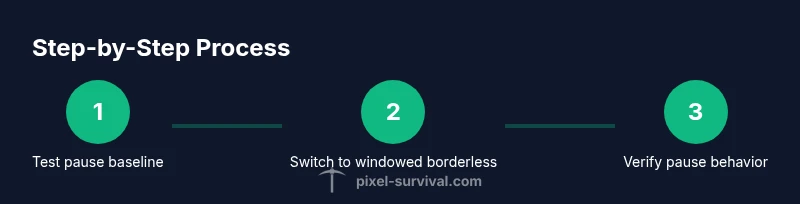
- Prepare a reproducible test: create a small test world and keep a backup save. 2) Switch Terraria to Windowed Borderless mode and relaunch. 3) Open a task you’ll tab out to (web browser, chat app). 4) Tab out for a fixed duration (e.g., 60 seconds) and return to Terraria. Observe whether the game resumes, stays paused, or resumes with a brief delay. 5) If pause persists, repeat with different window modes (fullscreen, windowed) and confirm consistency. 6) Document your results and revert if any changes create instability.
Testing and verification: how to confirm the game is still running
Create a simple, repeatable test: run a 60-second timer in-game, perform a focused action (like mining or inventory transfer), then tab out and back in. A continuous timer, animation, or automation signal after re-focusing indicates you’ve reduced or avoided the pause. If you notice a noticeable lag or a full pause, record the exact mode and OS state for later comparison. Verification should be repeated on at least two different sessions to rule out random OS hiccups. Keep a log of your findings for future reference. Pixel Survival recommends documenting tests to track what combinations work reliably on your hardware.
Safety, backups, and compatibility considerations
Before you begin, back up your Terraria worlds and character data. Mods, especially those affecting core behavior, can introduce instability or world corruption if something goes wrong with an update. Always test changes in a controlled environment, preferably on a separate profile or world. If you rely on automation or complex builds, consider incremental testing: make one change at a time and verify impact. Some anti-cheat or anti-tamper settings on certain platforms may also limit mod functionality; read platform-specific notes before proceeding. Pixel Survival emphasizes conservative experimentation and contingency planning to avoid data loss.
Alternative strategies: optimizing multitasking without changing pause behavior
If changing pause behavior proves unreliable, explore alternative workflows: use a second PC or device for monitoring and automation tasks, employ remote desktop solutions to interact with Terraria from another screen, or run a local server to handle automated processes while you play or observe from a separate client. These approaches preserve your main game state while enabling multitasking, without depending on pausing behavior changes. The Pixel Survival team notes that often the simplest, safest option is to restructure your multitasking setup rather than forcing the game to run in a way it wasn’t designed to.
What to do next: practical next steps and common pitfalls
Next steps: pick the approach that best fits your hardware and play style (windowed borderless, mods with caution, or external multitasking setups), test thoroughly, and keep a robust backup plan. Expected pitfalls include occasional crashes after switching modes, mods breaking after updates, and inconsistent results across platforms. Document your findings and proceed in small bets rather than sweeping changes. If you’re unsure, revert to your original setup and revisit the steps later when you have time to test carefully. Pixel Survival’s guidance emphasizes incremental testing and data-backed decisions to avoid disrupting your worlds.
Tools & Materials
- Terraria installed (latest patch relevant to your setup)(Ensure you know your current patch and compatible mods if used)
- Display mode tools (Windowed borderless or fullscreen)(Switch modes from in-game settings or launcher options)
- Mod loader (optional: tModLoader)(Use only if you are comfortable with mods and backups)
- Backup strategy (external drive or cloud save)(Back up worlds before testing modded behavior)
- Testing script or timer(Helps verify pause behavior with consistent intervals)
Steps
Estimated time: 30-60 minutes
- 1
Prepare a safe test environment
Create a small test world or use a dedicated testing profile. Back up your main world to prevent data loss. This ensures you can experiment without risking your progress.
Tip: Keep a separate clipboard or notes file to log observed behavior during each test run. - 2
Set display mode to windowed borderless
Open Terraria settings and switch to Windowed Borderless mode (or Borderless if available). This reduces OS focus delays when you tab out.
Tip: Apply settings and restart Terraria to ensure the mode takes effect. - 3
Test focus behavior with a simple task
Start a simple in-game activity (e.g., mining for 60 seconds), then tab out to another app and return. Note whether the game resumes smoothly or pauses.
Tip: Use a timer and observe exact resume behavior on return. - 4
Try an alternative display mode
If pausing still occurs, switch to fullscreen and repeat the test. Then re-test with a standard window mode to compare results.
Tip: Document which mode consistently minimizes pause for your setup. - 5
Consider mods with caution (optional)
If you’re comfortable, install a compatible mod loader and search for mods addressing pause behavior. Test in a separate profile and back up your worlds first.
Tip: Avoid combining risky mods; keep a clean vanilla profile for baseline comparisons. - 6
Verify across sessions
Repeat the tests on different sessions and, if possible, different hardware or OS instances. Consistency across sessions increases reliability.
Tip: Maintain a small log of results to reference later.
Got Questions?
Does Terraria pause when tabbed out in single-player by default?
Yes, in many vanilla setups Terraria is designed to pause when the game window loses focus in single-player. Behavior can vary by platform and patch, so testing on your system is essential.
In most single-player setups, the game pauses when the window loses focus, but your results may vary by patch and platform.
Is there an official setting to disable pause on focus loss?
There is no universal official toggle in vanilla Terraria to permanently disable pause on focus loss across all platforms.
There isn’t a universal official toggle to disable pause in the vanilla version of Terraria.
Can mods change this behavior?
Mods via tModLoader can adjust focus behavior in some cases, but they come with compatibility and stability risks. Always back up your worlds before trying mods that affect core behavior.
Yes, mods can modify pause behavior, but they may cause instability; back up first.
Will changing display mode affect multiplayer experiences?
Display mode changes primarily affect your local game session. In multiplayer, others’ experience is not directly altered by your window mode, but stability and lag can affect gameplay.
Changing display mode mainly affects your setup and should not directly alter others’ gameplay.
Is windowed mode guaranteed to prevent pausing?
No, windowed mode often reduces pausing but is not a guarantee across all patches and hardware. Always verify with a timed test on your system.
Windowed mode helps, but it isn’t guaranteed to stop pausing everywhere.
What are the risks of using mods to modify pause behavior?
Mods can cause crashes, corruption, or incompatibility after updates. Use backups and test in a separate profile before applying to main worlds.
Mods can be unstable; back up and test before using them in main worlds.
Watch Video
Key Points
- Test in a safe, backup-enabled environment
- Windowed borderless mode often reduces focus pause
- Vanilla options exist, but no universal toggle
- Mods offer a path but require caution and backups
- Verify results across sessions to ensure reliability